

When is 192kHz Recording Worth It for Studios; It Quadruples File Size!
Last Edited: Sep 26, 2026
For most professional workflows, recording at 192kHz is not worth it. Double-blind listening tests consistently show that trained listeners can’t reliably tell it apart from 48kHz or 96kHz, and on plenty of converters, 192kHz actually performs worse. The exception is narrow: extreme pitch-shifting, heavy nonlinear processing, and specialized capture work. Keep reading for the test data, the hardware caveats, and the rules of thumb that will save you storage space and CPU headaches.
TL;DR:
- Recording at 192kHz generally offers no audible benefit for music production, as most double-blind tests show listeners cannot distinguish it from 48kHz or 96kHz.
- The advantages of higher sample rates are limited to specific processing areas, such as nonlinear processing headroom or extreme pitch-shifting, rather than final sound quality.
- Many converters actually perform worse at 192kHz due to decreased anti-aliasing filter effectiveness, resulting in more distortion and artifacts.
- Higher sample rates dramatically increase storage, CPU load, and complicate collaboration, making 48kHz the practical default for most projects.
- Test your own setup if necessary, but for typical workflows, sticking to 48kHz or 96kHz provides the best balance of quality, resource use, and compatibility.
Does 192kHz Recording Actually Sound Better? What the Tests Show
The evidence is not close. A meta-analysis of controlled perceptual tests found that when listening tests are properly blinded, listeners cannot reliably distinguish standard resolution audio (44.1 or 48kHz) from high-resolution formats at 96 or 192kHz. That’s not a fringe result. It’s the pattern that shows up across the majority of double-blind trials on this question.
Sighted tests tell a different story, and that gap is the whole point. When people know they’re hearing “hi-res” audio, several things sneak into the result and masquerade as a sample-rate difference:
- Mastering differences between the compared files (a remaster often sounds better regardless of sample rate)
- Level mismatches, where even a fraction of a decibel louder gets perceived as “clearer”
- Plain placebo, driven by price tags, marketing copy, or knowing which file is which
Statistic Callout: In the majority of properly randomized, level-matched double-blind trials reviewed in the meta-analysis above, listeners performed no better than chance at identifying the higher sample rate.
None of this means 192kHz is useless. It means the audible benefit almost never survives contact with a real blind test at the point of final playback. The value, when it exists, lives earlier in the signal chain, not at the speaker.
When Higher Sample Rates Actually Help Your Workflow
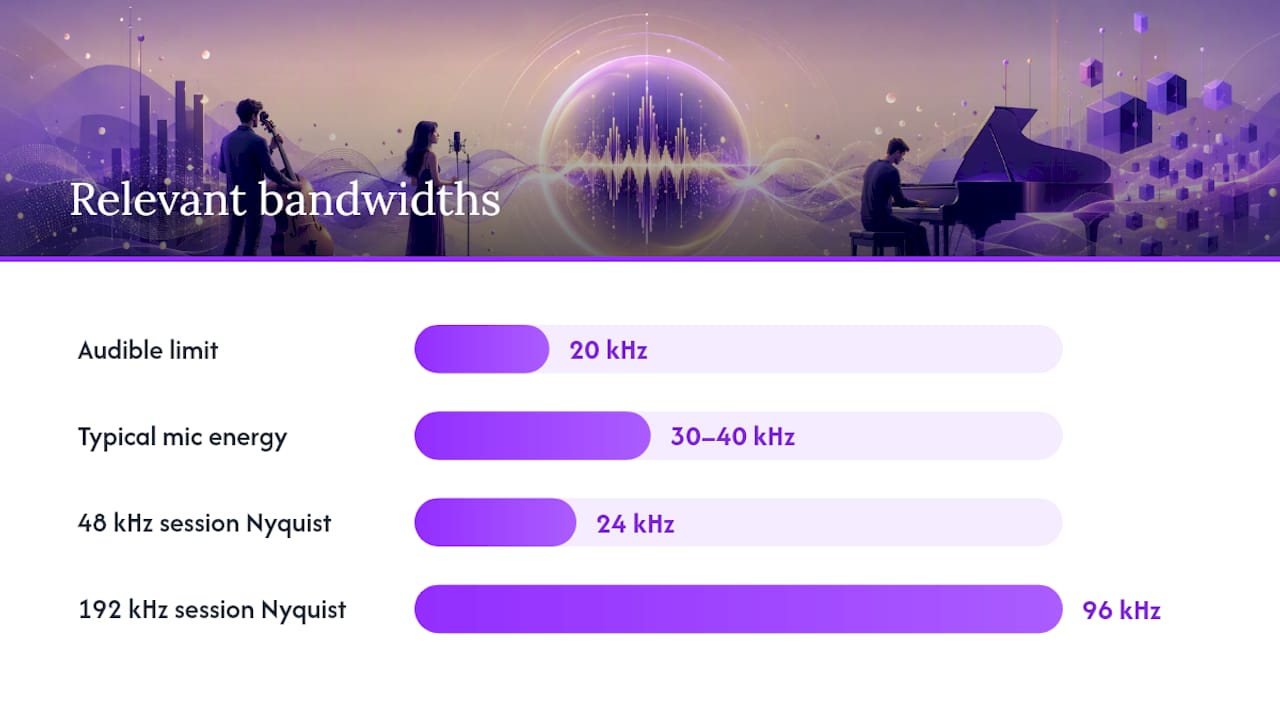
The Nyquist limit at 192kHz sits at 96kHz, versus 24kHz for a 48kHz session. That extra theoretical bandwidth rarely matters for capturing content, since most microphones and instruments produce negligible energy above 30-40kHz. Where it matters is processing.
Real edge cases worth knowing:
- Nonlinear processing headroom. Saturation, distortion, and heavy oversampling plugins generate harmonics that can fold back into the audible band as aliasing. Extra headroom above 20kHz gives those artifacts more room to live before they become a problem.
- Extreme time and pitch manipulation. Sound designers who down-pitch material by an octave or more benefit from recording at very high sample rates, since it preserves alias-free harmonic detail once the pitch drops into the audible range. This is a niche technique, not a music-production default.
- Ultrasonic or specialized capture, such as bat calls, mechanical diagnostics, or other content genuinely living above 20kHz.
Pro Tip: If you’re chasing headroom for a saturation-heavy mix bus, try oversampling the plugin itself first, inside your audio editing workflow. It often solves the aliasing problem without dragging the whole session to 192kHz.
One catch applies to every case above: none of it matters unless your entire signal chain maintains extended bandwidth, meaning your mics, preamps, converters, and monitors all have to keep up. Record at 192kHz through a mediocre interface, and you’ve wasted storage space for no gain.
Why Some Converters Sound Worse at 192kHz, Not Better
This is the part most sample-rate debates skip entirely: the hardware itself can work against you. Benchmark’s engineers have published commentary showing that many converter chips actually perform worse at 192kHz than at 96kHz, because doubling the sample rate forces a lower oversampling ratio inside the chip.
That’s a meaningful gap in how cleanly the chip rejects out-of-band noise before it can alias into your recording.
Lower stopband attenuation means the anti-aliasing filter has less margin to work with, which can let ultrasonic noise and image artifacts fold down into the audible range as low-level, non-musical distortion. It’s a real, measurable penalty, not audiophile folklore.
A few checks worth running before you trust any interface at 192kHz:
- Run a narrowband sweep test and compare the measured stopband attenuation against the manufacturer’s 96kHz spec.
- Listen for image rejection anomalies, which show up as faint intermodulation artifacts inside the audible band rather than obvious noise.
- Confirm your preamps and converters are actually rated for clean performance at that rate, since plenty of budget interfaces list 192kHz support without the analog front end to back it up.
Analog quality still does more work than sample rate. A better preamp and a better microphone typically move the needle further than switching from 96k to 192k ever will.
What Higher Sample Rates Cost You in CPU, Storage, and Collaboration
The trade-offs at 192kHz are not subtle. They show up immediately in session weight and machine load.
- File size quadruples relative to 48kHz. A one-hour multitrack session that is a few gigabytes at 48kHz can become much larger at 192kHz, increasing the burden on backups, archive costs, and transfer times in multi-track projects with a full band.
- CPU and plugin load scale with the sample rate. Every plugin instance processes significantly more samples per second than at 48kHz, which reduces your available plugin count and increases the risk of dropouts in a loaded session.
- Collaboration gets harder. Remote collaborators, mastering engineers, and streaming platforms overwhelmingly work in 44.1 or 48kHz. Sending 192kHz stems to a mastering house or a session partner usually just adds a conversion step nobody asked for.
Practitioner consensus, spread across production forums and tutorial sites, treats 48kHz as the practical default for 2026, with 96kHz reserved for sessions that genuinely need the extra ceiling. The storage and CPU math rarely justifies going further for standard music production.
Sample Rate Rules of Thumb for Every Kind of Session
Match the rate to the job, not the spec sheet:
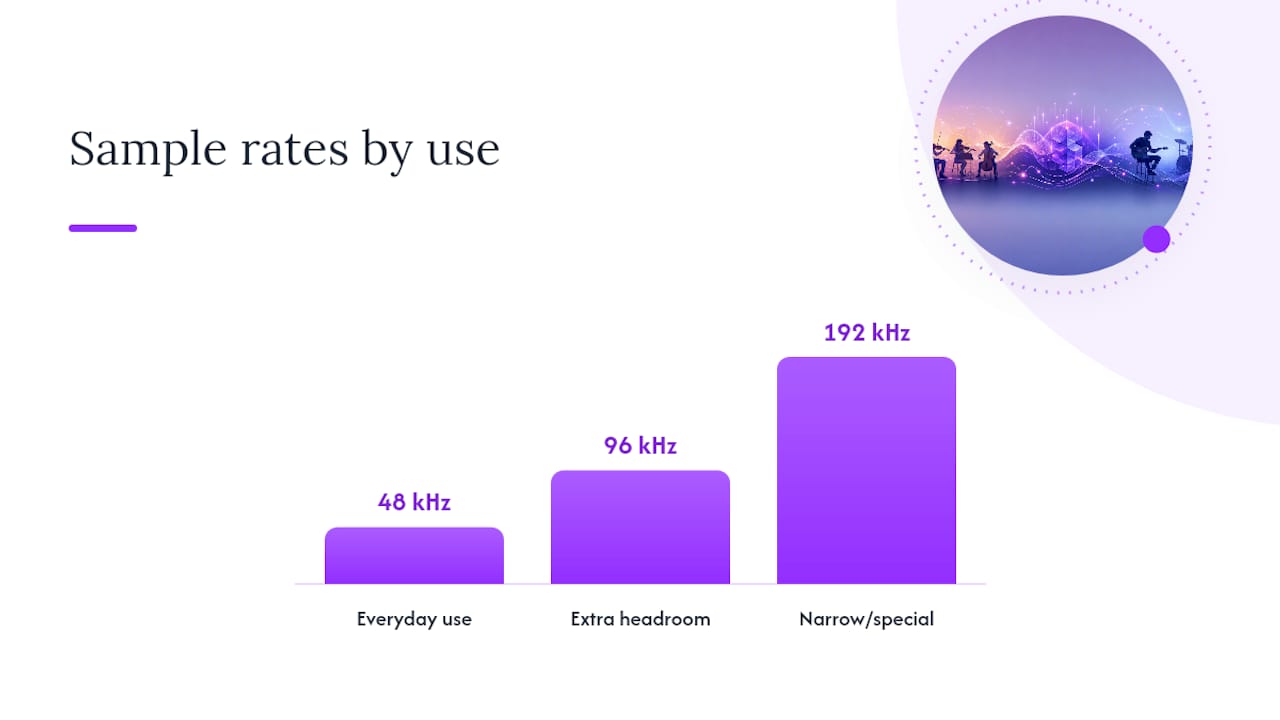
- 48kHz for the vast majority of music production, podcasts, and video work. It matches nearly every delivery format and keeps sessions light.
- 96kHz when you need extra processing headroom, plan heavy pitch or time manipulation, or want an archival safety margin for a big scoring session. Many engineers consider 96 kHz to be the better real-world balance between quality and workload, according to discussions among practitioners on forums like Gearspace.
- 192kHz only for narrow, specific cases: extreme down-pitching, ultrasonic capture, or a client who explicitly requires it for archival purposes.
A hybrid approach often beats an all-or-nothing choice. Track your session at 96kHz, then reserve 192kHz for the one or two stems that actually need the extra headroom, such as a sound design element getting pitched down two octaves.
Pro Tip: When a project wraps, don’t ship your mastering engineer a 192kHz file out of habit. Good sample-rate conversion is transparent, and most streaming platforms and mastering chains expect 44.1 or 48kHz anyway. Confirm the delivery spec before you export.
How to Test 192kHz Benefits in Your Own Studio
Don’t take anyone’s word for it, including this article’s. Run your own controlled test:
- Record identical takes at your baseline rate and at 192kHz, with matched levels, matched gain staging, and identical file metadata.
- Loudness-normalize both files, randomize playback order, and run a written scoring rubric so confirmation bias can’t creep in.
- Run a spectrum analysis on the 192kHz file to check for ultrasonic content and scan for aliasing artifacts near the top of the audible band.
- Log CPU load, disk throughput, and plugin stability across both sessions to weigh the real-world cost against whatever you heard.
| Test step | What to measure | Tool type |
|---|---|---|
| Blind A/B listening | Correct identification rate | Level-matched playback software |
| Spectrum analysis | Ultrasonic content, aliasing artifacts | Spectrum analyzer plugin |
| System load | CPU usage, disk throughput | DAW performance meter |
SoundBridge’s Take on Choosing the Right Sample Rate
SoundBridge supports 192kHz processing because some sessions genuinely need it, not because higher always means better. Pick your sample rate based on the project and your system’s real capability, and put money into your analog chain and converters before you default to a bigger number.
— Wake
Ready to Test High Sample Rates in a Real Session?
You can run these tests yourself, with high-fidelity audio processing up to 192kHz built into the same environment where you track, mix, and collaborate. That matters because the workflow trade-offs covered above (CPU load, file size, plugin stability) are exactly what you need to measure firsthand, not take on faith from a forum thread.

Zero-latency remote tracking means collaborators can join a 96kHz or 192kHz session without the sync headaches that usually come with high-sample-rate collaboration, and bi-directional plugin control keeps the processing chain consistent whether working solo or with a remote mastering partner at the Sound Studio: Mix and Fine-Tune Audio | AmmarAI. If you want to run your own blind A/B test or push a saturation-heavy mix bus to see where aliasing actually shows up, start a session with the SoundBridge DAW and put your own studio’s signal chain to the test. You can also read more about what a modern DAW handles before you dive in.
Sources
- A Meta-Analysis of High-Resolution Audio Perceptual Evaluation
- 96kHz vs. 192kHz (Benchmark commentary) - SoundStageHiFi
- 192k common sense — Tape Op Magazine
- Audio Interface Sample Rates Explained (2026) - SonusGearFlow
FAQ
Is 192kHz overkill?
For most music production, yes. The processing headroom it offers rarely translates into an audible difference at final playback, and the CPU and storage cost is steep for the return.
Is 24-bit 192kHz audio good quality?
The bit depth and sample rate combination is technically capable of very high fidelity, but quality depends far more on your microphones, preamps, and converter design than on the sample rate number.
Can humans hear frequencies captured at 96kHz or 192kHz?
Human hearing tops out around 20kHz for most adults, well below the ultrasonic content that higher sample rates can theoretically capture, which is why the extra bandwidth mainly serves processing rather than perception.
Does 192kHz sound better than 48kHz?
Not reliably. Double-blind testing shows listeners generally can’t tell the two apart once levels are matched, and the test is properly blinded, though 192kHz can still help in narrow processing scenarios like extreme pitch-shifting.
Recommended
MASTER MUSIC PRODUCTION
Expert-led courses designed to take you from fundamentals to finished tracks.

HOUSEFrom bouncy bass and solid kicks, this course teaches you the most modern House music production techniques needed to succeed and stand out.

TRAPQuit sounding like generic Trap and produce something World with hints of the Far East. Create ethnic soundscapes to put your Trap ahead of the curve.

AMBIENTProduce relaxing, sophisticated psy-influenced ambient. Psychedelic and relaxing to listen to, create meditative soundscapes to put your listeners in Zen.