

Cut Round-Trip Delay to 5–15 ms: ASIO vs WASAPI for Windows Producers
Last Edited: Sep 26, 2026
For low-latency recording and monitoring, use ASIO. For the easiest bit-perfect playback, use WASAPI Exclusive, or native ASIO if your interface offers it. ASIO wins on latency and driver consistency; WASAPI Exclusive wins on convenience because it ships inside Windows with no extra install. Which one actually fits your rig depends on your gear and your app, and that’s where the details below matter.
TL;DR:
- Native ASIO drivers generally deliver lower latency and more reliable performance during recording sessions than WASAPI Shared, especially on older hardware.
- WASAPI Exclusive can achieve bit-perfect playback and low-latency output similar to ASIO when the device is locked, but it often has higher round-trip delays in practice.
- Using native drivers or ASIO4ALL is essential for critical recording, while for casual listening or multitasking, WASAPI Shared offers more convenience and system integration.
- Mismatched sample rates between your DAW, Windows, and interface driver are the most common cause of latency issues, so synchronization is key.
- For most users, choosing between ASIO and WASAPI depends on the goal: low-latency recording prefers native ASIO, while high-fidelity playback or multitasking benefits from WASAPI’s built-in support.
ASIO vs WASAPI: A Quick Comparison
Here’s the shape of the decision before you go deeper into the mechanics:
- Latency: ASIO typically runs single-digit to low double-digit milliseconds round trip on a solid native driver; WASAPI Exclusive can match that in ideal setups but often lands higher; WASAPI Shared adds the most overhead, often significantly more on older systems.
- Drivers: ASIO needs a native driver from your audio interface’s manufacturer, or a wrapper like ASIO4ALL; WASAPI is built into Windows and needs nothing extra.
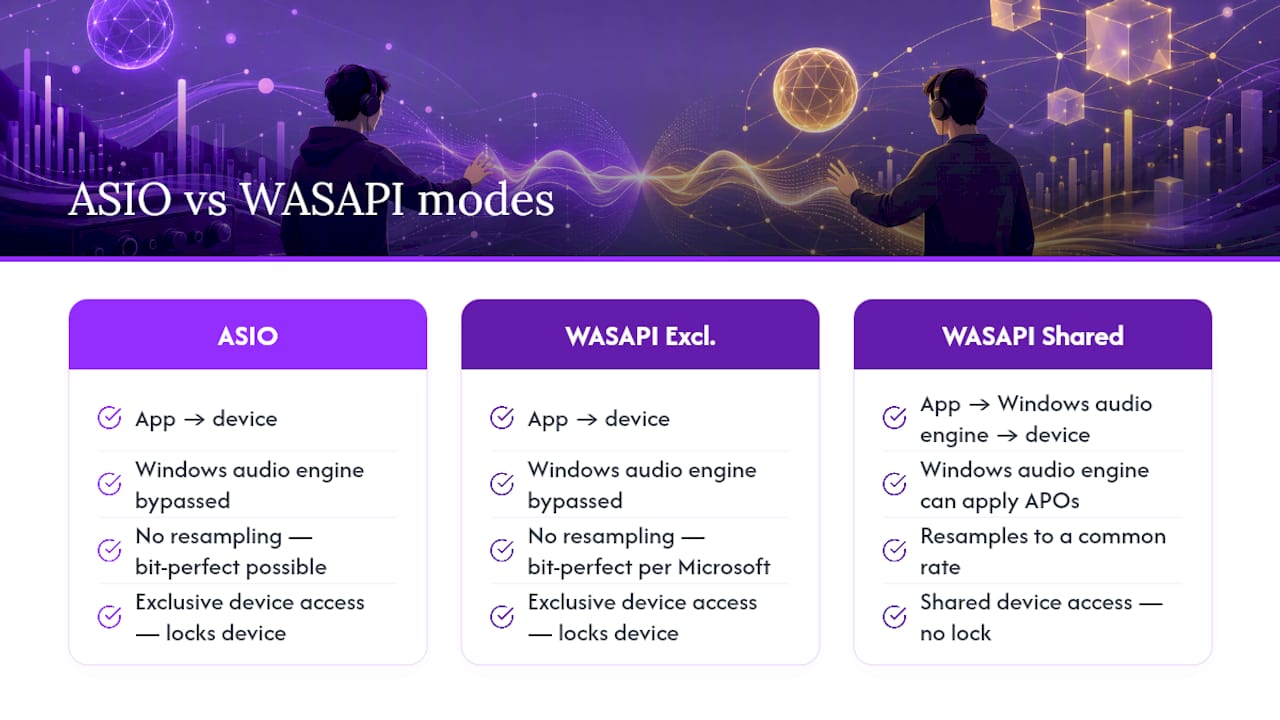
- Bit-perfect capability: Both native ASIO and WASAPI Exclusive can deliver bit-perfect output; WASAPI Shared mixes and resamples, so it can’t.
- Multi-client support: WASAPI Shared lets several apps play audio at once; ASIO and WASAPI Exclusive typically lock the device to one application.
- Common apps: DAWs like Soundbridge, Ableton Live, and Cubase lean on ASIO; audiophile players like foobar2000 and JRiver support WASAPI Exclusive directly; everyday apps (browsers, Spotify, Discord) run on WASAPI Shared by default.
If you record vocals or guitar and need to hear yourself without a delay, that latency column is the whole story — using a sound studio workflow can help manage latency effectively. If you just want your FLAC collection to play untouched, bit-perfect capability is what you’re really shopping for.
What Is ASIO and Why Does It Cut Latency?
ASIO (Audio Stream Input/Output) was built by Steinberg in the late 1990s specifically to solve a problem consumer Windows audio couldn’t: getting sound in and out of a computer fast enough for real-time recording. It talks almost directly to the audio hardware, skipping the layers of mixing and processing that Windows normally applies to sound. That’s the entire reason it exists, and it’s why every serious audio interface manufacturer ships an ASIO driver with their hardware.
A few things determine how well it performs on your machine:
- Native ASIO drivers, written by your interface’s manufacturer, almost always outperform ASIO4ALL, a generic wrapper that translates other driver types into ASIO.
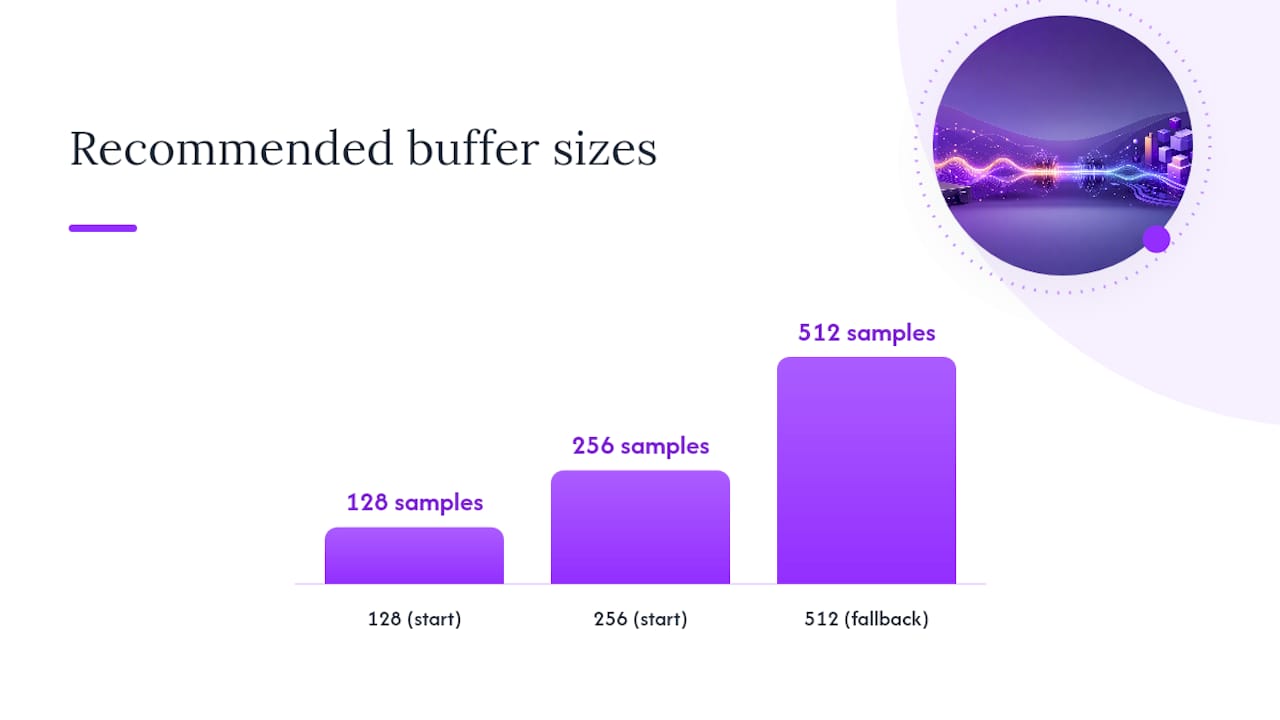
- Smaller buffer sizes cut latency but raise the risk of audio dropouts if your CPU can’t keep up.
- Most ASIO drivers lock the device to one application at a time, though some newer multi-client interfaces now allow limited sharing.
Pro Tip: Start with a buffer size of 128 or 256 samples when tracking vocals or guitar. If you hear crackling or dropouts, step up to 512 before blaming your interface.
What Is WASAPI and What Do Shared and Exclusive Mean?
WASAPI (Windows Audio Session API) arrived with Windows Vista to replace older, clunkier audio paths and give Windows a modern way to route sound. It runs in two distinct modes, and the difference between them decides whether you get convenience or control.
Shared mode is the Windows default. Every app that wants to make noise gets mixed together through the Windows audio engine, which can apply audio processing objects (APOs) and resample everything to a common rate. That’s how you hear a Discord ping over your music without either app fighting for the speaker.
Exclusive mode hands one application full control of the device, similar to how ASIO works. Windows steps out of the way, and the app talks straight to the hardware, which is what makes bit-perfect output possible according to Microsoft’s own documentation on Windows volume APIs. The trade-off: while an app holds Exclusive mode, nothing else can play sound through that device. Your system sounds go silent until you close the player or release the lock.
Technical Differences That Actually Show Up in Testing
Latency isn’t one number. It’s the sum of buffer size, driver overhead, and how the operating system schedules audio threads. Native ASIO drivers minimize all three by talking directly to hardware, while WASAPI Shared adds mixing and processing steps that stack extra milliseconds onto every trip.
Community round-trip measurements make this concrete. Testers on Stack Overflow have logged ASIO running around 15 milliseconds round trip against WASAPI closer to 50 milliseconds on the same older hardware. That gap isn’t fixed. It shrinks on newer Windows builds and well-written WASAPI backends, and it depends heavily on driver quality, so treat any single number as a data point, not a law.
Latency at a glance: ASIO commonly measures 5 to 15 ms round trip on native drivers. WASAPI Exclusive can approach that range in ideal conditions. WASAPI Shared regularly adds 20 to 35 ms on top, driven by mixing and resampling overhead.
Exclusive mode’s real power is what it skips. By locking out the Windows mixer, it removes the resampling and volume-scaling steps that can quietly alter your bits before they reach the DAC. That’s the mechanism behind the “bit-perfect” claim, and it’s functionally similar to what ASIO does, even though the two use different driver models to get there.
Sample-rate switching is where the two diverge in practice. Studios standardized on ASIO years before WASAPI Exclusive existed partly because ASIO handles rate changes more predictably, locking cleanly to a new project rate without dropouts. Some WASAPI Exclusive implementations stumble when a player switches from a 44.1kHz track to a 96kHz one mid-session, occasionally requiring a restart of playback to resync.
One more catch applies to both APIs equally: if your app applies its own volume control, EQ, or any DSP after the audio leaves the file, you’re resampling or altering the signal regardless of which driver carries it. Bit-perfect only means bit-perfect if nothing touches the data first.
Checking Drivers and Configuring WASAPI Without Headaches
- Open your audio interface’s control panel or check the manufacturer’s website. If a native ASIO driver exists, install it before touching anything else.
- If no native driver exists, install ASIO4ALL as a fallback, but expect slightly higher latency than a dedicated driver would give you.
- In your player or DAW’s audio settings, select WASAPI and choose Exclusive mode if bit-perfect playback matters more than multitasking.
- Match your DAW’s project sample rate, Windows’ device sample rate (in Sound settings), and your interface’s fixed rate, if it has one, before testing anything.
- Play a known test tone and check for dropouts or a locked exclusive icon in your app to confirm the mode actually engaged.
Pro Tip: If WASAPI Exclusive refuses to lock the device, another app is probably already holding it. Close background players and browser tabs with autoplay before troubleshooting drivers.
Checking your interface’s driver situation first can save an evening of guesswork. If you’re shopping for new hardware, understanding how audio interfaces handle drivers before you buy avoids this whole mess later.
Which One Should You Actually Use?
- Recording and monitoring: Use native ASIO. If your interface has no native driver, ASIO4ALL is an acceptable stopgap, though it rarely matches a manufacturer’s own driver.
- Critical hi-fi listening: WASAPI Exclusive or native ASIO both work; check your player’s audio settings to confirm exclusive access is actually engaged, not just selected.
- Watching video or running multiple apps at once: Stick with WASAPI Shared or your system default so notifications and other sounds aren’t silenced.
- DirectShow-based video players: These often fight with WASAPI Exclusive. An ASIO renderer plugin is usually the more reliable fix than forcing exclusive mode through a player that wasn’t built for it.
Getting Your Setup Ready for Serious Sessions
Match your Windows sample rate, DAW project rate, and interface driver rate before you test anything, since mismatched rates cause most of the “my latency is bad” complaints. A DAW built for high-fidelity routing at up to 192kHz, like Soundbridge, makes that alignment far easier to see and fix in one window instead of three.
Why the “Which Is Better” Debate Misses the Point
Most casual listeners genuinely can’t tell WASAPI Exclusive from native ASIO in a blind test, so if you’re just streaming music, pick whichever is easier to set up and move on. Producers and engineers face a different calculus: latency and driver reliability directly affect whether a take feels natural to play against, so test your actual buffer size and round-trip delay before committing to a signal chain for a session. The right answer changes with the job, not with brand loyalty to one API.
— Wake
Let Your DAW Handle the Routing Decisions
Chasing driver settings across three different control panels gets old fast, especially mid-session when a client is waiting. Some DAWs are built to keep the technical layer out of your way: they support high-fidelity routing and zero-latency remote tracking on Windows, with project rates up to 192kHz, so the ASIO versus WASAPI question mostly resolves itself once your interface driver is set correctly once.

Where some DAWs earn their place is in what happens after your driver is configured. Bi-directional plugin and hardware control, integrated talkback, and studio-accurate sync for remote sessions can sit on top of whichever low-latency path you’ve chosen. If you want to see how the pieces fit together before you commit to a workflow, read what a digital audio workstation actually does and try a DAW on your own rig.
Sources
- Linearity of Windows volume APIs — Microsoft MSDN blog
- Why is WASAPI so much slower than ASIO? — Stack Overflow
FAQ
Does WASAPI Improve Audio Quality?
WASAPI Shared mode doesn’t improve quality since it mixes and can resample your audio. WASAPI Exclusive mode can preserve the original bitstream by bypassing that mixer entirely.
What Is the Difference Between ASIO and WASAPI Exclusive?
ASIO uses a dedicated driver installed by your hardware manufacturer, while WASAPI Exclusive is built into Windows and needs no separate driver. Both can achieve bit-perfect, low-latency output, but ASIO generally handles sample-rate switching and buffer control more consistently.
Does ASIO Sound Better Than WASAPI?
Neither API changes how audio sounds when both are configured correctly and delivering bit-perfect output. The practical difference shows up in latency and reliability, not tone, with ASIO typically holding an edge for real-time recording.
Does Windows 11 Have a Built-In ASIO Driver?
No. Windows 11 does not include a native ASIO driver; you need one from your audio interface’s manufacturer, or a generic wrapper like ASIO4ALL if no native option exists.
Recommended
MASTER MUSIC PRODUCTION
Expert-led courses designed to take you from fundamentals to finished tracks.

HOUSEFrom bouncy bass and solid kicks, this course teaches you the most modern House music production techniques needed to succeed and stand out.

TRAPQuit sounding like generic Trap and produce something World with hints of the Far East. Create ethnic soundscapes to put your Trap ahead of the curve.

AMBIENTProduce relaxing, sophisticated psy-influenced ambient. Psychedelic and relaxing to listen to, create meditative soundscapes to put your listeners in Zen.