

Beginner Beat Making: Your 2026 Starter Guide
Last Edited: Jun 18, 2026
Beginner beat making is the process of crafting rhythmic and melodic instrumental tracks using a Digital Audio Workstation, or DAW, and a basic home setup. You do not need a professional studio, expensive gear, or years of music theory to get started. Tools like FL Studio, GarageBand, and BandLab put full production power in your hands from day one. This guide walks you through every step: choosing your software, programming drums, building bass lines, mixing your tracks, and avoiding the mistakes that slow most new producers down.
What Does Beginner Beat-Making Actually Require?
Beat making, known in the industry as music production, starts with three things: a computer, a DAW, and a pair of headphones. That is the entire minimum setup. An audio interface improves sound quality, but free DAWs like GarageBand, BandLab, LMMS, or Cakewalk remove every financial barrier so you can focus on learning skills rather than spending money on gear.
Here is a quick comparison of the most popular beginner DAWs:
| DAW | Platform | Cost | Best For |
|---|---|---|---|
| GarageBand | Mac / iOS | Free | Apple users, quick start |
| BandLab | Web / Mobile | Free | Browser-based, collaboration |
| LMMS | Mac / Windows / Linux | Free | Open-source flexibility |
| Cakewalk | Windows | Free | Full-featured, Windows users |
| FL Studio | Mac / Windows | Paid (free trial) | Trap, hip-hop, electronic |
Each of these DAWs includes built-in drum machines, virtual instruments, and sample libraries. You can learn the basics of music production and build your first complete track without spending a dollar. Once you outgrow the free tier, upgrading to a paid DAW like FL Studio or SoundBridge makes sense.
Pro Tip: Start with one free DAW and stick with it for at least three months. Switching software constantly resets your learning curve and kills momentum.
If you want to add hardware later, a MIDI keyboard controller (around $50–$100) makes playing melodies and chords far more natural than clicking notes on a piano roll. An audio interface like the Focusrite Scarlett Solo improves the quality of our monitoring. Neither is required on day one.
How Do You Make Your First Beat Step by Step?
Making your first beat follows a clear sequence. Work through these steps in order, and you will have a complete, playable track within a few hours.
-
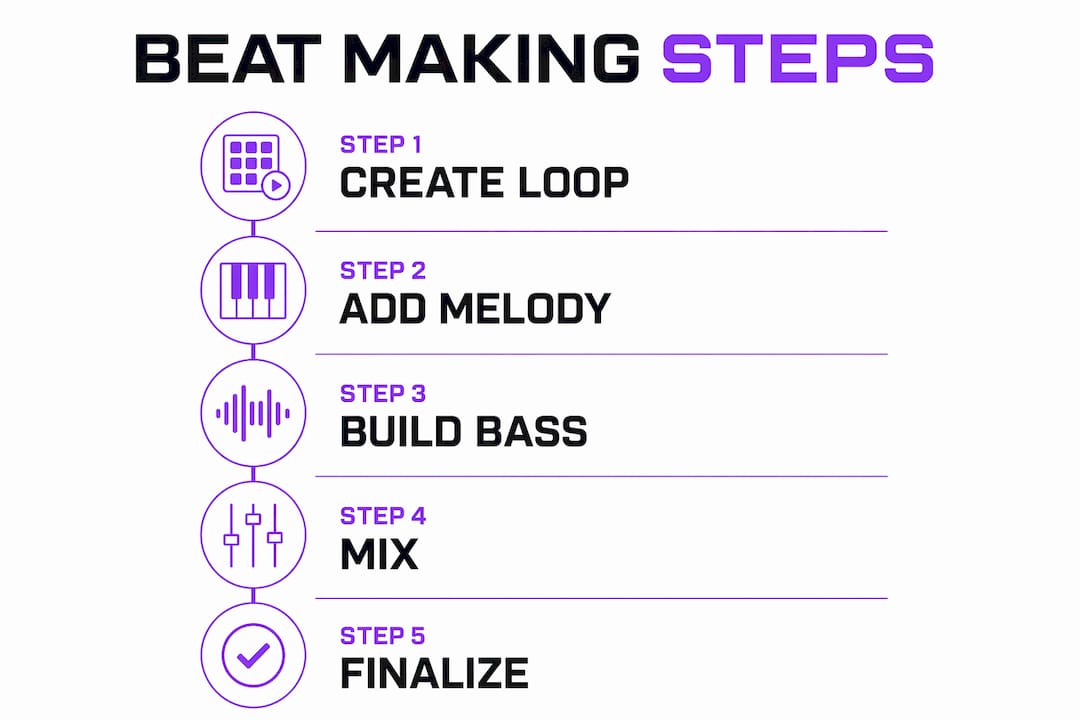
Set your tempo. Choose a BPM that matches your target genre. Standard starting tempos are 140 BPM for trap, 90 BPM for boom bap, and 70–80 BPM for R&B. Tempo shapes everything: the feel of your drums, the groove of your bass, and the energy of your melody.
-
Program your drum pattern. Open the drum machine or step sequencer in your DAW. Place a kick drum on beats 1 and 3, a snare on beats 2 and 4, and hi-hats on every eighth note. This classic pattern creates a functional rhythm base that works across hip-hop, trap, and electronic genres. Once it sounds solid, add variation on the last beat of every four bars to keep the groove interesting.
-
Build your bass line. Keep it simple. Match your 808 bass notes to the melody root notes and let the bass breathe. A complex bass line clashes with your kick, muddying the low end. Two or three notes per bar is enough to anchor the groove. Check out SoundBridge's guide on crafting a standout bassline for deeper technique.
-
Add a melodic element. Use a built-in synth or a royalty-free loop. Pick a scale (C minor is a great starting point for hip-hop and trap) and lock your notes to that scale. Most DAWs include a scale lock or chord helper feature. Play three to five notes and repeat the phrase. Simplicity wins here.
-
Arrange your sections. This is where most beginners stall. A four-bar loop is not a finished beat. Structure your track into an intro, verse, hook, and outro. Arrangement is largely an act of subtraction: strip elements out of the verse, bring them back in the hook, and use silence to create tension. A polished beat runs three to four minutes with real dynamics.
Pro Tip: Duplicate your main loop, then remove the melody from one copy and the bass from another. Use those stripped versions as your verse and intro. You already have three sections built.
Here is a simple arrangement map to follow:
| Section | Length | What to Include |
|---|---|---|
| Intro | 8 bars | Drums only or minimal elements |
| Verse | 16 bars | Drums, bass, light melody |
| Hook | 16 bars | Full arrangement, all elements |
| Outro | 8 bars | Strip back to drums, fade out |
What Are the Basics of Mixing for New Producers?
Mixing is the process of balancing every sound in your beat so nothing clashes and everything is heard clearly. You do not need to master it on your first track. You do need to understand four core concepts.
Gain staging is the most overlooked skill in beginner music production. Neglecting gain staging leads to digital clipping and destroys your mix quality before you even start. Keep individual track levels below 0 dBFS and aim for your master output to peak around -6 dBFS. This headroom gives you room to mix and master without distortion.
EQ (equalization) carves space for each instrument. High-pass filter guitars below 80Hz and vocals below 120Hz to clear the low end for your kick and bass. Every instrument occupies a frequency range. EQ removes the parts of each sound that compete with other elements. SoundBridge's guide on mastering critical frequency ranges is a strong next read once you understand the basics.
Compression controls the dynamic range of a sound. A compressor turns down the loudest peaks of a drum hit or vocal, making the overall level more consistent. For beginners, apply a gentle compressor to your kick and snare with a 4:1 ratio and a medium attack. You will hear the drums sit more solidly in the mix.
Panning creates stereo width. Place your hi-hats slightly left or right, your melody elements wider, and keep your kick, bass, and snare centered. Wide panning makes a beat feel larger and more professional. Use the step-by-step mixing guide from SoundBridge to go deeper on each of these techniques.
Pro Tip: Before you mix, mute everything except your kick and bass. Make those two elements sound perfect together first. Every other element should fit around that foundation.
What Mistakes Do Most Beginner Producers Make?
Most new producers repeat the same handful of mistakes. Recognizing them early saves months of frustration.
- Treating a loop as a finished beat. A looped 8-bar phrase is not a finished track. Professional beats use arrangement with tension, release, and dynamics over three to four minutes. Build sections, not just loops.
- Overloading the beat with sounds. More instruments do not equal a better beat. Clutter kills clarity. Leave space for each element to breathe, and leave room for a vocalist if someone plans to rap or sing over your track.
- Never finishing anything. Finishing projects is the single most important skill separating beginners from producers who actually improve. An imperfectly finished beat teaches you more than a perfectly unfinished one.
- Chasing the perfect sound before learning the basics. Spending hours browsing sample packs instead of making music is a trap. Use the sounds already in your DAW and focus on structure and arrangement first.
- Ignoring timing. Quantize your drum patterns to the grid when starting. Off-grid timing sounds intentional only when you understand the grid well enough to break it deliberately.
“Every seasoned producer started by creating imperfect beats.” The habit of completing songs, not perfecting them, is what builds real skill over time.
How Do You Build Real Beat-Making Skills Over Time?
Beginners typically reach basic competency in music production within 6–12 months of consistent daily practice. Professional-quality results usually take 2–5 years. That timeline is not discouraging. It is a roadmap.
The first phase (months 1–3) is about completing five to ten simple projects. Do not judge them. Just finish them. Each completed beat teaches you something a tutorial cannot.
- Reverse engineer tracks you love. Load a beat from your favorite producer into your DAW and try to recreate it from scratch. You will learn more about arrangement, sound selection, and mixing in one session than in hours of passive watching.
- Practice daily, even for 20 minutes. Short, consistent sessions beat long, infrequent ones. Your ears and instincts develop through repetition.
- Engage with a community. Forums like Reddit's' r/WeAreTheMusicMakers, Discord production servers, and beat challenges give you feedback and accountability. Sharing your work, even early work, accelerates growth faster than working in isolation.
- Study one skill at a time. Spend one week focused only on drum programming. The next week, focus only on EQ. Depth beats breadth at the beginner stage.
Pro Tip: Set a rule: finish every beat you start, no matter what. Even if it sounds bad, export it and move on. The habit of finishing is the skill you are actually building in year one.
Key Takeaways
Beginner beat making requires a DAW, consistent practice, and the discipline to finish projects before chasing perfection.
| Point | Details |
|---|---|
| Start free, stay focused | Use GarageBand, BandLab, or LMMS to learn without spending money on gear. |
| Follow the production sequence. | Set the tempo, program the drums, build the bass, add the melody, then arrange into full sections. |
| Mix with headroom | Keep gain staging clean and use EQ to carve space for each instrument. |
| Finish every project | Completing imperfect beats builds more skill than perfecting unfinished ones. |
| Practice with purpose | Aim for 6–12 months of consistent daily sessions to reach basic competency. |
The Honest Truth About Learning to Produce
When I started making beats, I spent the first two months convinced I needed better plugins. I bought sample packs I never used and watched tutorials instead of opening my DAW. The beats I was most proud of in year one came from sessions where I forced myself to finish something, anything, using only the stock sounds already in my software.
The learning curve in music production is real. But it is not technical. The hardest part is sitting with an unfinished beat that sounds rough and choosing to complete it anyway. Every producer I respect went through that exact phase. The ones who pushed through it are the ones still making music.
My honest advice: treat your first ten beats as practice runs, not portfolio pieces. Experiment with genres outside your comfort zone. Try making a boom bap beat if you love trap. Try a lo-fi melody if you usually make club music. Your unique sound does not come from copying one style. It comes from the unexpected combinations you discover when you stop playing it safe.
The technical side, mixing, EQ, and compression, will click faster than you expect once you have a few finished projects under your belt. Permit yourself to make bad music on purpose. That is how good music gets made.
— Wake
Start Making Beats With the Right DAW
If you are ready to move from learning to doing, the right DAW makes all the difference. SoundBridge offers a free tier designed for producers at every level, with an interface that doesn't get in the way of your creativity.

Start by reading SoundBridge's complete DAW introduction to understand exactly what your software can do. Then explore the guide on unlocking essential DAW features to get the most out of every session. Whether you are on Mac or Windows, SoundBridge gives you the tools to turn your first four-bar loop into a fully arranged, mixed track ready to share.
FAQ
What is the easiest DAW for beginner beat-making?
GarageBand is the easiest starting point for Mac users because it is free, pre-installed, and includes a full library of loops and instruments. BandLab is the best free option for Windows and browser-based users.
How long does it take to learn how to make beats?
Most beginners reach basic competency within 6–12 months of consistent daily practice. Professional-quality production typically takes 2–5 years of focused work.
Do I need a MIDI keyboard to start making beats?
No. You can program every note using your DAW's piano roll with a mouse. A MIDI keyboard speeds up melody and chord input, but it is not required for your first beats.
What BPM should I use for my first beat?
Set 140 BPM for trap, 90 BPM for boom bap, and 70–80 BPM for R&B. Matching your tempo to your genre shapes the entire feel of your drums and melody.
Why does my beat sound cluttered?
Clutter usually comes from too many elements playing at once. Remove instruments from your verse sections, keep your kick and bass centered, and use EQ to high-pass filter non-bass elements below 80Hz to clear the low end.
Recommended
MASTER MUSIC PRODUCTION
Expert-led courses designed to take you from fundamentals to finished tracks.

HOUSEFrom bouncy bass and solid kicks, this course teaches you the most modern House music production techniques needed to succeed and stand out.

TRAPQuit sounding like generic Trap and produce something World with hints of the Far East. Create ethnic soundscapes to put your Trap ahead of the curve.

AMBIENTProduce relaxing, sophisticated psy-influenced ambient. Psychedelic and relaxing to listen to, create meditative soundscapes to put your listeners in Zen.