


Beyond Browser-Based Collaboration: SoundBridge vs Soundtrap
Last Edited: Jun 26, 2026
The Rise of Browser-Based Music Collaboration
In this article, we'll look closely at how browser-based collaboration platforms like Soundtrap approach remote music production and collaboration. We'll also compare that experience with SoundBridge Virtual Collaboration, a system designed specifically for synchronized remote production, remote recording, and real-time collaboration between producers and musicians.
Music production collaboration has recently become easier than ever before. What once required artists, producers, and engineers to work together in the same physical studio can now happen entirely online. Over the last decade, cloud-based tools and browser-powered music platforms have made remote collaboration accessible to a much wider audience.
Platforms such as Soundtrap helped popularize this shift through cloud-based music production workflows. Instead of installing, continuously updating, and configuring complex software, users could open a project, invite collaborators, and start creating. This approach lowered the barrier to entry for a new generation of creators to collaborate on remote music production.
As remote production continues to evolve, however, expectations are also changing. Today's producers are increasingly looking beyond basic project sharing and cloud-based collaboration. Session synchronization, remote recording, communication tools, latency management, and real-time interaction are becoming essential parts of modern production workflows.
Key Takeaways
|
Point |
Details |
|
Browser-Based Collaboration |
Browser-based DAWs have made remote music production more accessible, but they also introduce unique workflow and performance considerations. |
|
Modern Collaboration Needs |
Today's producers increasingly expect synchronized sessions, remote recording, integrated communication, and real-time interaction. |
|
Buffering Architecture |
SoundBridge VC uses a proprietary buffering approach designed to support remote recording and stable collaboration across a wide range of network conditions. |
|
Advanced Session Control |
Features such as the Control Plane, collaborative editing, and synchronized session management extend collaboration beyond simple project sharing. |
|
Beyond the Browser |
SoundBridge VC focuses on deeper remote production workflows that go beyond traditional browser-based collaboration environments. |
What Modern Creators Expect from SoundBridge Virtual Collaboration
As remote music production continues to evolve, collaboration is no longer just about sharing project files. Modern producers and musicians increasingly expect a complete production environment. The system should support synchronized workflows, real-time communication, remote recording, advanced editing, flexible mixing, and seamless project interaction. It should also have a streamlined workflow that does not disrupt the creative process.
SoundBridge Virtual Collaboration was developed in response to this changing reality. The platform focuses on keeping producers and musicians connected throughout the entire creative process. Communication, synchronization, recording, and session interaction become part of the workflow itself. Remote collaboration isn't treated as a separate task that needs to be managed independently.
This shift reflects a broader change in how creators approach remote production. Today, many musicians are looking beyond basic cloud sharing and project exchange. They also expect access to all the production tools required for professional workflows. These features include advanced recording, editing, automation, mixing, and plugin integration.
As a result, evaluating a modern collaboration platform often involves much more than comparing recording or editing features. The overall collaboration experience, how efficiently creators can communicate, exchange ideas, and work together remotely, has become an equally important part of the production process.
The Hidden Challenges of Browser-Based Collaboration Workflows
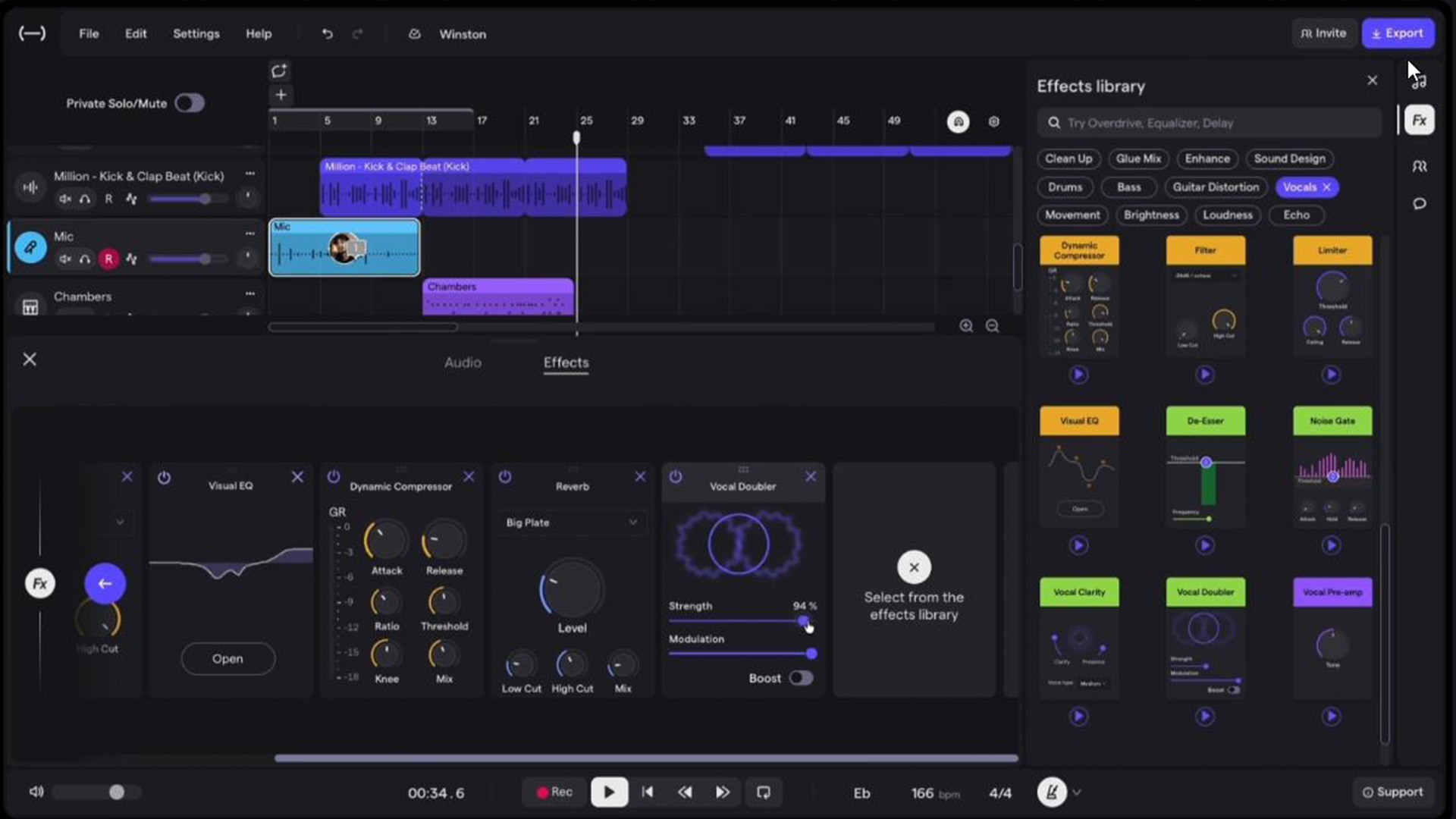
Browser-based music production platforms have made remote collaboration easier to access. Soundtrap is one of the clearest examples of that shift. With its cloud-based workflow, users can quickly open projects, invite collaborators, and start collaborating with minimal setup.
That convenience, however, comes with tradeoffs. While Soundtrap is available through both desktop and cloud-based environments, its collaboration workflow remains closely tied to its cloud-first architecture. As projects become more demanding, producers may place greater demands on recording, editing, synchronization, automation, and overall workflow flexibility.
The limitations become more noticeable when moving beyond basic collaboration into full production workflows. SoundBridge offers features such as third-party plugin support, advanced take management, comping workflows, track grouping, tempo automation, and time signature automation, all of which are important in professional recording and production environments. As projects become more complex, these capabilities can significantly affect how efficiently producers record, edit, organize, and mix their work. For some sets of producers, these tools often become fundamental parts of the production process rather than optional workflow enhancements. These producers include those working on progressive arrangements, film scoring, game audio, or projects that require tempo and meter changes.
Third-party plugin support is particularly important in professional production environments. SoundBridge allows producers to work with their preferred VST instruments and effects. The platform relies primarily on its built-in processing tools, which can limit workflow flexibility in mixing and production. However, SoundBridge allows producers to work with their preferred VST instruments and effects.
When remote production requires tighter timing, deeper session control, and a more stable recording experience, cloud-based collaboration workflows can start to feel less like a full production environment and more like a convenient collaboration layer.
Inside the SoundBridge Virtual Collaboration Experience
SoundBridge Virtual Collaboration approaches remote production differently from many browser-based collaboration platforms. The system is built around synchronized sessions in which producers and musicians work together in a real-time production environment.
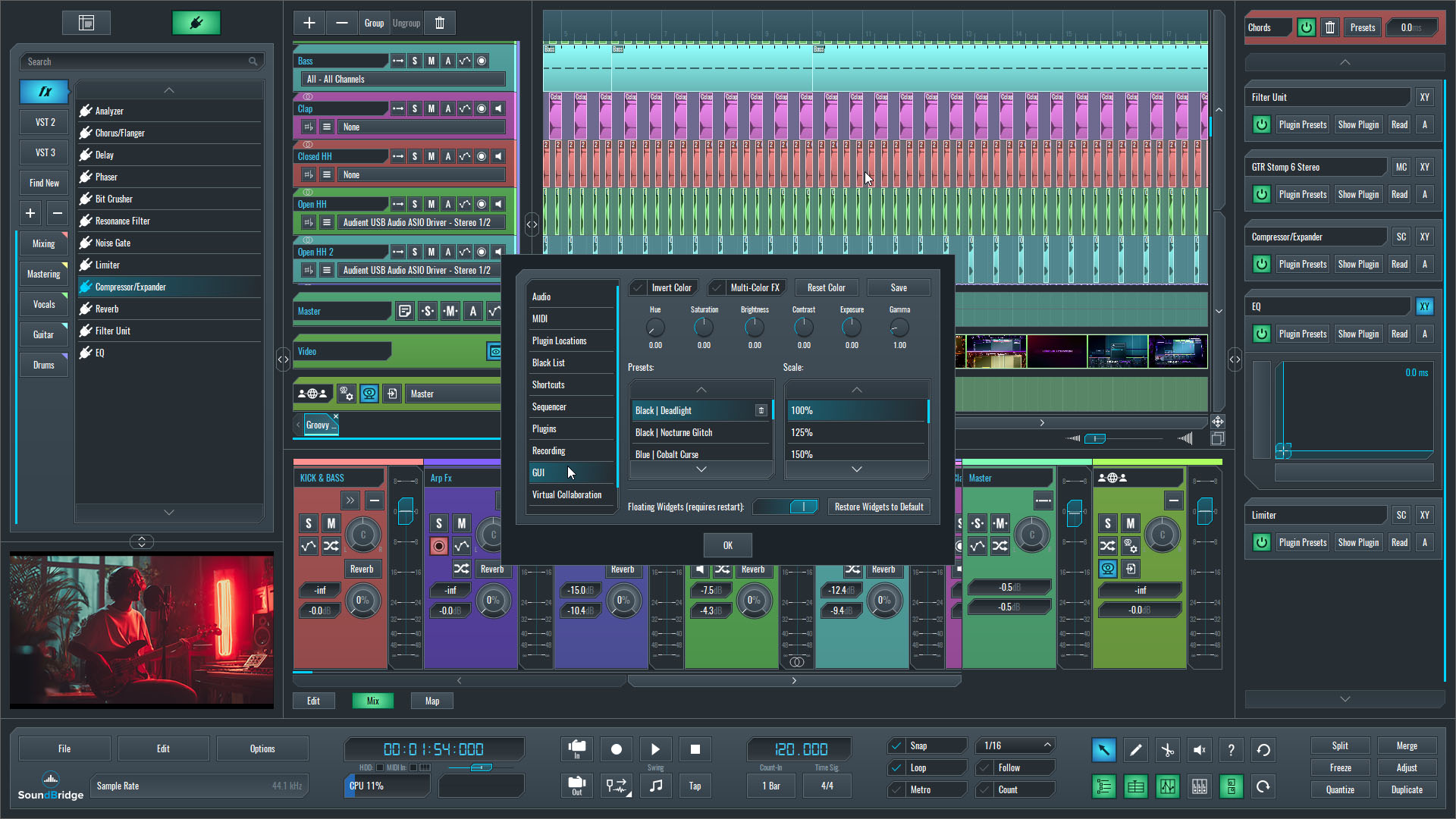
Once connected via a session token, the host controls key project parameters. These parameters include tempo, time signature, and position markers. Simultaneously, the guest session remains synchronized throughout the collaboration process. This allows producers and remote musicians to stay aligned during playback, recording, editing, and arrangement changes. This workflow differentiates SoundBridge from the cloud-based collaboration platforms, which often center on shared projects and cloud access.
SoundBridge VC also combines several collaboration and production tools into a single workflow. Built-in video communication, talkback, synchronized session playback, file transfer, block transfer, and sample-accurate synchronization work together to reduce reliance on external communication and project-sharing platforms. Because this is a full-featured DAW environment, collaborators can also use third-party VST plugins with advanced recording workflows. Musicians here have access to take management, comping, automation, and other mixing tools that extend well beyond basic project collaboration.
Here are some of the core elements that shape the SoundBridge VC experience:
-
Synchronized Sessions – Host and guest sessions remain aligned throughout playback, recording, and editing.
-
Integrated Communication – Built-in video and talkback features support direct communication during sessions.
-
Sample-Accurate Synchronization – Helps maintain precise timing between collaborators.
-
File and Block Transfer – Project elements can be exchanged directly inside the session.
-
Remote Recording – Supports recording workflows between producers and remote musicians without leaving the production environment.
Why Buffering Matters More Than Latency Compensation Beyond Browser-Based Collaboration
Latency remains one of the biggest challenges in remote music production. While browser-based collaboration platforms such as Soundtrap make online collaboration accessible, remote recording often places much greater demands on synchronization, monitoring, and overall session stability.
SoundBridge Virtual Collaboration approaches this challenge through a proprietary buffering architecture designed specifically for remote recording workflows. Before recording, the system performs sub-millisecond pre-calibration and buffers the master tracker's non-destructive headphone mix on the musician's side. This process helps maintain a natural recording experience for both participants.
This allows the musician to monitor with zero latency while providing the producer with a latency-compensated preview of the performance. Rather than relying solely on traditional latency compensation, SoundBridge VC is designed around maintaining a more predictable recording workflow throughout the session.
The difference becomes particularly noticeable when collaborators are working across mobile networks, public Wi-Fi, or less predictable internet connections. While Soundtrap focuses primarily on cloud-based project collaboration, SoundBridge Virtual Collaboration's buffering architecture is designed to support a more consistent remote recording experience across a wider range of real-world network conditions. This becomes especially valuable when recording multiple takes, working with remote musicians, or managing production sessions where timing, monitoring, and recording accuracy are critical to the final result.
The Control Plane and Collaborative Editing
Remote collaboration is no longer limited to sharing projects and exchanging recordings. As production workflows become more interactive, many creators expect the ability to actively participate in editing, arranging, and managing sessions while collaborating remotely.
This is one of the areas where SoundBridge Virtual Collaboration extends beyond the browser-based collaboration model used by platforms such as Soundtrap. Through its Control Plane architecture, SoundBridge VC enables collaborators to interact directly with the production environment rather than simply sharing project data.
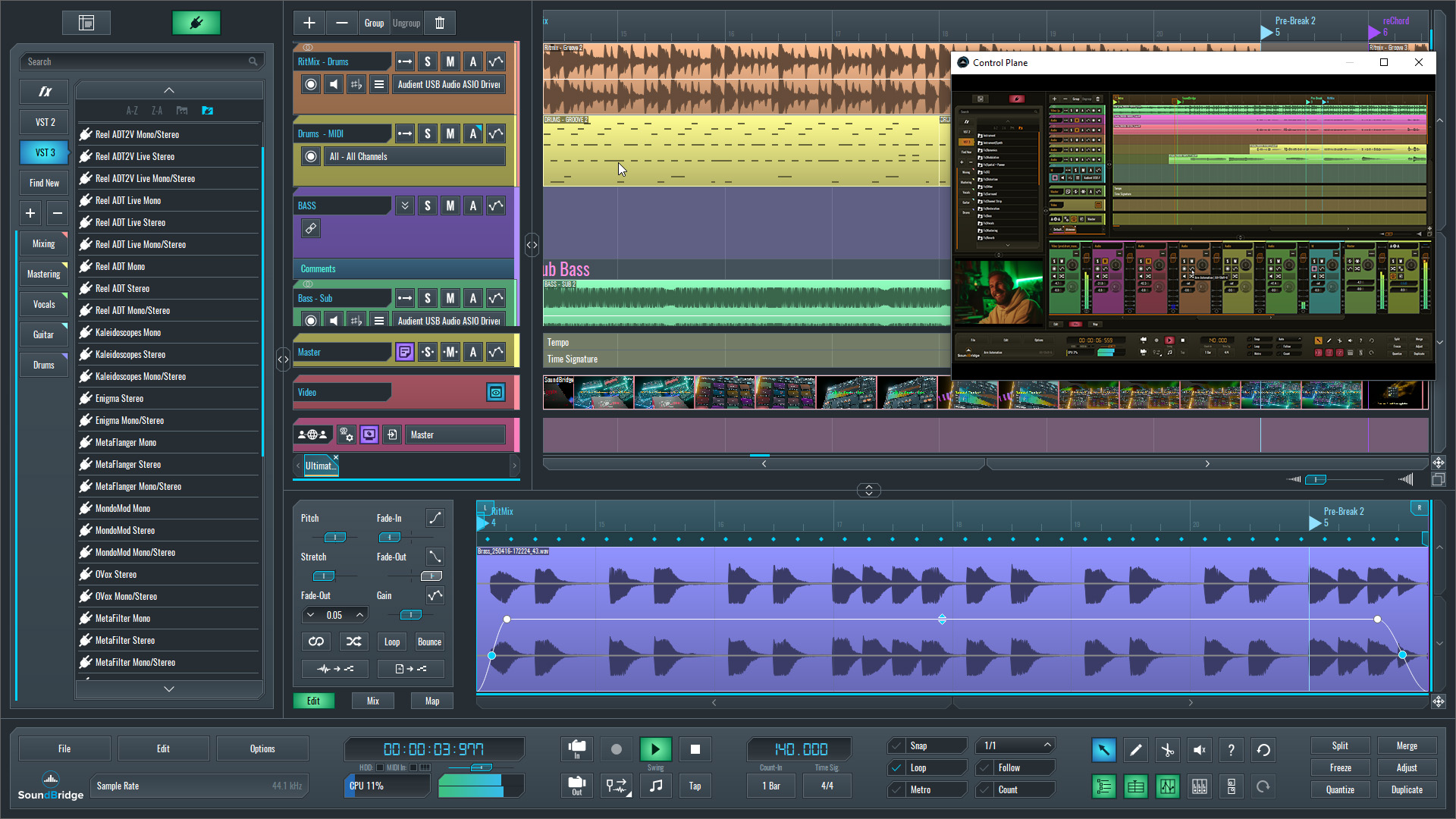
Recent SoundBridge 3.1 updates further expand the Control Plane experience. Cursor changes are now visible to other participants during remote control sessions, making it easier to follow editing actions in real time. Privacy Mode helps keep the focus on the DAW itself by displaying only the SoundBridge window. At the same time, redesigned editing tools and context-aware cursor updates provide clearer visual feedback throughout the session.
SoundBridge 3.1 also introduces new Draw Tool modes, including triangle, square, and random shapes, giving producers additional creative options when working with automation and MIDI data. Combined with SoundBridge's dedicated editing environment, these tools provide a more advanced approach to MIDI and automation editing than is typically found in cloud-focused collaboration platforms.
Together, these features help transform remote collaboration from simple project sharing into a more interactive production experience, allowing producers and musicians to work together with greater awareness of each other's actions inside the session.
SoundBridge VC vs Soundtrap: Side-by-Side Comparison
While both SoundBridge VC and Soundtrap allow creators to collaborate remotely, they approach the challenge from very different perspectives. Soundtrap focuses on cloud-based project collaboration, while SoundBridge VC is designed around synchronized remote production, recording workflows, and deeper interaction between producers and musicians during sessions.
|
Feature |
SoundBridge VC |
Soundtrap |
|
Platform Type |
Native Desktop DAW |
Cloud-Based Production Platform |
|
Collaboration Model |
Synchronized Sessions |
Shared Projects |
|
Session Synchronization |
Sample-Accurate Synchronization |
Shared Project State |
|
Third-Party Plugins |
Full VST Support |
Not Supported |
|
Take Management |
Advanced Take Recording |
Basic Recording Workflow |
|
Comping |
Supported |
Limited |
|
Track Organization |
Track Grouping & Advanced Routing |
Limited Organization Tools |
|
Tempo Automation |
Supported |
Not Available |
|
Time Signature Automation |
Supported |
Not Available |
|
MIDI & Automation Editing |
Dedicated Editing Tools + Draw Tools |
Basic Editing Workflow |
|
Latency Handling |
Proprietary Buffering Architecture |
Cloud-Based Workflow |
|
Remote Recording |
Integrated Remote Recording Workflow |
Project Collaboration Focus |
|
Session Control |
Control Plane Architecture |
Standard Collaboration Controls |
|
Collaborative Editing |
Tool-Aware Editing Features |
Standard Shared Editing |
|
Communication Tools |
Integrated Video and Talk Features |
Built-In Communication Tools |
|
File & Block Transfer |
Built Directly Into Sessions |
Project Sharing Based |
|
Network Flexibility |
Designed For Variable Network Conditions |
Dependent On Connection Quality |
|
Best Fit |
Professional Remote Production |
Browser-Based Collaboration |
Final Thoughts
Soundtrap has helped make online music production and collaboration more accessible through its cloud-based workflow and streamlined approach to project sharing. For many creators, this can be an effective way to collaborate remotely and develop ideas together.
SoundBridge Virtual Collaboration takes a different approach. By combining synchronized sessions, remote recording, proprietary buffering technology, Control Plane architecture, third-party plugin support, advanced editing tools, and professional production workflows, it is designed for creators who need more than basic collaboration features.
As remote music production continues to evolve, the difference is no longer simply about where collaborators work. It is increasingly about how deeply the collaboration system integrates with the recording, editing, mixing, and production process itself.
Recommended
MASTER MUSIC PRODUCTION
Expert-led courses designed to take you from fundamentals to finished tracks.

HOUSEFrom bouncy bass and solid kicks, this course teaches you the most modern House music production techniques needed to succeed and stand out.

TRAPQuit sounding like generic Trap and produce something World with hints of the Far East. Create ethnic soundscapes to put your Trap ahead of the curve.

AMBIENTProduce relaxing, sophisticated psy-influenced ambient. Psychedelic and relaxing to listen to, create meditative soundscapes to put your listeners in Zen.