

How to Add Motion and Depth to Your Sounds
Last Edited: Oct 23, 2026
Creating depth in a mix is relatively straightforward. However, it is a completely different challenge to add depth along with motion to sounds. Many traditional effects, such as reverb, delay, and chorus, can make a sound feel larger, but they are usually static. Modern electronic productions, however, frequently rely on effects that continuously evolve. These evolving textures add subtle motion and keep the arrangement interesting throughout.
One effective way to achieve this is through creative spectral processing. Spectral effects can introduce new harmonic content, shimmering textures, and ever-changing tails. These effects transform even the simplest audio source into something far more expressive. The result is not only a wider sound, but one that feels alive and constantly moving.
In this tutorial, we'll explore this concept using several different audio sources inside SoundBridge: DAW. We prepared a short arrangement, featuring drums, melodic elements, and vocal textures. This arrangement allows us to hear how the same processing technique responds to completely different material. Instead of relying on a single preset, we'll shape the effect to complement each source individually.
You'll see how a single creative processing tool can add motion, atmosphere, and depth to sounds across an entire production. More importantly, you'll learn how subtle automation can turn ordinary sounds into evolving textures that enhance the overall mix.
Listening to the Arrangement in Context
Before introducing any processing, the first step is to listen to the unprocessed arrangement in SoundBridge: DAW. We have a short musical sequence featuring drums, bass, melodic synths, vocal textures, and several supporting elements. These provide a variety of sound sources we will process throughout this tutorial.
At this stage, every element is completely dry, with no instances of the featured effect. This gives us a clear reference point and helps us see how each sound evolves as we introduce motion.
One of the most interesting aspects of this workflow is that the same effect can produce dramatically different results depending on the source material. A drum loop can become a rhythmic atmospheric texture. A synth can gain width and harmonic movement, while a vocal sample can transform into an evolving ambient layer. We will process each source individually to highlight the unique characteristics the effect brings to different types of audio.
Throughout the tutorial, we will play back every example in solo first. This allows us to focus on the details of the processing. Afterward, we will hear each processed sound in the context of the full arrangement. That will demonstrate how these subtle enhancements contribute to a wider, more dynamic, and more immersive mix.
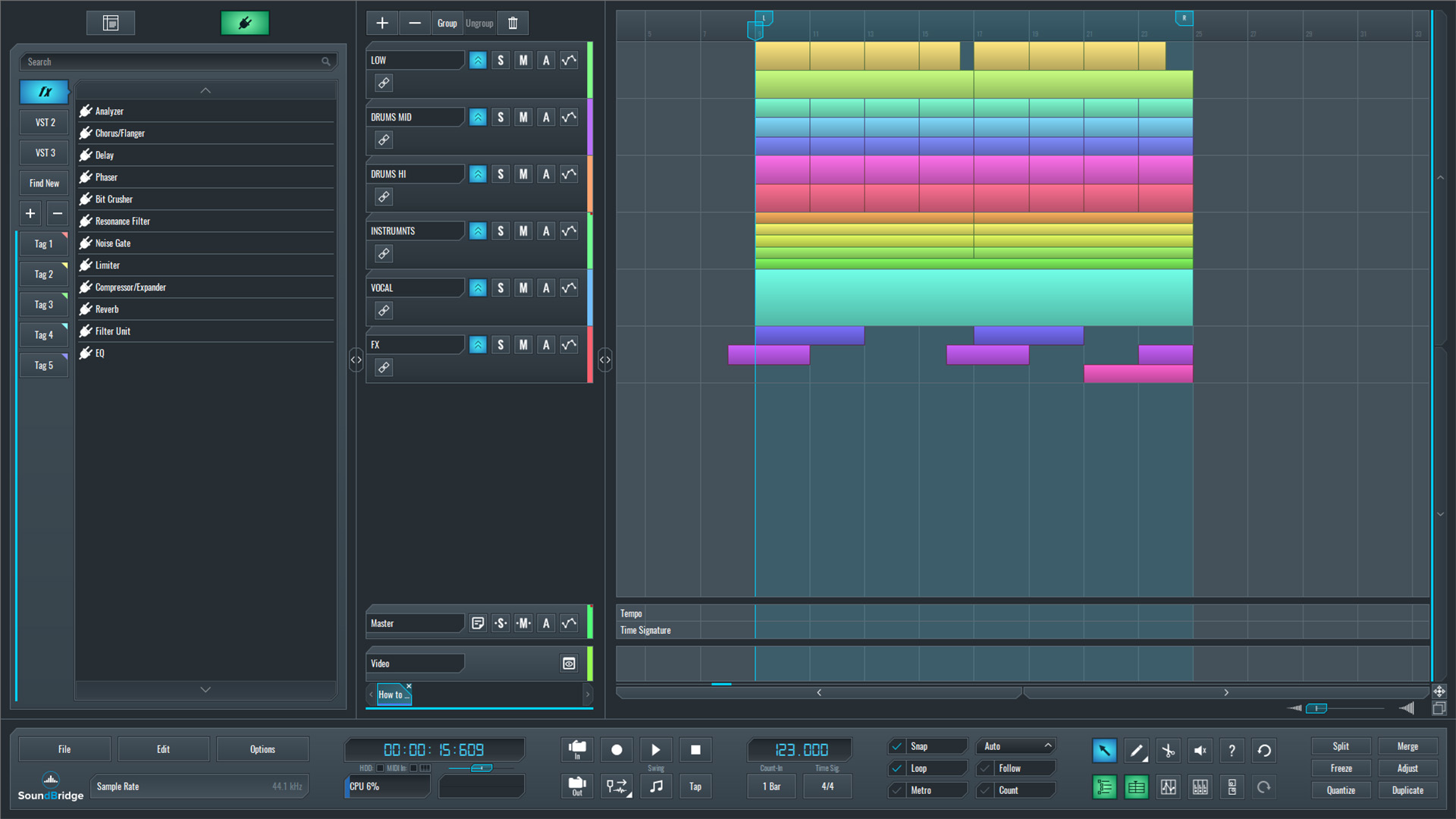
~Full Mix - Unprocessed
Adding Depth and Motion Effects to the Mid-Drum Sounds
The first source we'll process is the Drum Mid group, and we'll be processing it with Scintillate by Sweet Audio. Unlike a conventional reverb, this effect creates evolving spectral textures that add movement and depth rather than simply placing a sound into a virtual space.
Its main controls are straightforward: Rate determines how frequently it generates sparkles, Decay controls how long they last, and Length shapes their overall character. Together, these parameters can create anything from subtle rhythmic textures to large atmospheric effects.
For this example, the goal is to add only a gentle digital layer behind the percussion. A high Rate combined with short Decay and Length settings produces tiny rhythmic sparkles that enhance the groove without masking the transients. We set the tone to 50% to soften the digital character, Shimmer to 100%, Density to 25%, Width to 100%, and the final Mix to approximately 35%.
To clearly hear what the plugin contributes, the Drum Mid group is first played dry, then with the effect at 100% wet, revealing only the processed signal, and finally with the Mix returned to 35%, where it blends naturally with the original percussion sounds and adds subtle motion and depth.
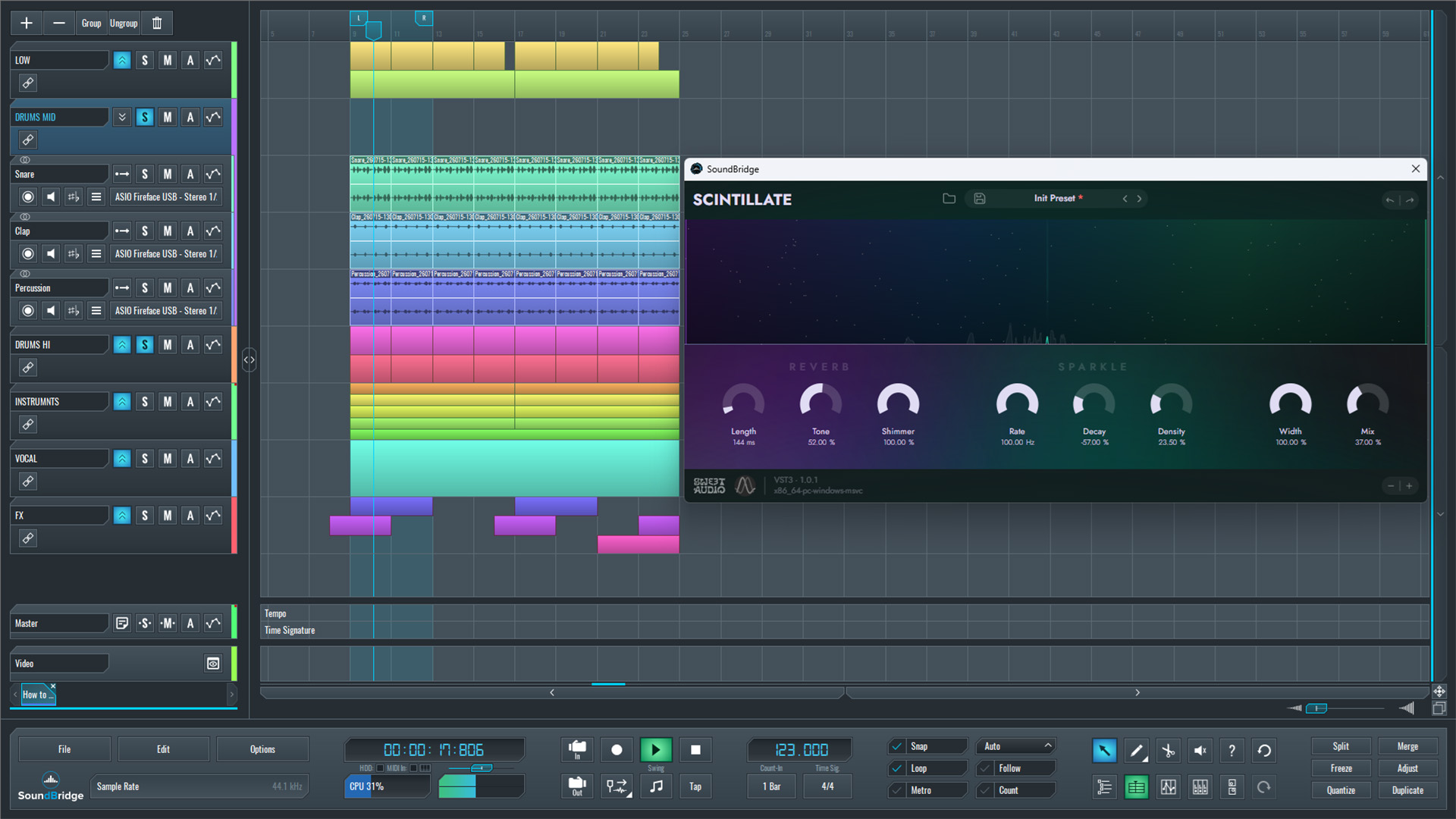
~Drums Mid Group - Solo (Unprocessed)
~Drums Mid Group - Solo (Processed With Scintillate - Mix 100%)
~Drums Mid Group - Solo (Processed With Scintillate - Mix 35%)
Processing the Synth Arp
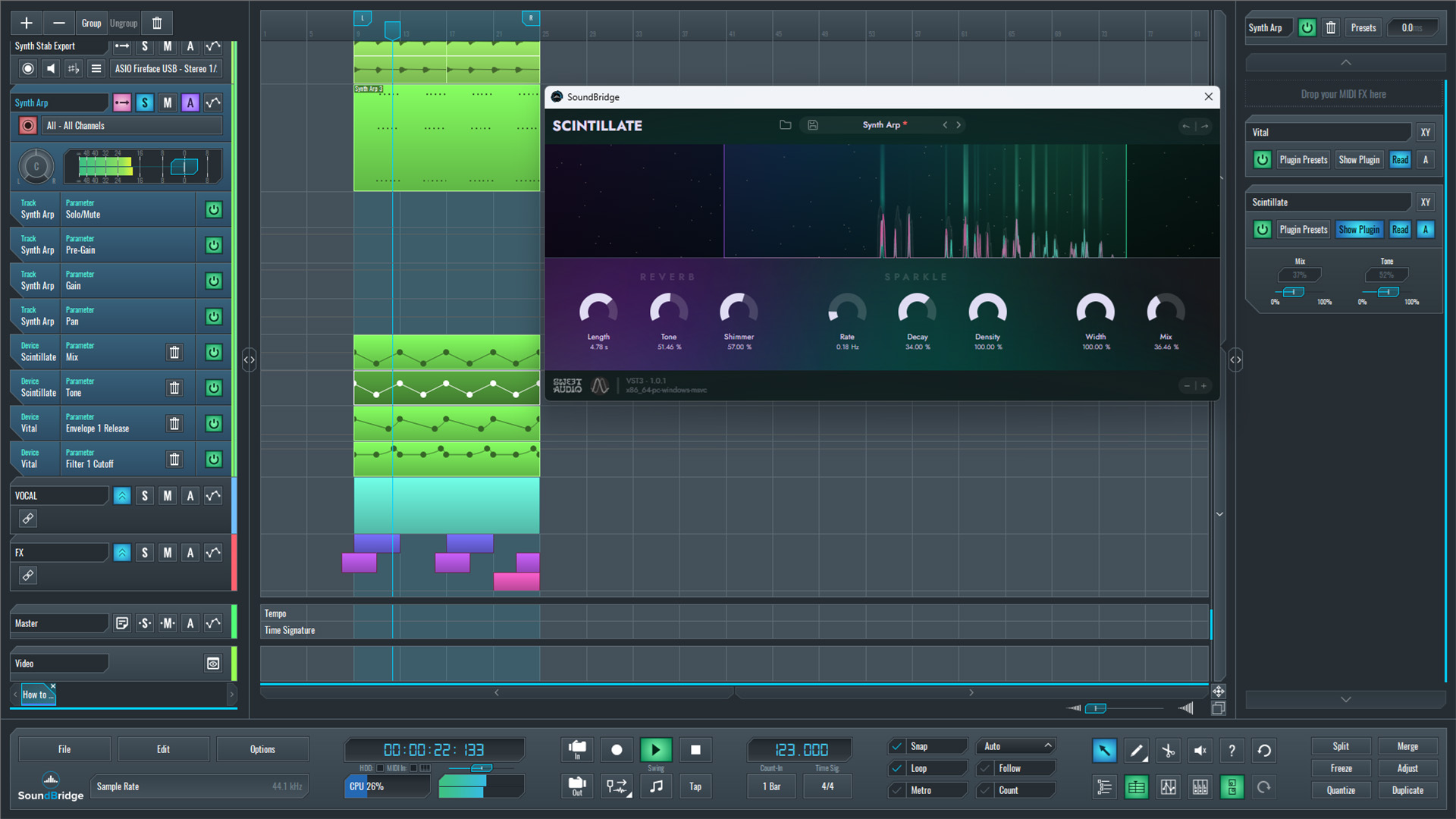
Next, we applied the same effect to a synth arp created in Vital. Unlike the Drum Mid group, this sound needs a lot more depth and motion, so we configured the plugin quite differently.
This time, we extended Length to over 4 seconds, creating a long, floating tail. We slowed Rate to approximately 0.20 Hz and increased Decay to let the generated textures evolve more gradually. We set Density and Width to 100% to produce a rich, immersive stereo image, while reducing shimmer to around 57% for a smoother result.
Since the original synth already has built-in reverb, the goal is not to overwhelm it but to reshape the ambiance. We gently automated the Tone control throughout the sequence to keep the effect from becoming too harsh, while we automated the Mix to gradually introduce more movement where needed. In addition, the plugin's input filters apply both a low-cut and a high-cut, limiting the frequency range processed by the effect and helping it sit more naturally in the mix.
To demonstrate the result, the synth arp is first played back with the effect set to approximately 25% Mix, which is enough to clearly hear the additional movement and depth without overpowering the original sound. Compared to its built-in reverb alone, the processed version feels more animated and spacious, adding a new layer of atmosphere that evolves throughout the arrangement.
~Synth Arp - Solo (Unprocessed)
~Synth Arp - Solo (Processed With Scintillate)
Processing the Vocal Sounds for Depth and Motion
For the final example, we applied the plugin to a vocal phrase, but this time with a completely different objective. Instead of adding rhythmic sparkle or subtle movement, it is used as a lush, spacious reverb that extends the vocal far beyond its original tail, creating a smooth atmospheric layer around each phrase.
To achieve this, Length, Decay, Density, and Width are all set to relatively high values, allowing the effect to produce a long, immersive tail. Unlike the previous examples, Shimmer is reduced to 0%, keeping the reverb smooth and avoiding the brighter spectral character. We lowered the Tone control slightly to soften the effect, while a Low Cut filter removes unnecessary low frequencies from the reverb, keeping the vocal clean and preventing the ambiance from becoming muddy.
Rather than leaving the effect static, the Mix parameter is automated throughout the vocal performance. The wet signal is increased only at the ends of phrases and sustained syllables. This setting allows the reverb to bloom naturally after each vocal line while keeping the words themselves clear and intelligible.
The vocal is first played back solo to highlight its effect on the phrase endings, and then in the context of the full arrangement, where the long, evolving tail blends with the other processed elements, adding another layer of motion and depth to the mix.
~Vocal - Solo (Unprocessed)
~Vocal - Solo (Processed With Scintillate)
~Full Mix - Drums, Synth & Vocal Processed
Final Thoughts
Adding depth and motion to sounds doesn't always require stacking multiple reverbs or complex effect chains. As demonstrated throughout this tutorial, a single creative processor can produce dramatically different results depending on the source material and the way its parameters are configured.
The Drum Mid group added a subtle rhythmic texture, increasing the perceived complexity of the groove. The synth arp became wider and more animated with longer, evolving tails, while the vocal transformed into a spacious, atmospheric element by emphasizing only the ends of its phrases. Although the same plugin was used in every example, each sound required a completely different approach.
Perhaps the most important lesson is to treat creative effects as sound design tools rather than static insert effects. Small adjustments to parameters such as Rate, Decay, Length, Density, and Mix, combined with thoughtful automation, can dramatically change how a sound interacts with the rest of the arrangement.
Finally, listening to all of these processed elements together in the full mix demonstrates how subtle movement across multiple sources creates a production that feels wider, deeper, and more alive, without overwhelming the original sounds or sacrificing clarity.
If you liked this tutorial, here are some more on the same subject:
MASTER MUSIC PRODUCTION
Expert-led courses designed to take you from fundamentals to finished tracks.

HOUSEFrom bouncy bass and solid kicks, this course teaches you the most modern House music production techniques needed to succeed and stand out.

TRAPQuit sounding like generic Trap and produce something World with hints of the Far East. Create ethnic soundscapes to put your Trap ahead of the curve.

AMBIENTProduce relaxing, sophisticated psy-influenced ambient. Psychedelic and relaxing to listen to, create meditative soundscapes to put your listeners in Zen.