


Mastering Sidechain Compression: 3 Proven Techniques for Cleaner Mixes in Music Production
Last Edited: Dec 17, 2025
In the world of music production, effectively handling low-end frequencies is often the key to producing a punchy and professional-sounding mix. Sidechain compression is an important technique because it prevents clashes between your kick drum and bass, giving your tracks more space and clarity. So, if you've ever wanted to know how to sidechain bass to a kick or looked into alternatives to traditional compression, you've come to the right place.
This guide is based on practical insights from a popular YouTube tutorial, which breaks down three simple sidechain techniques using compressors, LFO plugins, and automation clips, and shows when to use each one. These techniques will help you improve your mixes because they create space between the kick and the bass. But even if you already know the basics, you'll pick up faster workflows and smarter settings. So, let's get started and learn how to implement sidechain compression step by step.
What Is Sidechain Compression and Why Use It?
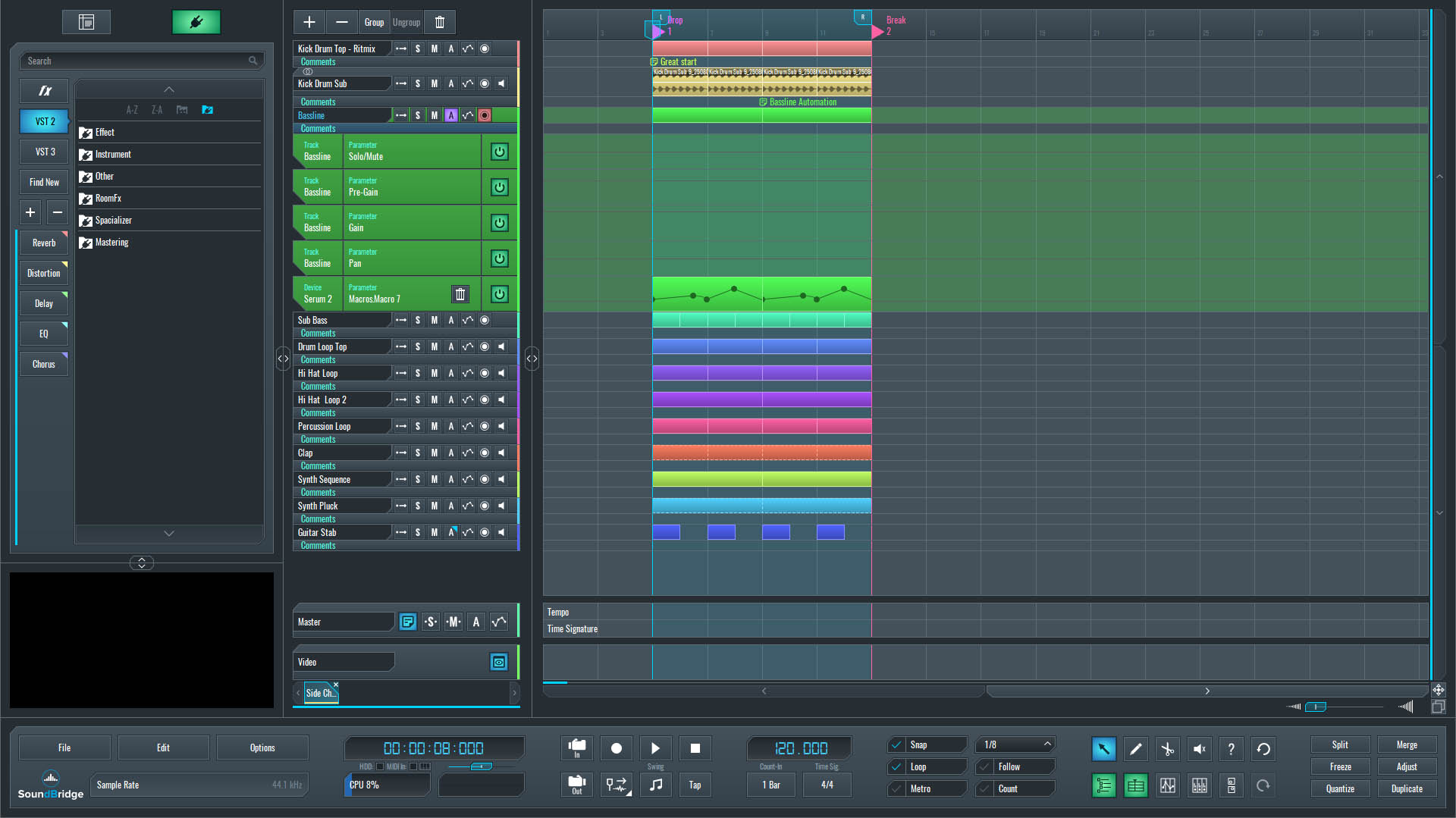
~Full Mix - Bassline (Unprocessed)
~Bassline Solo - Unprocessed
- Clearer mixes: Prevents frequency overlap between bass and kick.
- Punchier beats: Enhances the impact of your drums.
- Genre versatility: Essential for EDM, hip-hop, house, and more.
Common issues without a sidechain? Your track sounds cluttered, particularly on smaller speakers. Let's now put these techniques to use in your DAW.
Technique 1: Sidechain with a Simple Compressor
The easiest way to achieve sidechain compression is to use your DAW's built-in compressor, because it’s already included and easy to set up. This method is simple and beginner-friendly, so it does not require any third-party plugins.
Step-by-Step Guide:
- Insert the Compressor: Drag a native compressor (like the one in SoundBridge) onto your bass channel.
- Enable Sidechain: Look for the sidechain option in the compressor's settings and activate it.
- Select the Trigger Input: Choose your kick drum as the sidechain input. This tells the compressor to react to the kick's transients.
- Adjust Settings: Start with a high ratio (e.g., 4:1 or higher) and lower the threshold until you hear the bass ducking. Set a fast attack (under 5ms) for immediate response and a release around 50-100ms to let the bass return smoothly.
- Preview and Tweak: Solo the bass and kick. Without sidechain, they'll clash; with it engaged, the bass will pump in rhythm.
Example: In a loop, extreme settings might sound exaggerated, but dial them back for subtlety. Listen to the before-and-after to ensure no unwanted artifacts.
This technique is ideal for quick setups and works in most DAWs like Ableton Live, FL Studio, or Logic Pro.
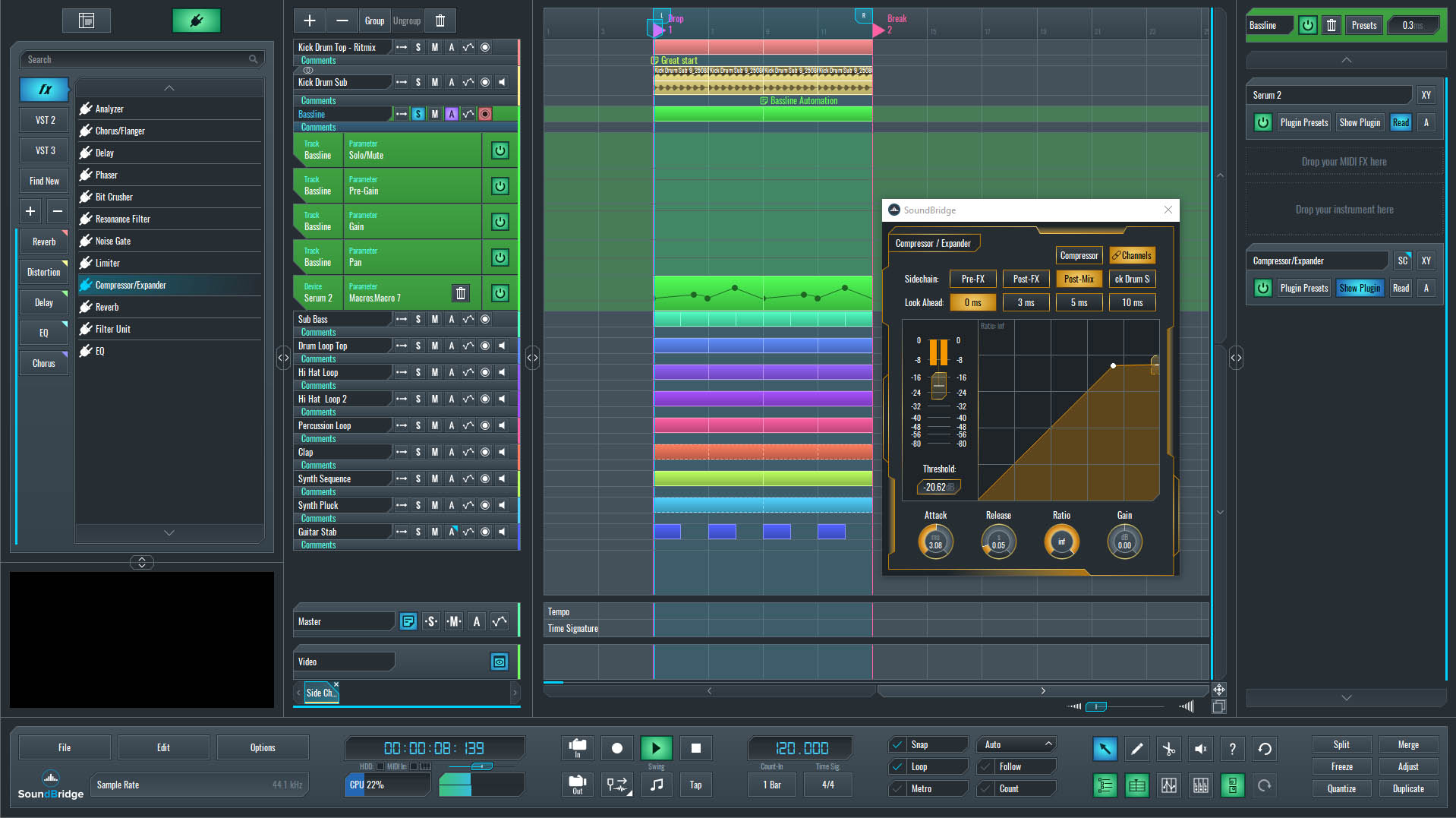
~Bassline Solo - Compressor Sidechain
Technique 2: Advanced Sidechain with LFO Tools
For more creative control, use plugins such as LFO Tool or free alternatives like TALFilter 2, because they give you flexibility beyond the basics. These allow you to precisely shape the volume curve and extend your options beyond basic compression, so you can design more dynamic and unique results.
Why Use an LFO Plugin?
- Flexibility: Draw custom curves for smooth or aggressive ducking, so you can control exactly how your volume responds, and adjust the effect to fit your mix perfectly.
- Avoid Clicks: Fine-tune shapes to prevent popping sounds at loop ends.
- Creative Effects: Add rhythmic pumping for stylistic flair.
How to Implement It:
- Remove Previous Effects: Clear any compressor from your bass channel.
- Add the Plugin: Insert LFO Tool (paid) or TAL-Filter 2 (free) on the bass track.
- Draw the Curve: In the plugin's interface, create a downward curve that dips when the kick would hit. Adjust points for a gradual release-e.g., start sharp for punch, then ease back up.
- Sync to BPM: Ensure the LFO syncs to your project's tempo for perfect timing.
- Audition with Kick: Play the bass and kick together. Tweak the curve until the ducking feels natural.
Pro Tip: If budget is a concern, TAL-Filter 2 provides comparable drawing tools and is completely free, so it’s a great choice for beginners and advanced producers alike. To mimic natural compression, experiment with shapes that have a steep initial drop and then a slow rise, because this closely resembles the way a compressor reacts to audio.
This method shines in electronic music where precise rhythmic control is key.
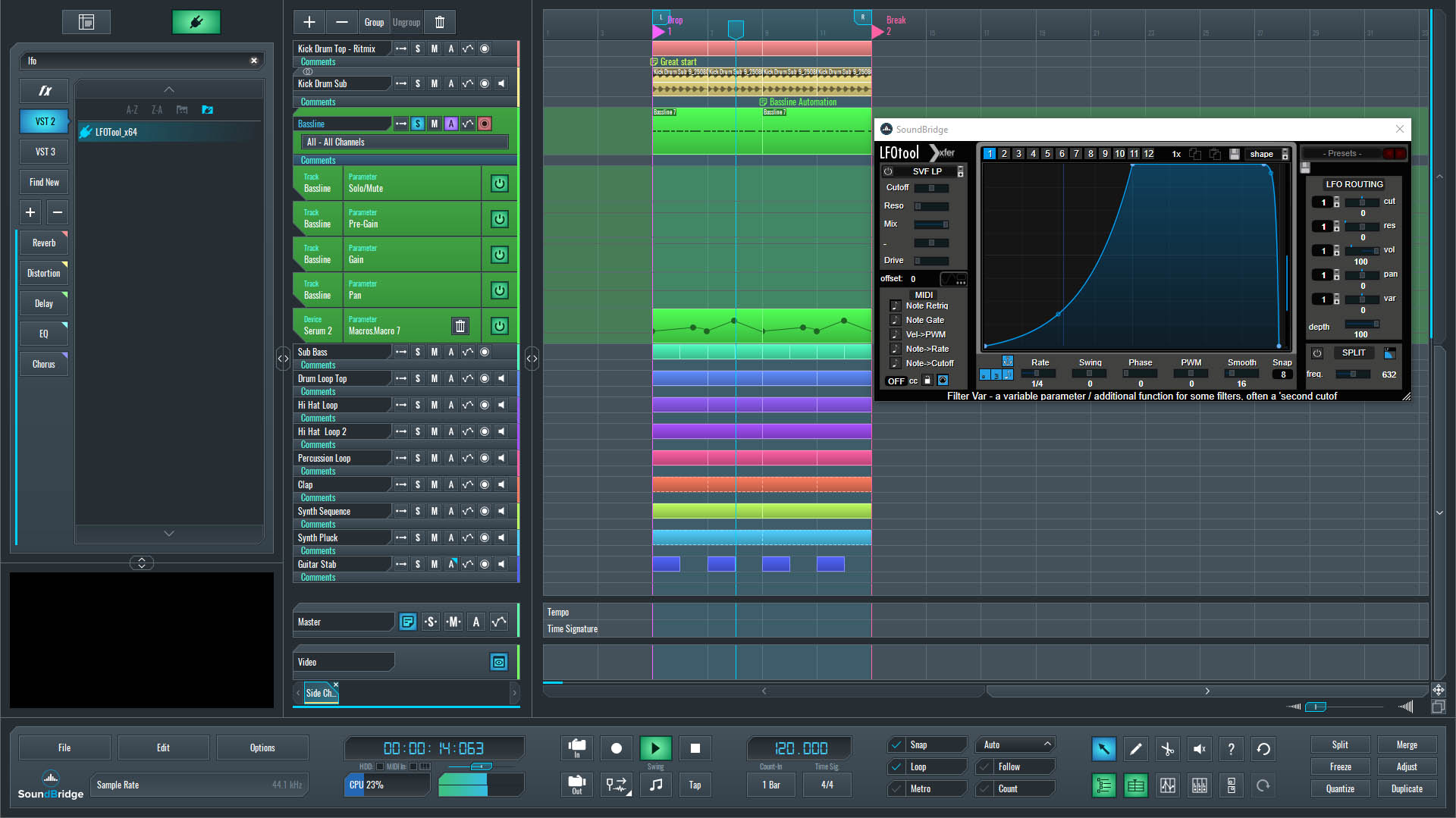
~Bassline Solo - LFO Tool Sidechain
Technique 3: Sidechain via Pre-Gain Automation
No plugins? No problem. Use your DAW's automation features to manually create sidechain effects by automating the pre-gain (volume) on your bass channel.
Benefits of Automation:
- Full Control: No reliance on external triggers.
- Loop-Friendly: Easily repeat patterns infinitely.
- Click Prevention: Smooth curves eliminate artifacts.
Step-by-Step Process:
- Create an Automation Clip: In your DAW, make a short automation block for the bass channels pre-gain.
- Set Points: Mark the start and end of your loop. Draw a dip where the kick hits-e.g., drop to -6dB or lower, then ramp back up.
- Shape the Curve: Use Bezier handles or curve tools for a natural fade-in/fade-out. This avoids clicks at loop transitions.
- Enable Looping: Set the automation to repeat, copying the pattern across your track.
- Test the Mix: Play with the kick. Adjust the depth and timing for the desired pump.
This hands-on approach is perfect for producers who prefer visual editing, and it also works seamlessly in DAWs with strong automation support, so you can achieve precise results more easily.
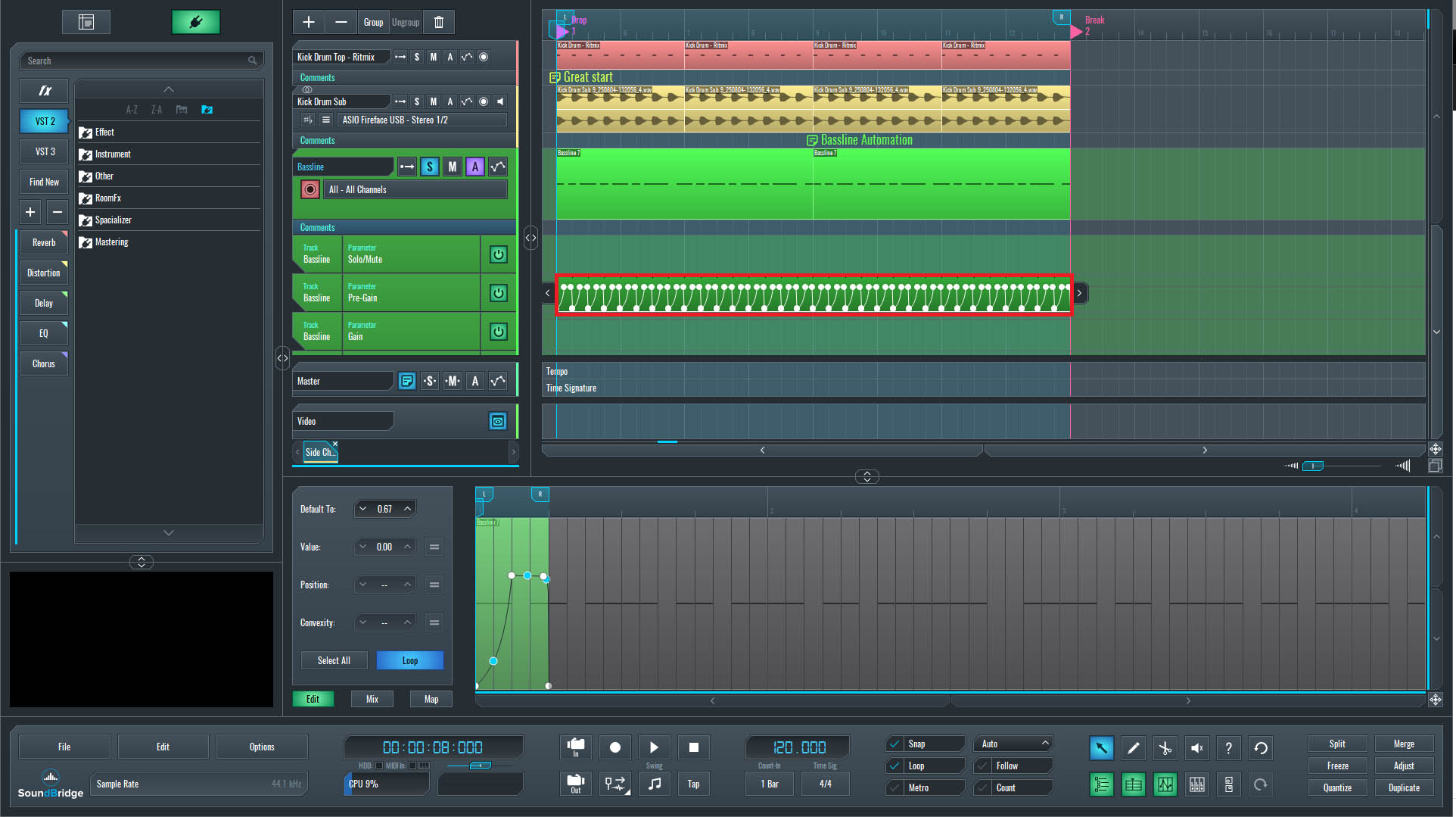
~Bassline Solo - Pre-Gian Automation Sidechain
Tips for Optimizing Your Sidechain Setup
- Monitor in Context: Always check your sidechain in the full mix, not just soloed tracks.
- Frequency-Specific Sidechain: For advanced users, sidechain only low frequencies (e.g., via multiband compression) to preserve mids and highs.
- Common Pitfalls: Avoid over-compression, which can make tracks feel lifeless. Start subtle and build up.
- Tools Roundup: Compressor (free/native), LFO Tool (paid), TAL-Filter 2 (free alternative). By incorporating these sidechain techniques, your music production workflow will become more efficient, leading to professional-grade results.
Conclusion: Elevate Your Mixes with These Techniques
Sidechain compression is more than just a trick; it's a necessary skill for any producer seeking clean and impactful tracks. Whether you use a simple compressor, an LFO plugin, or automation, these three techniques provide versatility for any setup, because they adapt to different workflows and styles. Experiment in your DAW today and you'll notice a difference in your bass-kick relationship right away.
If you're new to music production, start with Technique 1 and then progress to the others, so you build confidence step by step. Share your experiences in the comments, and let us know what’s your go-to sidechain method. For more tutorials on mixing, EQ, and compression, subscribe to our blog and keep learning.
If you liked this article on sound design, here are some more on the same subject:
MASTER MUSIC PRODUCTION
Expert-led courses designed to take you from fundamentals to finished tracks.

HOUSEFrom bouncy bass and solid kicks, this course teaches you the most modern House music production techniques needed to succeed and stand out.

TRAPQuit sounding like generic Trap and produce something World with hints of the Far East. Create ethnic soundscapes to put your Trap ahead of the curve.

AMBIENTProduce relaxing, sophisticated psy-influenced ambient. Psychedelic and relaxing to listen to, create meditative soundscapes to put your listeners in Zen.