

Multi-User Session Editing: A Studio-Grade Setup Guide
Last Edited: Aug 26, 2026
Multi-user session editing means real-time, DAW-native collaborative editing: two or more people shaping the same session, hearing each other’s changes live, with low enough latency that it feels like sharing a room. Here’s the verdict: full zero-latency collaboration works reliably over short distances or managed, provisioned networks, but for studio-grade final audio, you want a hybrid workflow instead. Direct the session in real time, then record locally at full resolution and sync afterward.
Two approaches make this possible, and they solve different problems:
- Low-latency audio streaming sends compressed or uncompressed audio packets between collaborators for live jamming and direction.
- Control-data and shared-project synchronization send lightweight DAW commands and sync project state, while high-resolution audio gets recorded locally and shared after the fact.
You’ll use both, at different moments in the same session.
Key Takeaways
Studio-grade multi-user session editing works best as a hybrid: real-time control-data streaming for direction, paired with local high-resolution recording for the final take.
| Point | Details |
|---|---|
| Define the term correctly | Multi-user session editing means real-time, low-latency collaborative editing inside a DAW, not a generic file-sharing feature. |
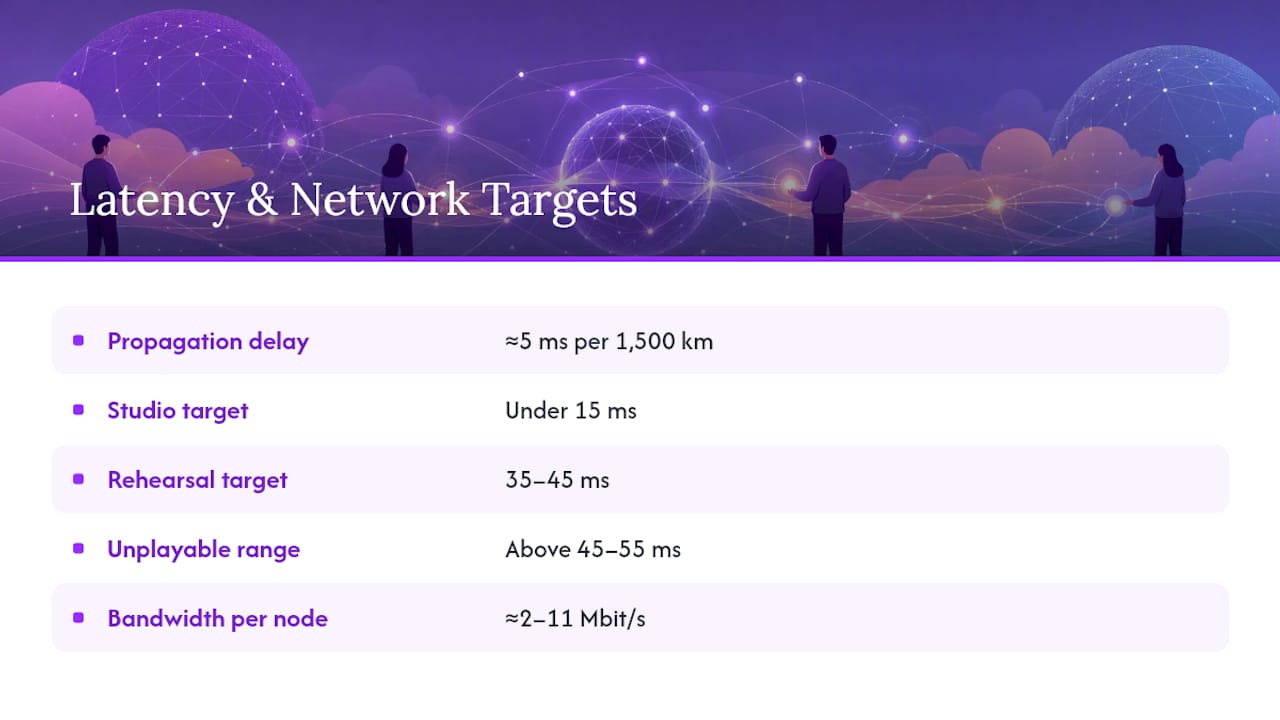
| Know your latency band | Aim under 15 ms for tight monitoring; treat 35 to 45 ms as the practical ceiling for direction and rehearsal. |
| Watch jitter, not just averages | Latency spikes break timing worse than steady delay, even when the average looks fine. |
| Separate streaming from recording | Use live audio streaming to direct and jam, then always capture locally at full resolution. |
| Match roles to the platform | Soundbridge pairs zero-latency remote tracking with 192kHz local recording and bi-directional plugin control for this exact workflow. |
How Does Multi-User Session Editing Actually Work?
Every millisecond of delay in a collaborative session comes from somewhere specific: acoustic travel time, analog-to-digital conversion, your DAW’s buffer, network packetization, and routing through however many hops sit between you and your collaborator. Add them up, and you get end-to-end latency, the number that actually determines whether a session feels playable or frustrating. Shaving buffer size on your end does nothing if the real bottleneck is three network hops away.
Audio streaming sends the actual sound live from one performer to another, which lets you hear a bandmate’s guitar the instant they play it. Research platforms like JackTrip built their reputation on this approach, transmitting uncompressed linear audio over UDP with tightly managed ring buffers. At 96 kHz with 64-frame buffers, JackTrip’s design achieves packet intervals of around 0.67 milliseconds locally, but that level of precision requires a managed network rather than the open internet.
Control-data synchronization takes the opposite bet. Instead of streaming audio, it streams the DAW actions themselves, plus pre-shared high-resolution assets, and lets each collaborator’s machine play everything back locally. A scalable DAW collaboration framework built on this principle, scaled to 30 collaborators on a centralized architecture, using just 50 Mbps client connections, something no raw-audio-streaming setup could match.
- Peer-to-peer mesh connections suit two or three collaborators on a fast, low-jitter link.
- Centralized routing or mixing servers scale better once you pass four or five participants, since they avoid the exponential connection overhead of full mesh topologies.
- UDP and uncompressed audio dominate research setups because they avoid compression latency entirely, but that trade-off only pays off when real bandwidth provisioning is behind it.
Pro Tip: If your collaborator count exceeds three or four, stop trying to force a mesh connection. Switch to a control-data model and let each machine handle its own high-resolution playback.
What Latency Is Actually Acceptable for Remote Collaboration?
Numbers matter more than feelings here, because “it felt laggy” isn’t a diagnosis. Practitioner surveys and testing converge on a workable band: around 30 to 45 milliseconds is generally considered near the upper limit of acceptability for tight ensemble playing, with sessions degrading noticeably beyond 45 to 55 milliseconds. For studio-grade monitoring, where you’re tracking a vocal or lead line against a live mix, you want closer to 10 to 15 milliseconds or less.
The physics floor: Signal propagation alone costs about 5 milliseconds for every 1,500 kilometers of distance, even at the speed of light with a perfect connection. A session between New York and Los Angeles carries an unavoidable latency floor before you add network, buffer, or processing delay on top.
A controlled 5G testbed recorded average latencies below the practical upper bound across up to four nodes, which sounds promising until you look at the fine print: spikes and packet loss still appeared under real-world conditions. That’s the trap. Average latency tells you almost nothing if jitter spikes hit 80 milliseconds every few bars.
- Run a one-way latency test first: play a click at one end and measure its arrival time at the other end.
- Follow with a round-trip test using a loopback signal to catch asymmetric routing issues.
- Treat anything under 20 milliseconds round-trip as viable for tight playing; treat 20 to 45 milliseconds as workable for direction and rehearsal only.
- Flag consistent jitter above 10 milliseconds as a bigger problem than raw latency, since spikes break timing in ways steady delay never does.
Building a Studio-Grade Hybrid Workflow
The pattern that actually holds up under real sessions runs in four stages: real-time direction and jamming, local high-resolution recording, file synchronization, and collaborative mixing built on control-data sync rather than streamed audio. Nobody mixes a final master over a live audio stream. Direction happens live; the actual capture happens locally, at full fidelity, with zero compression artifacts.
- Jam and direct in real time. Use a low-latency audio path to work out arrangement, feel, and takes together, live.
- Record locally, always. Each collaborator tracks their part at the full sample rate and bit depth on their own machine, regardless of how the live stream sounds.
- Sync project files and stems. Push the local recordings into a shared project space so every collaborator’s DAW reflects the same session state.
- Mix collaboratively using control-data sync. Once assets are synced, plugin moves, automation, and mix decisions are transmitted as lightweight commands rather than streamed audio.
Assign roles before you start. One person runs transport and holds final say on takes; another handles editing and file organization. Without that split, sessions drift into everyone reaching for the space bar at once.
Preparation matters more than most producers admit. Unify your sample rate and bit depth across every collaborator’s session before you touch record, agree on a file-naming and versioning convention, and build a quick check-in routine at the start of each session to confirm everyone’s local clock and buffer settings match expectations. For the live direction layer, lean on integrated talkback and video rather than cramming conversation into the same channel that carries your reference audio.
Pro Tip: Never let the “vibe check” audio stream double as your final take. Even a great-sounding live jam is a scratch track. Track locally, every time, no exceptions.
Setup Checklist Before Every Session
Run this before you hit record, not after something breaks mid-take.
Network:
- Use wired Ethernet rather than Wi-Fi whenever possible; wireless jitter is the most common cause of dropped sessions.
- Budget bandwidth per participant. Network-music-performance research indicates roughly 2 to 11 Mbit/s per node, depending on how many collaborators are active simultaneously.
- Confirm NAT traversal and open ports ahead of time rather than during a live session.
- Apply QoS prioritization to your audio traffic if your router supports it.
DAW and interface settings:
- Match sample rates across every collaborator’s session; mismatches cause subtle pitch and sync drift that’s hard to trace later.
- Set small buffers (64 to 128 samples) for live monitoring, and larger buffers (256 to 512 samples) for stable recording once tracking begins.
- Verify clock sync or word clock settings on your audio interface before the session, not mid-take.
Redundancy:
- Always run a local multitrack recording alongside any streamed reference mix.
- Keep a backup sync method (e.g., a cloud folder or direct transfer) in case your primary sync tool fails.
Quick troubleshooting:
- Glitching audio: reduce monitoring plugin load first, since heavy plugins on the monitor path are a common hidden cause of dropouts.
- Drift between takes: check clocking settings before assuming it’s a performance issue.
- Missing assets after sync: resync the project and re-transfer any assets flagged as incomplete.
Where Does SoundBridge Fit Into This Workflow?
SoundBridge builds directly toward the hybrid model this guide recommends. It supports zero-latency remote tracking alongside studio-accurate synchronization, so the real-time direction stage and the local recording stage run within a single connected environment rather than two disconnected tools.
- Bi-directional plugin and hardware control lets a producer adjust a collaborator’s outboard gear or plugin settings live, without waiting on a round-trip file transfer.
- High-fidelity processing up to 192kHz ensures the local recording stage never becomes a bottleneck for your final audio quality, regardless of any compression that occurred during live direction.
- Integrated talkback and video cover the communication layer this guide flags as essential, so direction doesn’t compete with your audio path for bandwidth.
- Customizable workflows let you assign the leader and recorder roles this guide recommends directly inside session permissions.
Every checklist item above maps to a real product feature rather than a workaround you’d need to bolt on separately.
What the Research Actually Tells Producers to Do
Most advice on this topic still chases an old fantasy: zero-latency collaboration across any distance, as if enough bandwidth could beat physics. It can’t. The 5-millisecond-per-1,500-kilometer floor isn’t a technology limitation waiting on next year’s fiber rollout; it’s the speed of light. Chasing it wastes setup time that should be spent on the hybrid workflow instead.
The bigger blind spot in most guides is jitter. Producers obsess over average latency numbers while ignoring that a single 60-millisecond spike mid-phrase does more damage than a steady 30 milliseconds ever will. Test for consistency, not just a good average.
If you take one thing from this guide, prioritize the split between direction and capture. Stop trying to make the live stream double as your master. Direct live, record locally, sync after. That single habit shift solves more sessions than any buffer setting or router upgrade ever will.
Try SoundBridge for Your Next Remote Session
SoundBridge gives you the hybrid workflow this guide describes in a single platform, instead of stitching together a streaming app, a separate recorder, and a file-syncing tool. You get zero-latency remote tracking for the live direction stage, 192kHz local recording for the final capture, and bi-directional control over plugins and hardware so a collaborator across the country can adjust a synth patch in real time without a round-trip export.

That combination matters most for composers and engineers who’ve been burned by tools that handle one half of the workflow well and leave the other half to guesswork. If you’re scoring a film with a remote collaborator, tracking vocals with a producer three time zones away, or just tired of bouncing stems back and forth, start by exploring what a modern DAW built for remote collaboration actually looks like, then set up a session and run the latency test from this guide yourself.
Frequently Asked Questions
Is true real-time multi-user session editing possible over long distances? It’s possible but limited. Physical propagation delay adds roughly 5 milliseconds per 1,500 kilometers, so cross-country or international sessions will always carry some baseline latency. Short-distance or well-provisioned regional connections achieve near-zero-latency performance.
What latency should I aim for in a collaborative editing session? Under 15 milliseconds for tight studio-grade monitoring, and up to 35 to 45 milliseconds for general direction and rehearsal work. Anything consistently above 45- 55 milliseconds tends to feel unplayable for tight ensemble parts.
Do I need special network settings to enable multi-user editing? Wired Ethernet, open NAT ports, and enough bandwidth per node (research suggests roughly 2 to 11 Mbit/s depending on participant count) make the biggest difference. QoS prioritization on your router helps keep audio traffic ahead of everything else.
Why does my session glitch even though my internet speed tests fine? Speed tests measure throughput, not jitter or consistency. A connection with plenty of bandwidth can still spike unpredictably, and those spikes disrupt musical timing far more than steady, low bandwidth ever would.
Can I mix a final track over a live collaborative session? You shouldn’t. Live-streamed audio, even at low latency, typically involves some compression or processing that shouldn’t end up in your master. Direct the session live, then finish the mix using locally recorded, full-resolution files synced afterward.
Sources
- JackTrip design and implementation (CCRMA / SoundWIRE paper)
- Latency and reliability analysis of a 5G-enabled IoMusT system (2023)
- Understanding audio latency for musicians – Lutefish
Recommended
MASTER MUSIC PRODUCTION
Expert-led courses designed to take you from fundamentals to finished tracks.

HOUSEFrom bouncy bass and solid kicks, this course teaches you the most modern House music production techniques needed to succeed and stand out.

TRAPQuit sounding like generic Trap and produce something World with hints of the Far East. Create ethnic soundscapes to put your Trap ahead of the curve.

AMBIENTProduce relaxing, sophisticated psy-influenced ambient. Psychedelic and relaxing to listen to, create meditative soundscapes to put your listeners in Zen.