

Prevent Missing-Plugin Issues: Plugin Formats for DAW Collaboration
Last Edited: Sep 26, 2026
VST3 is the cross-platform default for most producers, AU is the right call only if you’re locked into macOS, and AAX matters only when Pro Tools sits at the center of your session. VST2 and older formats like RTAS and TDM still show up in legacy sessions, but they’re deprecated and worth phasing out. If you’re building a plugin library today, choose VST3 or your DAW’s native format first, and keep an eye on open formats like CLAP for the future.
TL;DR:
- VST3 is the preferred plugin format for Windows and cross-platform setups due to its improved CPU efficiency and advanced automation features.
- AU is exclusive to macOS and should be installed through official installers to avoid path issues that can lead to plugin scanning failures.
- Most developers have migrated to VST3 and AAX formats, making legacy VST2, RTAS, and TDM plugins increasingly obsolete and better replaced with modern versions.
- AAX plugins are only relevant if using Pro Tools, with AAX Native suitable for most home studios and AAX DSP reserved for hardware-accelerated processing in specific setups.
- Open-source formats like CLAP and LV2 support portability across operating systems, especially Linux, but lack the broad commercial plugin support of proprietary formats.
Plugin Formats Explained: VST and VST3 in Practice
VST has been the backbone of third-party plugin development since Steinberg introduced it in the 1990s, and it remains the most widely supported format across Windows DAWs. VST3 is the modern version, and it’s not just a version bump. It changes how plugins talk to your DAW.
The biggest practical win is CPU behavior. VST3 plugins can go quiet when they’re not processing audio, so a session stacked with many inactive synth instances doesn’t tax your processor the way the same session would under VST2. VST3 is more CPU-efficient than older VST builds and is recommended when available, which matters most in large template projects where dozens of tracks sit idle at any given moment.
VST3 also brings:
- Sample-accurate automation, so parameter changes land exactly where you draw them instead of drifting by a buffer or two
- Smarter voice handling for synths, which reduces wasted processing on notes that aren’t sounding
- A single plugin file that can host multiple instruments or effects, cutting down on menu clutter
VST2 has been formally phased out by Steinberg, and most major developers have migrated their catalogs to VST3 only. If you’re shopping for a new plugin, check that it ships as VST3 before buying, when that information is provided by the developer. Some manufacturers still bundle a standalone executable with the plugin, letting you run the tool without opening a DAW at all.
Audio Units (AU): What macOS Producers Need to Know
AU is Apple’s plugin format, and it runs only on macOS. If you’re on Windows, you’ll never see it. That’s the simple part. The trickier part is how Apple’s Core Audio system manages where AU files live.
Unlike VST, where you can often point your DAW to a custom plugin folder, AU is strongly integrated with macOS Core Audio and uses system-managed file paths. Move an AU component from its expected location, and your DAW’s plugin scanner may stop detecting it.
That fixed structure has upsides:
- Consistent scanning across every AU host, since they all check the same system locations
- Fewer “missing plugin” errors caused by manually relocated files, as long as you leave the installer’s defaults alone
- Tight integration with macOS-native DAWs that were built around AU from day one
Pro Tip: Always install plugins through the developer’s official installer rather than manually copying component files. Since AU’s file paths are managed by the system, a manual copy is the fastest way to break your plugin manager’s scan.
If you’re switching from a Windows rig to a Mac, don’t assume your VST-only plugins will appear. Check whether each developer offers an AU build before you migrate a project.
AAX and Pro Tools: Native vs. DSP Explained
AAX is Avid’s plugin format, and if you work in Pro Tools, it’s the format you’re stuck with unless the developer also ships VST3 for other DAWs on your machine. AAX has two variants, AAX Native and AAX DSP, and is Pro Tools’ supported plugin format.
The distinction matters more than it sounds:
- AAX Native runs on your computer’s CPU, exactly like VST3 or AU, and covers the vast majority of home and project studios.
- AAX DSP offloads processing to dedicated Avid hardware, which only matters if your studio has invested in that hardware for low-latency tracking at scale.
Most home producers only ever need AAX Native. If you’re collaborating with a Pro Tools studio and sending sessions back and forth, confirm which plugins they’re running in AAX, since a VST3-only effect won’t load on their end without a separate AAX build.
Open-Source Formats: CLAP, LV2, and Portability
CLAP and LV2 exist because producers increasingly move between operating systems, and proprietary formats don’t always follow. CLAP and LV2 are open-source formats adopted to improve portability across operating systems, especially where Linux support matters, which is significant since neither VST nor AU officially supports Linux.
What sets these apart:
- LV2 is platform-agnostic with a permissive license, so any developer can build support without licensing fees
- CLAP is newer and designed with modern plugin architecture in mind, including better threading and modulation support
- Both formats let producers keep a working plugin library even if they migrate their whole studio to Linux
The catch is commercial adoption. Most major plugin developers still prioritize VST3, AU, and AAX because that’s where the paying audience sits. Open formats are gaining ground, but you’ll find far fewer commercial synths and effects available in CLAP or LV2 than in VST3 today.
Legacy Formats: VST2, RTAS, and TDM
Older sessions sometimes carry plugins in formats that current DAWs barely support. VST2 has been deprecated, and many vendors have migrated to VST3, while legacy formats like RTAS and TDM are still found in older Pro Tools sessions but are no longer actively developed.
Here’s how to handle them when they show up:
- Identify the format first. Open your plugin manager and check whether the flagged plugin is VST2, RTAS, or TDM before assuming it’s broken.
- Look for a bridge or wrapper. Some hosts can run older plugin architectures through a compatibility layer, though performance and stability vary.
- Replace instead of patching. If the original developer offers a VST3 or AU version of the same plugin, switching is almost always safer than keeping a legacy bridge running long term.
RTAS and TDM belong to Pro Tools’ pre-AAX era, so if you’re still opening sessions with those plugin references, budget time to source modern replacements before a deadline forces the issue.
How to Check a Plugin’s Format and Bit Depth
Most compatibility headaches trace back to one of two things: the wrong plugin format for your DAW, or a mismatch between 32-bit and 64-bit builds. Plugin scanning and format detection are typically visible in the DAW’s plugin manager or in installer metadata, so you rarely have to guess.
To confirm what you’re dealing with:
- Open your DAW’s plugin browser or manager and look for a format tag (VST3, AU, AAX) next to the plugin name
- Check the installer or developer’s download page, which almost always states the format and bit depth before you install
- If a plugin fails to load, try rescanning your plugin folders, since a stale scan is a common false alarm for “missing” plugins
- Remember that 64-bit DAWs generally can’t load 32-bit plugins directly, so you’ll need a bridge utility or the developer’s 64-bit build
Here’s a general reference for which formats major DAW categories typically support:
| DAW category | Typical format support |
|---|---|
| Windows-based DAWs | VST3, VST2 (legacy), some support CLAP |
| macOS-native DAWs | AU, VST3 |
| Cross-platform DAWs (Mac and Windows) | VST3, AU (on Mac only) |
| Pro Tools | AAX Native, AAX DSP |
| Linux-friendly hosts | LV2, CLAP |
Check both your DAW’s documented features and each plugin’s product page before assuming compatibility.
Which Format Should You Actually Use?
The right format depends less on preference and more on what your session needs to do next.
- If you collaborate across Windows and Mac machines, standardize on VST3 wherever the plugin offers it, since it’s the one format both platforms share.
- If you’re macOS-only and never plan to switch, AU integrates cleanly, but don’t ignore VST3 versions of the same plugins, since some macOS DAWs handle VST3 just as well.
- If Pro Tools drives your sessions, confirm every third-party plugin has an AAX Native build before you commit to a workflow around it.
- If portability across operating systems, including Linux, is a real priority for you, start tracking which of your regular plugins offer CLAP or LV2 builds.
Pro Tip: Keep a simple spreadsheet of every plugin in your template, noting which formats each one ships in. When a collaborator asks what they need to install, you’ll have the answer in seconds instead of digging through folders.
Maintaining a DAW built around flexible plugin hosting makes this process less painful, since format mismatches surface immediately in the plugin manager rather than during a session.
SoundBridge’s Take on Format Choices and Remote Collaboration
Format compatibility becomes a much bigger deal the moment a session leaves your machine. A track that loads perfectly on your rig can throw missing-plugin errors the second a collaborator opens it on a different OS or DAW, and that’s exactly where format discipline pays off.
When you’re tracking remotely with zero-latency sync and bi-directional plugin control, a single mismatched plugin format can stall an entire session. Standardizing on VST3 or confirming AU/AAX equivalents before a remote session starts saves everyone the troubleshooting later.
SoundBridge’s approach to remote collaboration leans on consistent plugin hosting so that high-sample-rate sessions, up to 192kHz, don’t hit format snags mid-take. The practical habit: before inviting a collaborator into a session, confirm their DAW and OS, then check your plugin list against it.
Why Architecture Differences Affect Performance and Stability
Plugin formats aren’t just file wrappers. Each one defines how a plugin communicates with the host, and that interaction shapes CPU load, latency, and crash behavior.
VST2’s architecture processes every loaded plugin instance continuously, whether it’s making sound or not. VST3 changed that by letting idle instances go dormant, which is why large templates with dozens of synths run noticeably lighter under VST3 than under the same plugins in VST2 form. AU follows a similar idea but ties it tightly to Apple’s Core Audio subsystem, which is part of why AU plugins tend to feel stable specifically within macOS-native hosts, since the OS is managing more of the routing itself rather than leaving it entirely to the DAW.
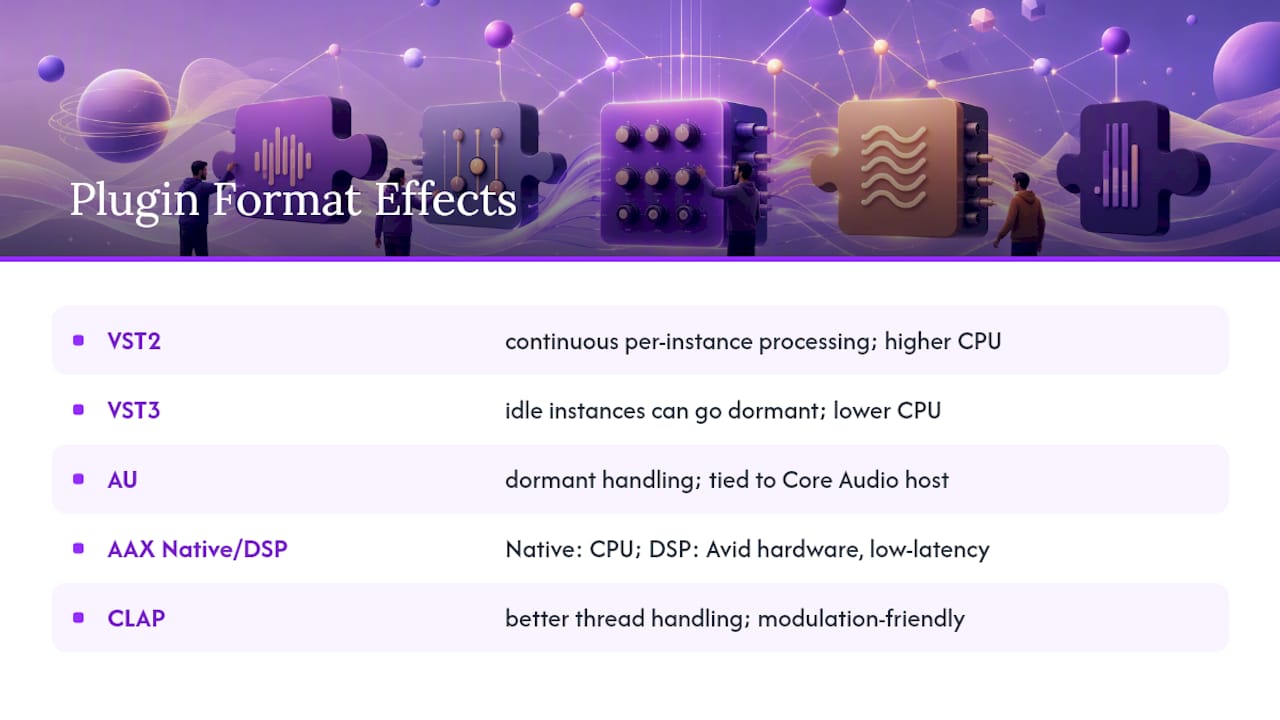
AAX strikes a balance between software and hardware. AAX Native runs entirely on your CPU like VST3, so its stability profile matches your computer’s general performance. AAX DSP, by contrast, offloads processing to dedicated Avid hardware, which can deliver rock-solid, low-latency performance, but only as good as the hardware and its drivers.
Open formats like CLAP were designed with years of hindsight into where VST2 and even VST3 created bottlenecks, so CLAP includes features like better thread handling for modulation-heavy patches. Stability differences between formats usually show up most under stress: big sessions, high track counts, or heavy automation. A plugin format that handles idle processing efficiently and manages threading well will hold up better as your session grows, regardless of the specific format.
Proprietary vs. Open Standards: What the License Actually Means
VST3, AU, and AAX are all proprietary formats, owned and controlled by a single company. Steinberg controls VST3’s specification, Apple controls AU, and Avid controls AAX. That control has a real upside: consistency. Because one company sets the rules, developers building for these formats know exactly what to expect, and hosts can rely on predictable behavior.
The trade-off is access. Developing for a proprietary format sometimes requires licensing agreements or SDK terms set by the format’s owner, which can shape what independent developers can build and how quickly.
Open standards like LV2 flip that model. LV2 is a platform-agnostic open-source plugin format with a liberal license, meaning any developer can build support without negotiating terms with a controlling company. CLAP follows a similar open philosophy. That openness is exactly why these formats have found a home on Linux, where proprietary, closed-ecosystem formats have historically had little reason to show up.
For you as a producer, the license model mostly matters indirectly. Proprietary formats tend to have deeper commercial plugin catalogs because established companies build for the audience with money to spend. Open formats tend to grow through community and indie-developer contributions instead. Neither approach is inherently better, but knowing which model you’re relying on helps you predict where new plugin support is likely to appear first.
Where Plugin Formats Are Headed Next
The clearest trend right now is momentum behind open, cross-platform formats. The industry trend includes greater support for open formats and cross-platform portability, driven by producers who want a single plugin library that works whether they’re on a Windows desktop, a Mac laptop, or a Linux-based studio rig.
CLAP is the format most worth watching. It was built specifically to address technical limitations that VST3 and AU carry forward from earlier plugin architectures, particularly around modulation and threading. Adoption is still catching up to VST3’s dominance, but more developers are adding CLAP builds alongside their existing formats rather than replacing them outright, which is a reasonable middle path for an industry that can’t afford to alienate its existing customer base overnight.
Expect proprietary formats to stay dominant for the near future simply because of catalog depth. Thousands of commercial plugins ship in VST3, AU, and AAX, and that inventory doesn’t disappear just because a new open standard arrives. What’s more likely is a slow layering effect: new plugins increasingly ship in three or four formats simultaneously, VST3 and AU as the commercial baseline, AAX for Pro Tools users, and CLAP or LV2 as a bonus for producers who prioritize portability.
If you’re building a plugin library for the long haul, treat format breadth as a factor in your buying decisions, the same way you’d weigh price or sound quality.
Get a DAW Built for Modern Plugin Workflows
Choosing the right plugin format only solves half the problem. You also need a DAW that hosts those formats cleanly and keeps sessions portable when collaborators join from different setups. SoundBridge handles plugin hosting and zero-latency remote tracking, so format compatibility issues surface early rather than mid-session. If you’re new to DAWs entirely, the musician’s guide to digital audio workstations is a solid starting point before you build out a plugin library. For producers testing collaborative mixing workflows across different setups, tools like AmmarAI’s sound studio offer another practical look at cross-platform audio work.
The Real Priority Isn’t Definitions, It’s Migration Discipline
Most plugin format guides stop at explaining what VST3 or AAX means. That’s the easy part. The harder, more useful skill is building a habit of checking format compatibility before a session goes sideways, not after a collaborator can’t open your project.
Conventional advice tends to treat format choice as a one-time decision: pick VST3, move on. In practice, plugin libraries drift. You accumulate legacy VST2 tools, a few AU-only macOS plugins, maybe an AAX effect from a Pro Tools session years back. Nobody audits that drift until a session breaks.
The priority, then, isn’t memorizing format specs. It’s building a lightweight system, a spreadsheet, a tagged plugin folder, anything, that tells you at a glance what format each tool in your template uses. That habit costs a few minutes now and saves hours the next time a collaborator’s session refuses to load a plugin you assumed was universal.
— Wake
Sources
FAQ
What Are the Different Types of Plugin Formats?
The main types are VST3 and VST2 (cross-platform), AU (macOS only), AAX (Pro Tools), and open-source formats like CLAP and LV2, plus legacy formats such as RTAS and TDM still found in older sessions.
Is VST or VST3 Better?
VST3 is generally the better choice because it uses less CPU for idle plugin instances and offers sample-accurate automation, whereas VST2 has been deprecated by most developers.
What Is a CLAP File?
A CLAP file is a plugin built on the CLAP open-source format, designed to improve cross-platform portability and modern plugin architecture, particularly for producers who use Linux.
How Do I Know if a Plugin Is VST2 or VST3?
Check your DAW’s plugin manager, where the format is usually labeled directly next to the plugin name, or check the developer’s installer and product page for format details before installing.
Recommended
MASTER MUSIC PRODUCTION
Expert-led courses designed to take you from fundamentals to finished tracks.

HOUSEFrom bouncy bass and solid kicks, this course teaches you the most modern House music production techniques needed to succeed and stand out.

TRAPQuit sounding like generic Trap and produce something World with hints of the Far East. Create ethnic soundscapes to put your Trap ahead of the curve.

AMBIENTProduce relaxing, sophisticated psy-influenced ambient. Psychedelic and relaxing to listen to, create meditative soundscapes to put your listeners in Zen.