

Real-Time MIDI Collaboration: Musicians' Practical Guide
Last Edited: Aug 11, 2026
The fastest way to start real-time MIDI collaboration is to pick one of three approaches and follow a short checklist. A collaborative DAW session (like SoundBridge's virtual collaboration workflow) gives you full-session editing with audio, MIDI, and talkback in one place. Network MIDI routing via rtpMIDI or Ableton Link is the leanest path for instrument-only jamming on a LAN, with round-trip latency that can stay under 5ms locally. A hybrid WebRTC MIDI bridge handles WAN sessions where NAT traversal is a problem, trading some latency for reach. Over a local network, expect sub-10ms round trips. Over the public internet, plan for 20–80ms depending on routing and geography.
Quick picks by goal:
- Jamming or live performance: Network MIDI on LAN (Ableton Link for tempo sync) or a WebRTC bridge for remote peers
- Remote tracking and overdubs: Collaborative DAW session with talkback and plugin delay compensation enabled
- Teaching or co-production: Collaborative DAW session with screen share and named MIDI channels
Run the pre-session checklist (network, routing, talkback) before any live take. The sections below walk through every step.
What Real-Time MIDI Collaboration Actually Means and When to Use It
Real-time MIDI collaboration is the live exchange of MIDI event data (note-on/off, control change, pitch bend, clock, and transport messages) between two or more musicians or producers, so that each participant's actions affect a shared musical state in real time. It is distinct from audio streaming: you are sending compact event messages, not rendered sound, which is why latency targets are far tighter than for video calls.
The ecosystem that makes this possible spans several standards. Ableton Link synchronizes tempo and beat phase across apps on the same network. rtpMIDI (also called RTP-MIDI or Network MIDI on macOS) tunnels MIDI over IP using the Real-time Transport Protocol. OSC (Open Sound Control) offers a flexible, high-resolution alternative for control data. WebRTC provides peer-to-peer, low-latency media transport with built-in NAT traversal, and WebMIDI exposes MIDI devices directly to browser-based apps. MIDI 2.0 improves timing resolution and bidirectional communication at the protocol level, though DAW support is still maturing.
Primary use cases:
- Live jamming and telematic performance: — Two or more musicians improvising in real time, each hearing the others' MIDI-triggered instruments
Pro Tip: For education sessions, assign the teacher as session host and lock the student's transport controls. This prevents accidental playhead jumps that derail the lesson.
Cross-cultural and world-music collaborations are another growing use case. A sitar crossover collaboration between geographically distant musicians, for example, benefits enormously from low-latency MIDI exchange rather than bouncing audio files back and forth.
How Real-Time MIDI Collaboration Works Technically
Two fundamental architectures cover almost every tool you will encounter.
Shared-instance model: A single authoritative project state lives on a server or host machine. All participants connect to it and see the same session. Changes are reflected immediately for every user. The tradeoff is that the host's CPU and network become bottlenecks, and cross-DAW compatibility depends on the platform.
Synchronized local engines model: Each participant runs a full local copy of the DAW or sequencer. A sync layer (Ableton Link, rtpMIDI, or a custom WebRTC data channel) broadcasts events and clock so all copies stay aligned. Latency is lower because there is no round-trip to a central server for every event, but state divergence (one machine drops a packet) requires reconciliation logic.
Research into timing and transport issues in telematic musical performance confirms that protocol-level latency minimization is the primary differentiator for synchronous performance. That clock drift between peers compounds over long sessions if not actively corrected.
| Model | Latency profile | NAT traversal | Session size | Best for |
|---|---|---|---|---|
| Shared-instance | Medium (server RTT) | Handled by server | Large (many editors) | Co-production, education |
| Synchronized local engines | Low (peer-to-peer) | Requires setup or relay | Small (2–4 peers) | Live jamming, overdubs |
| Hybrid WebRTC bridge | Low to medium | Built-in (STUN/TURN) | Small to medium | WAN performance, remote tracking |
Protocol tradeoffs at a glance:
- Ableton Link: — Zero-config tempo/phase sync; no MIDI note routing; LAN only without a relay
The MidiEditor AI collaboration modes documentation breaks down four concrete modes (async PR, Discord post, LAN Live, WAN Live) with their transport stacks (UDP multicast, TCP, WebRTC/DTLS) and typical latency characteristics, making it a useful reference when you are deciding which stack to build on.
Which Approach Fits Your Goal, and Why SoundBridge Leads for Production Sessions
Each approach has a clear home turf.
Network MIDI only (rtpMIDI + Ableton Link):
- Best for: LAN jams, tempo-synced multi-app setups, hardware-heavy rigs
- Latency: Sub-10ms on a wired LAN
- Setup complexity: Low to medium; requires port forwarding for WAN use
- Weakness: No integrated audio, talkback, or project versioning
Hybrid WebRTC MIDI bridge:
- Best for: Remote performers who need NAT traversal without a VPN
- Latency: 20–60ms over a well-routed WAN connection
- Setup complexity: Medium; browser-based options reduce install friction
- Weakness: Audio quality depends on the bridge implementation; MIDI-only bridges still need a separate audio solution
Collaborative DAW session:
- Best for: Full remote production, overdubs, film scoring, and any session where audio + MIDI + talkback must stay in sync
- Latency: Depends on implementation; SoundBridge targets zero-latency remote tracking
- Setup complexity: Higher upfront, but the integrated workflow saves time across a full session
For professional sessions that combine audio, MIDI, and talkback, SoundBridge's virtual collaboration workflow is the recommended choice. It handles studio-accurate synchronization, plugin delay compensation, and integrated video in a single environment, eliminating the patchwork of separate tools required by network-MIDI-only setups.
Hackathon-driven experiments documented in MixOnline's Let's Build series show that the industry is actively prototyping new collaboration features. Still, production-ready integration of audio, MIDI, and talkback in a single DAW remains the benchmark that purpose-built platforms like SoundBridge are designed to meet.
Your Pre-Session Checklist for a Live MIDI Session
Follow these steps in order. Skipping any one of them is the most common reason a session falls apart mid-take.
Pre-session:
- Choose your collaboration model (shared-instance, synchronized local, or hybrid WebRTC) based on the goal and network conditions.
- Confirm OS and DAW compatibility: rtpMIDI requires the Apple MIDI Network driver on macOS or the free tobias.erichsen.de driver on Windows; WebRTC sessions need a modern Chromium-based browser or a native app with WebRTC support.
- Test your audio and MIDI drivers with a loopback before the session starts.
- Set your sample rate (48kHz is the minimum for remote sessions; 96kHz if bandwidth allows) and buffer size (128 samples or lower for performance; 256 for stability over WAN).
- Reserve at least 5 Mbps upload bandwidth per participant; disconnect other high-bandwidth devices on the same network segment.
- Set up talkback and video (a dedicated headset mic for talkback prevents bleed into the session audio).
During the session:
- Name every MIDI channel and track before the first take: "KEYS_CH01_Player1" beats "Track 3" when you are troubleshooting a routing issue at 2 AM.
- Assign session roles: one host/engineer controls transport and tempo; performers focus on playing.
- Freeze CPU-heavy instrument tracks before the session begins to free processing headroom.
- Enable plugin delay compensation in your DAW and verify it is active for every instrument track.
- Monitor round-trip latency by pinging your peer's IP and comparing it to the in-DAW latency meter.
Post-session:
- Save the authoritative session state immediately after the last take.
- Export MIDI stems and audio renders with a consistent naming scheme:
ProjectName_YYYYMMDD_v01_STEM.mid. - Revoke any temporary firewall rules or port forwards opened for the session.
Pro Tip: Run a 10-minute rehearsal at 60% of your target tempo before any live take. It surfaces routing problems and clock drift before they cost you a real performance.
Community-sourced configuration patterns from the Cantabile remote MIDI collaboration thread confirm that most session failures stem from skipped pre-session checks, particularly driver conflicts and unchecked buffer settings.
Why You Hear Latency and How to Fix It Fast
Latency in a live MIDI session comes from four stacked sources, and you need to address each one separately.
Root causes:
- Audio I/O buffer: The single largest controllable variable. A 512-sample buffer at 48kHz adds roughly 10ms of output latency before any network delay is added.
- Network RTT: The round-trip time between peers. A ping of 40ms means at least 20ms of one-way delay for every MIDI event.
- DAW internal latency: Plugin processing chains add latency that plugin delay compensation (PDC) is supposed to correct, but PDC only works when it is enabled and when plugins correctly report their latency.
- Clock drift: Two machines running independent clocks will drift apart over time. Without an active sync protocol (Ableton Link, MIDI clock, or a shared word clock), a 30-minute session can drift by hundreds of milliseconds.
How to measure it:
- Run a loopback test: send a MIDI note out and record the audio result; measure the gap in your DAW's sample-accurate editor.
- Check ping/RTT to your peer's IP from the terminal (
ping [peer IP]) before and during the session. - In WebRTC-based sessions, the browser's
chrome://webrtc-internalspage shows connection stats including round-trip time and packet loss.
Concrete mitigation steps:
- Drop your buffer to 64 or 128 samples for performance-critical sessions on a wired LAN.
- Switch from Wi-Fi to Ethernet; a wired connection typically reduces jitter by 80–90% compared to a busy 2.4 GHz Wi-Fi network.
- Use Ableton Link or MIDI clock to actively correct drift rather than relying on each machine's internal clock.
- Freeze or bounce instrument tracks that are not being performed live to reduce CPU-induced latency spikes.
- If true zero-latency is not achievable over WAN, switch to a "perform and correct" workflow: the performer plays to a click, and the engineer nudges MIDI events into alignment after the take.
Pro Tip: If your WAN RTT exceeds 50ms, stop chasing zero-latency and instead use a tight click track with a shared Ableton Link session. Both players lock to the grid, and the slight offset becomes inaudible in the mix.
Academic analysis of telematic performance timing shows that active clock correction protocols outperform passive NTP-based sync for musical applications, particularly in sessions longer than 20 minutes.
Session Etiquette and Workflows That Keep Remote MIDI Sessions Productive
The technical setup is only half the equation. The sessions that actually produce great music are the ones with clear roles and a shared understanding of how decisions get made.
Roles and responsibilities:
- Host/engineer: Owns the session file, controls transport, manages plugin delay compensation, and calls for retakes: one person, one decision.
- Performer: Focuses on playing. Does not touch the session tempo or routing without asking.
- Talkback etiquette: Use push-to-talk for talkback. Open mics during a take introduce noise and distraction.
Naming and versioning conventions:
- Name tracks with player initials and MIDI channel:
JD_PIANO_CH03. - Save a checkpoint version every 30 minutes:
Session_v01,Session_v02. Never overwrite the previous version mid-session. - Keep a shared text doc (Google Docs or a Notion page) open during the session for quick notes on take numbers and arrangement decisions.
Do/don't bullets:
- Do agree on a tempo and key before the session starts, and lock the tempo in the DAW.
- Do rehearse the signal chain at low volume before recording at full level.
- Don't change sample rate or buffer size mid-session; it forces a driver restart and drops the connection.
- Don't use the same MIDI channel for two different instruments; channel collisions are the hardest routing bugs to diagnose under time pressure.
Pro Tip: Before the first real take, run through the full arrangement once at 70% tempo. You will catch wrong MIDI channel assignments and missing plugin presets before they matter.
For deeper workflow strategies, SoundBridge's expert tips for remote music collaboration cover session-specific optimizations that go beyond the basics here.
How SoundBridge Handles Real-Time MIDI Collaboration
SoundBridge is built for exactly the scenario this guide describes: a professional session where audio, MIDI, talkback, and video need to stay in sync across a network without a patchwork of separate tools.
Core collaboration features:
- Zero-latency remote tracking: SoundBridge's architecture prioritizes studio-accurate synchronization over the variable latency inherent in generic network MIDI setups.
- Integrated MIDI routing: Full MIDI channel assignment, routing, and monitoring within the DAW, no third-party MIDI patchbay required.
- High sample rate support: Sessions up to 192kHz, which matters for film scoring and audio post-production where fidelity cannot be compromised.
- Built-in talkback and video: No need for a separate video call running alongside the session; talkback is integrated, keeping communication and music in the same environment.
- Plugin delay compensation: Active PDC across the signal chain, so performers hear a consistent latency regardless of how many plugins are in the chain.
Practical setup notes:
- Enable the collaboration session from SoundBridge's virtual collaboration panel; the platform handles port negotiation and peer discovery.
- For WAN sessions, verify that your router allows the required UDP ports (see SoundBridge's setup documentation for the current port ranges).
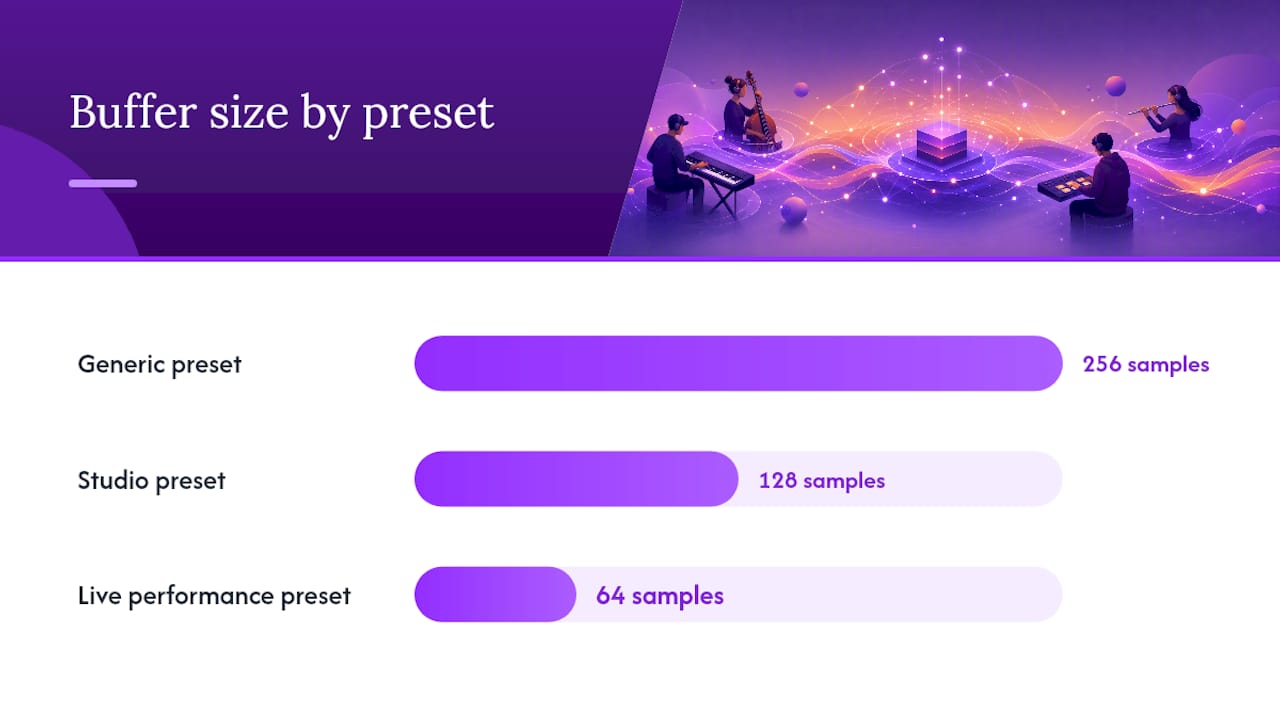
- Set your session preset to "Studio" for overdub sessions (higher buffer tolerance, full PDC) or "Live Performance" for low-latency jamming (minimal buffer, frozen instrument tracks).
| Feature | Generic preset | Studio preset | Live performance preset |
|---|---|---|---|
| Buffer size | 256 samples | 128 samples | 64 samples |
| Sample rate | 48kHz | 96kHz | 48kHz |
| Plugin delay compensation | On | On | On |
| Talkback | Optional | Enabled | Push-to-talk |
| Track freezing | Off | Recommended | Required |
The Connect Through MIDI prototype from MIDI.org illustrates how even lightweight MIDI bridging prototypes can validate the core architecture on which production DAWs like SoundBridge are built. A developer blog post documenting the same prototype confirms the real-world constraints: latency, device discovery, and NAT traversal are the three problems every serious collaboration platform must solve at the architecture level.
For a side-by-side look at how desktop DAW collaboration compares to browser-based alternatives, SoundBridge's "beyond browser-based collaboration" article explains the tradeoffs clearly.
Key Takeaways
Choosing the right model upfront (collaborative DAW, network MIDI, or hybrid WebRTC) and running a complete pre-session checklist are the two decisions that determine whether a live MIDI session produces music or just troubleshooting.
| Point | Details |
|---|---|
| Pick your model first | Match the collaboration model to your goal: LAN MIDI for jamming, collaborative DAW for full production sessions. |
| Run the pre-session checklist. | Confirm drivers, buffer size, sample rate, and talkback before any live take to avoid mid-session failures. |
| Control latency at every layer | Address buffer, network RTT, PDC, and clock drift separately; each requires a different fix. |
| Use roles and naming conventions. | Assign host, engineer, and performer roles; name every MIDI channel before recording starts. |
| SoundBridge for professional sessions | SoundBridge's zero-latency remote tracking, integrated talkback, and 192kHz support make it the production-ready choice. |
The Part Most Guides Skip: Reliability Beats Spontaneity Every Time
Here is the honest take after running dozens of remote sessions: the biggest enemy of great collaborative music is not latency. It is ambiguity. Who controls the tempo? Who decides when a take is good? Whose session file is the authoritative one? When those questions are unanswered, a 20ms network delay feels catastrophic because the session has no structure to absorb it.
The protocols and tools in this guide (Ableton Link, rtpMIDI, WebRTC, MIDI 2.0) are genuinely impressive. But the sessions that produce music worth keeping are the ones where someone took 10 minutes before the first note to assign roles, lock a tempo, and agree on a naming convention. The technology is a solved problem at this point. The workflow is where most collaborators still leave performance on the table.
Hybrid approaches get unfairly dismissed as a compromise. A "perform and correct" workflow, where performers lock to a shared click and the engineer nudges MIDI into alignment after the take, produces results that are indistinguishable from a zero-latency session in the final mix. For WAN sessions with RTT above 40ms, that workflow is not a fallback. It is the professional choice.
SoundBridge Gives You a Production-Ready Collaboration Environment From Day One
If you have read this far, you know the setup is manageable. What SoundBridge removes is the integration tax: the hours spent routing talkback through a separate app, manually managing plugin compensation, and reconciling two session files after a WAN jam. SoundBridge's virtual collaboration platform puts zero-latency remote tracking, integrated talkback, MIDI routing, and 192kHz audio processing in a single environment on Mac and Windows.

The free tier gets you into a session today. The paid tiers unlock server-enhanced collaboration and full sample-rate support for studio and film scoring work. If you are new to DAW-level production, SoundBridge's DAW fundamentals guide is the right place to start before your first collaborative session. Ready to run your first live MIDI session? Download SoundBridge at soundbridge.io and follow the pre-session checklist above.
Primary Sources and Further Reading
These sources underpin the technical claims and practical examples throughout this guide.
- Connect Through MIDI
- MIDI Editor AI collaboration modes
- arxiv.org
- Remote MIDI Collaboration
- Connect Through MIDI (blog)
- online-sequencer (GitHub)
- band-app-v2 (GitHub)
- MixOnline: Let's Build hackathon adds collaborators
Recommended
MASTER MUSIC PRODUCTION
Expert-led courses designed to take you from fundamentals to finished tracks.

HOUSEFrom bouncy bass and solid kicks, this course teaches you the most modern House music production techniques needed to succeed and stand out.
TRAPQuit sounding like generic Trap and produce something World with hints of the Far East. Create ethnic soundscapes to put your Trap ahead of the curve.

AMBIENTProduce relaxing, sophisticated psy-influenced ambient. Psychedelic and relaxing to listen to, create meditative soundscapes to put your listeners in Zen.