

Sending Large Project Files for Collab: A Practical Playbook
Last Edited: Aug 26, 2026
Ongoing collaboration calls for a shared workspace or file streaming setup, not repeated transfers. A one-off big handoff calls for a transfer service or a direct P2P stream. Highly sensitive intellectual property calls for zero-knowledge storage or a private direct transfer where no third party ever holds a decryptable copy.
Here’s your next 15 minutes, sorted by situation:
- Ongoing project work: Set up a shared workspace or mounted remote drive so collaborators edit in place instead of downloading fresh copies every day.
- One-time large handoff: Zip the entire project folder (not just the export) and send it via a transfer service that preserves the directory structure, such as WeTransfer.
- Sensitive or proprietary material: Use a zero-knowledge-encrypted service or a direct machine-to-machine transfer so that no server ever holds a readable copy.
Pro Tip: Before you send anything, check that your transfer method preserves folder hierarchy and offers resumable uploads. A dropped connection on a large transfer without chunking means starting over from zero.
Key Takeaways
The right method for sending large project files depends entirely on whether the work is ongoing, a one-time handoff, or sensitive enough to require zero-knowledge protection.
| Point | Details |
|---|---|
| Match method to use case | Ongoing work needs a shared workspace; one-off handoffs need a transfer service with resumable uploads. |
| Bundle the whole folder | Sending single exports without linked assets breaks plugin chains and sample paths on arrival. |
| Preserve folder hierarchy | Tools like WeTransfer preserve the directory structure, so recipients don’t have to rebuild sessions manually. |
| Verify with checksums | Include a hash in your manifest so recipients can confirm nothing was corrupted during transfer. |
| Reduce repeat sends with SoundBridge | SoundBridge’s zero-latency remote sessions reduce the need for repeated file handoffs in active audio projects. |
Why Sending Large Project Files for Collab Breaks Down
Most failed transfers aren’t bandwidth problems. They’re structural problems that show up the moment a file gets too big for the tool handling it.
Email chokes first. Most providers cap attachment sizes at levels that make email unsuitable for anything beyond a single high-res photo. Browser-based upload tools have their own ceiling: many hold files in memory during upload, so a multi-gigabyte session file can crash the tab before it finishes. That’s why resumable, chunked transfers matter. A chunked upload breaks a file into pieces, tracks which ones succeeded, and resumes from the last checkpoint instead of restarting after a dropped connection.
Beyond the technical wall, there’s a workflow wall. Teams end up with five files named “final,” “final2,” and “final_ACTUALFINAL,” because nobody agreed on a versioning rule. Linked assets go missing when someone exports a single audio file instead of the whole session folder, breaking every plugin reference and sample path on the other end.
Then there’s recipient friction:
- Forced account creation before a download even starts.
- Preview tools that choke on RAW audio, high-bit-depth video, or proprietary session formats.
- Storage caps on the receiving end that silently truncate a transfer.
Each of these failure points has a fix, but only if you pick a method that’s built for the specific way your project breaks.
What to Look for in a File-Sharing or Collaboration Approach
Not every transfer tool solves the same problem, so run any option through this checklist before committing a project to it.
- Resumable or chunked transfer support. If a 60 GB video pack drops at 90%, you want it to resume, not restart.
- Folder-structure and metadata preservation. Preserving hierarchy saves the recipient from manually rebuilding a session and hunting for missing dependencies.
- Granular access controls. Password protection, link expiration, and email-restricted access matter more for client deliverables than most teams assume.
- The right encryption model for the job. Transport encryption (HTTPS/TLS) protects data in transit; zero-knowledge encryption means the provider itself can’t decrypt stored data, which matters when the project is confidential.
- Collaboration features versus recipient friction. A shared workspace with commenting beats a one-way file drop for active projects, but forcing every collaborator to create an account before they can even preview a file kills momentum fast.
Pro Tip: Test the recipient side, not just the sender side. Send yourself a dummy file from a burner email and see whether it demands an account, mangles the folder structure, or times out.
Which Method Actually Fits Your Project?
Five approaches cover almost every real-world scenario. The right one depends on how often you’re sending, how sensitive the content is, and what your collaborator can actually handle on their end.
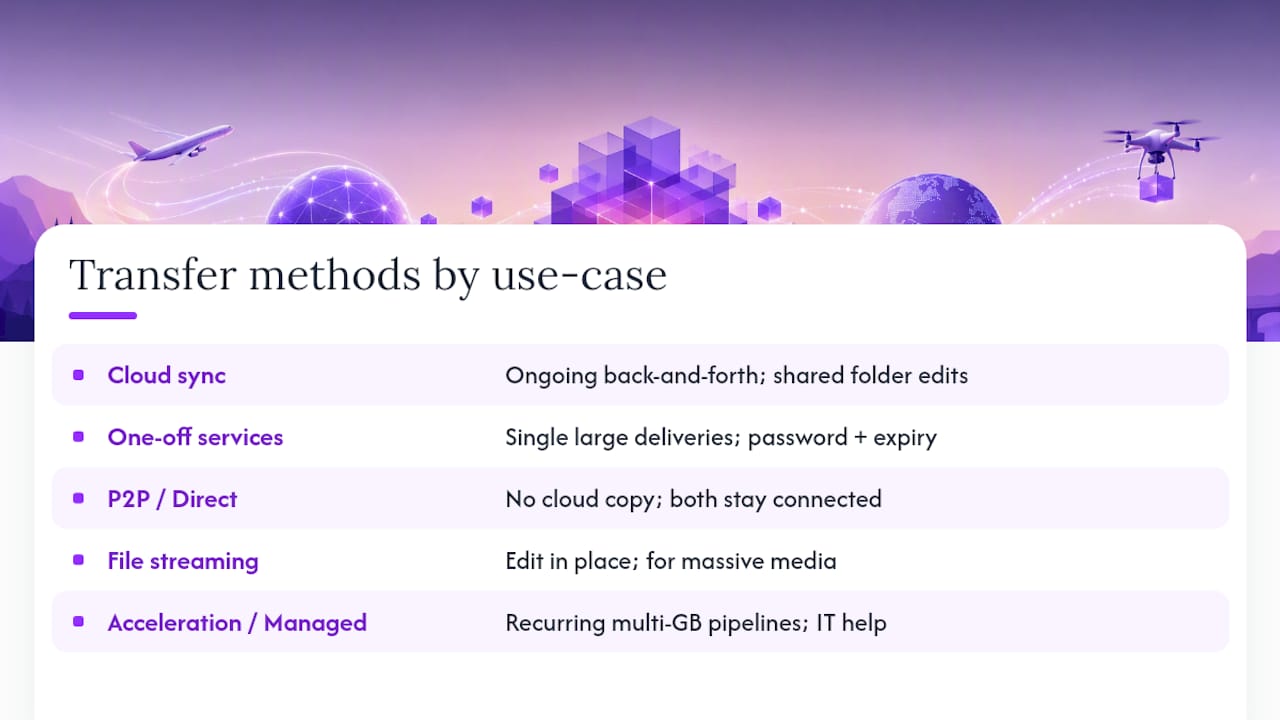
Cloud sync and shared folders work best for projects with ongoing back-and-forth. Set up a shared folder, assign edit or view permissions, and share the link once. Collaborators sync changes automatically, rather than waiting for a new file with every revision. The catch: sync tools assume both sides understand how conflict resolution works, so agree on who “owns” a folder before two people edit the same file simultaneously.
One-off transfer services are for single, large deliveries when you don’t need an ongoing relationship. Upload the entire project folder or a deterministic archive, set a password and an expiration date, test the download link yourself, then send instructions. WeTransfer preserves the folder hierarchy along the way, and while the free tier caps transfers at a lower size limit, paid tiers remove that ceiling entirely, which matters when you’re moving full session archives rather than a bounced mix.
P2P and direct browser transfers suit situations where you want zero cloud copy and exact folder fidelity. Tools like Pairchute stream files disk-to-disk over an encrypted WebRTC pipe with no server storage, while a CLI tool like Drift handles recursive directory transfers between machines with end-to-end encryption. Both require both parties to stay connected until the transfer finishes, and receiving very large files this way benefits from the File System Access API in Chrome or Edge, which streams straight to disk instead of holding everything in browser memory.
File streaming and remote workspaces let you work on massive media without downloading it first. Assign access, confirm your editor’s latency tolerance, and edit files in place on a mounted remote drive. This suits video editors and mix engineers handling multi-gigabyte masters where a full download isn’t practical before the first edit even starts.
Acceleration and managed transfer options come into play once you’re moving multi-gigabyte media pipelines on a recurring basis. UDP- and QUIC-based accelerators deliver higher throughput than standard TCP, but they often fail behind restrictive corporate firewalls, where TCP- or WebSocket-based tools trade some peak speed for reliability. If your team hits this wall weekly, it’s worth a conversation with an IT specialist about a managed accelerator rather than fighting network policy every time.
Run any transfer through this quick filter: How big is the file? How urgent is the handoff? How sensitive is the content? What can the recipient actually receive? Answering those four questions in order eliminates most of the guesswork.
How Do You Bundle a Handoff Without Losing Context?
The single biggest cause of a broken handoff isn’t file size. It’s sending the wrong thing.
- Send the whole project folder, not a single export, whenever the project depends on linked assets. A stray exported WAV without its session file leaves the recipient guessing at plugin chains and automation.
- Adopt a clear version convention and stick to it: date stamps or sequential numbers, never “final” as a filename. Pair every handoff with a short manifest listing sample rate, plugins used, and critical file paths, along with a checksum for verification.
- Prefer deterministic zips when compression is unavoidable, and include the manifest inside the archive so it travels with the files rather than getting lost in a separate email.
- Automate repeat transfers with a folder watcher or script that builds the archive and computes checksums automatically, removing the human error that creeps into manual, repeated handoffs.
Pro Tip: Drop a plain-text “how to open this” file in the project root for non-technical recipients, listing the load order and any stub plugin names they’ll need to install first.
Bundling interdependent files into a single transfer, rather than scattering exports across multiple emails, preserves the metadata that keeps a session usable the moment it lands. If you’re new to how DAW sessions store dependencies, it helps to understand how a digital audio workstation organizes linked assets.
How Do You Keep Sensitive Project Files Secure?
Standard transport encryption protects a file while it’s moving, but it doesn’t stop the storage provider itself from being able to view what’s sitting on its servers. For most day-to-day project work, that’s fine. For unreleased masters, client-confidential stems, or anything under NDA, it isn’t enough.
Choose zero-knowledge encryption when you want the provider genuinely locked out of your content, since the decryption keys never leave your device. For everyday hygiene on less sensitive transfers, password-protected links, email-gated access, and automatic expiration dates cover most of the risk without adding real friction.
Verify every transfer with a checksum, a short hash string generated from the file’s contents, and include it in your manifest so the recipient can confirm nothing got corrupted or altered in transit. For the highest-stakes handoffs, direct machine-to-machine transfers bypass cloud storage entirely, though both sides must remain online simultaneously for the transfer to complete.
Before any sensitive send, run this quick checklist:
- Who holds the encryption keys, you or the provider?
- What’s the retention setting once the transfer completes?
- Does the collaborator need an NDA reminder attached to the handoff?
How SoundBridge Cuts Down on Repeated File Transfers
A lot of large-file headaches in music and audio work come from sending the same session back and forth every time someone tweaks a level. SoundBridge’s remote collaboration tools are designed to reduce that exact cycle.
- Zero-latency remote tracking lets collaborators record into the same session in real time, rather than exporting stems for review.
- Integrated talkback keeps communication inside the session, cutting down on the “did you get my email” loop.
- Session sharing means collaborators work from a synced project state rather than a static file dump.
A typical workflow: consolidate your tracks, confirm your sample rate matches across contributors, export a consolidated stem set alongside the session file, then invite collaborators directly into the shared session rather than emailing a zipped folder. Session prep guidance outlines what to consolidate before inviting anyone in.
Reducing repeated handoffs doesn’t eliminate the need for a good transfer method. Deliverables to clients, mastering engineers, or anyone outside the session still need a proper one-off transfer or secure archive.
A remote session handles the collaborative middle of a project. A dedicated transfer still handles the final handoff.
What Actually Matters Most Here?
Most advice on this topic obsesses over file size limits, and that’s the least interesting part of the problem. The real failure point is almost always structural: a missing asset, an unclear version, a recipient who can’t open what you sent. Solving for gigabytes while ignoring folder hierarchy is solving the wrong problem.
The overrated fix is throwing every transfer at the biggest, fastest pipe available. Raw throughput matters far less than whether the receiving end can actually use what arrives intact. A slower transfer that preserves session structure and includes a manifest beats a blazing-fast one that dumps a flat folder of orphaned files.
What deserves priority first isn’t the transfer tool at all. It’s the decision about whether this project needs repeated collaboration or a single handoff. Ongoing work belongs in a shared session or workspace, where fewer transfers happen in the first place. One-off deliveries deserve a transfer method chosen for integrity checks and folder preservation, not raw speed. Get that distinction right before you touch a single upload button.
— Wake
Try SoundBridge for Real-Time Remote Collaboration
If the workflow trouble in this article sounds familiar, the fix usually isn’t a better transfer tool. It’s needing fewer transfers to begin with. SoundBridge replaces the endless export-review-reexport cycle with zero-latency remote tracking and integrated talkback, so your collaborators can work in the same live session instead of waiting for the next file drop.

If you’re producing, scoring, or mixing with people who aren’t in the room, start a session and invite a collaborator directly rather than bundling another archive. Curious how it stacks up against browser-based tools you might already know? Read the comparison on SoundBridge versus Soundtrap, or head straight to the SoundBridge platform to start a free session and see the shared workspace in action. Your session data remains under your control throughout, with no forced exports to keep a project moving.
Sources
- Send every project file in one clean transfer | WeTransfer
- MEGA security
- Send Large Files With No Upload, No Account | Pairchute
- aeroxy/drift
Recommended
MASTER MUSIC PRODUCTION
Expert-led courses designed to take you from fundamentals to finished tracks.

HOUSEFrom bouncy bass and solid kicks, this course teaches you the most modern House music production techniques needed to succeed and stand out.

TRAPQuit sounding like generic Trap and produce something World with hints of the Far East. Create ethnic soundscapes to put your Trap ahead of the curve.

AMBIENTProduce relaxing, sophisticated psy-influenced ambient. Psychedelic and relaxing to listen to, create meditative soundscapes to put your listeners in Zen.