

SoundBridge vs Ableton Link: Which Tool Fits Your Flow?
Last Edited: Jul 28, 2026
SoundBridge and Ableton Link solve fundamentally different problems. If you need a full remote studio session where two producers can record, edit, and mix the same project in real time from different cities, SoundBridge’s Virtual Collaboration is built for that. If you need five devices to lock onto the same tempo during a live jam without any of them surrendering transport control, Ableton Link is your answer. The confusion between them comes from a surface-level similarity: both involve multiple users, both involve networks, and both claim to keep things “in sync.” But the sync they deliver is completely different in depth, scope, and purpose.
Here’s the fast breakdown before we go deeper:
- SoundBridge Virtual Collaboration: Full DAW remote control, sample-accurate latency compensation, lossless audio streaming, integrated webcam and talkback, bi-directional plugin and hardware control, session-wide edit coherence
- Ableton Link: Free tempo/beat/phase sync across apps on a local network, independent user timelines, no full DAW session control, no remote recording
- Platform support: SoundBridge runs on macOS and Windows; Ableton Link works across iOS, macOS, Windows, and any third-party app that integrates its open-source SDK
- Primary use case: SoundBridge for remote recording and mixing sessions; Ableton Link for live multi-device jamming and tempo alignment
- Cost: SoundBridge offers free and paid tiers, with the full collaboration feature set available via a perpetual license; Ableton Link is included free with Ableton Live
- Session coherence: SoundBridge locks the timeline across all collaborators; Ableton Link maintains a temporal relationship between independent timelines without locking them
How Real-Time Audio Synchronization Actually Works in DAWs
The technology underneath both tools is worth understanding, because it shapes every practical decision you’ll make about which one to use.
Real-time audio collaboration relies on low-latency network streaming protocols that transmit audio data in small, time-stamped packets. The goal is to minimize the gap between when audio is captured and when a remote collaborator hears it. Two core models exist: timeline locking and relative tempo sync.
Timeline locking, as SoundBridge implements it, means every collaborator’s session state is kept coherent. Edits, playhead position, plugin states, and recorded audio all reflect a single shared session. This requires sample-accurate latency compensation, where the system measures the round-trip delay and offsets playback so that audio lands at the right moment in the timeline regardless of network conditions.
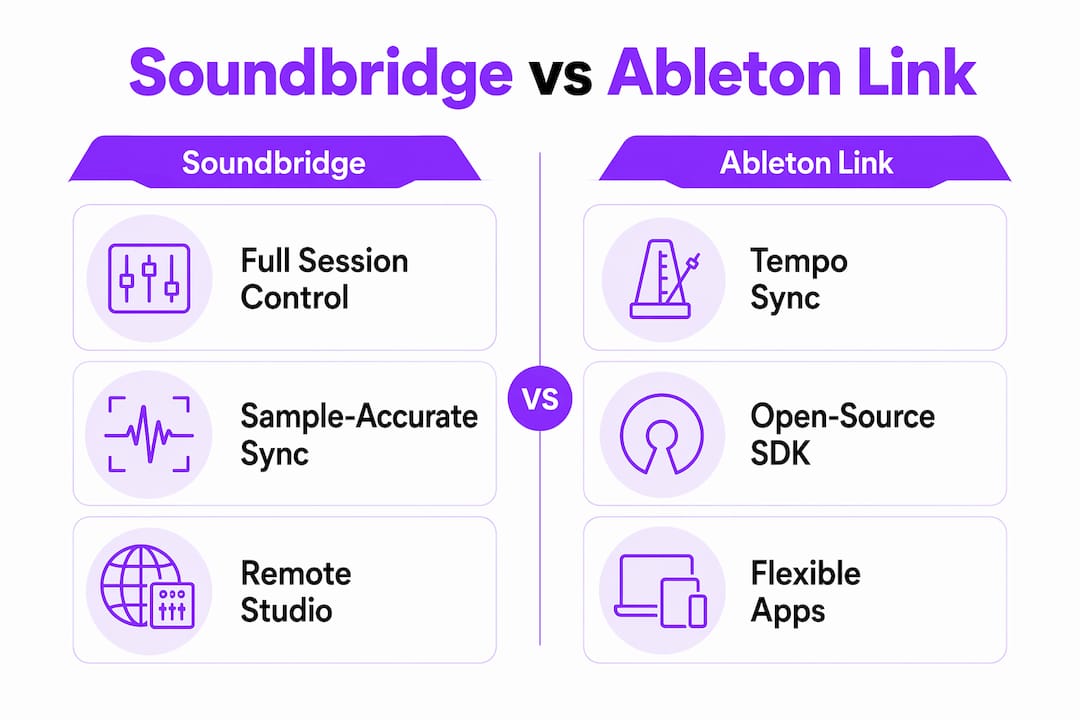
Relative tempo sync, which is Ableton Link’s model, works differently. Each device maintains its own independent timeline, but all devices share the same tempo, beat, and phase. You can think of it as a group of musicians who all agree on the tempo and where beat one falls, but each plays from their own sheet music. Ableton Link intentionally avoids locking transport start times, which gives performers flexibility to start and stop independently while staying musically in time.
Key technical factors that affect both approaches:
- Audio buffering: Larger buffers reduce CPU strain but increase latency; smaller buffers tighten timing but demand more from your hardware and network
- Phase alignment: Critical for Ableton Link sessions where multiple apps must agree on where beat subdivisions fall, not just the tempo
- OS-level optimization: Both tools benefit from low-latency audio drivers; on macOS, Core Audio handles this natively, while Windows users often rely on ASIO drivers
- Bandwidth and jitter: Consistent bandwidth matters more than raw speed; jitter (variation in packet arrival times) causes audio dropouts even on fast connections
How Top DAWs and Plugins Put These Technologies Into Practice
SoundBridge’s Virtual Collaboration Add-on
SoundBridge 3.0.0 introduced Virtual Collaboration as a dedicated add-on, and the 3.1.0 update continued expanding it with automation tools and stability improvements. The feature set goes well beyond basic screen sharing or file exchange. You get:
- Peer-to-peer connections that work from anywhere in the world
- Lossless audio streaming with latency low enough for remote tracking
- Bi-directional DAW control, meaning the remote collaborator can operate your session, not just watch it
- Integrated webcam and talkback for real-time communication without switching to a separate app
- Full session control including transport, mixer, and plugin parameters
This positions SoundBridge as a genuine remote studio, not just a sync tool. The remote collaboration workflow mirrors what you’d experience working side by side in a physical room, with the added layer of network latency managed at the system level.
Ableton Link’s Open-Source SDK
Ableton Link is distributed as a header-only C++ library, which makes it straightforward for third-party developers to integrate into their own apps. The result is a broad ecosystem: Ableton Live ships with Link built in, and hundreds of third-party apps on iOS, macOS, and Windows support it. Any app that integrates the SDK can join a Link session automatically when devices share the same local network, with no manual pairing required.
What Link does not do is give any app control over another app’s session. Each participant remains fully independent. The tempo changes propagate to all connected apps, and beat/phase alignment is maintained, but there’s no shared project file, no remote plugin control, and no synchronized editing.
Pro Tip: If you’re running a live performance with multiple Link-enabled apps, set your primary tempo source in Ableton Live and let the other apps follow. Changing tempo from a secondary app works, but having one designated “conductor” app reduces the chance of accidental tempo jumps mid-set.
Browser-based DAWs like Soundtrap and BandLab have also started incorporating real-time collaboration features, though their approach is closer to shared file editing than true low-latency streaming. For a deeper look at how SoundBridge compares to browser-based options, the SoundBridge vs Soundtrap breakdown covers the key differences in detail.
Latency and Stability: What Actually Affects Your Session Quality
Latency is the number one practical concern in any real-time collaboration setup, and the two tools handle it in very different ways.
SoundBridge’s sample-accurate latency compensation means the system actively measures and corrects for delay, so recorded audio lands at the correct position in the timeline. This is what makes remote tracking viable: a vocalist in one city can record to a backing track being played in another city, and the resulting audio will sit correctly in the session without manual nudging.
Ableton Link’s approach is more tolerant of timing variation by design. Because each device runs its own timeline, small differences in when audio actually hits the speakers don’t break the session. The intentional flexibility in Link’s timing model is a feature for live performance, where a few milliseconds of drift between devices is musically acceptable. For recording, that same flexibility becomes a liability.
Common issues and how to address them:
- macOS permissions: SoundBridge’s Virtual Collaboration requires Screen Recording and Accessibility permissions to be explicitly granted in System Settings. Missing these is among the most common causes of sync failures, often misdiagnosed as a network problem.
- Firewall conflicts: Both tools need specific ports open; check your router and software firewall settings before a session
- Wi-Fi instability: Packet loss on Wi-Fi causes audio dropouts and sync errors in both tools; a wired Ethernet connection is strongly preferred
- Heavy network traffic: Streaming video, large file transfers, or other bandwidth-heavy activity on the same network degrades session quality
Pro Tip: For SoundBridge remote sessions, a wired Ethernet connection with at least 20–50 Mbps dedicated bandwidth gives you the most stable foundation. For Ableton Link, all devices should be on the same local network subnet — cross-subnet discovery doesn’t work without additional configuration.
Browser-Based DAWs and Real-Time Collaborative Streaming
Browser DAWs have made real collaboration more accessible, but they come with real trade-offs that matter at a professional level.
Platforms like Soundtrap, BandLab, and Splice offer multi-user editing, session versioning, and cloud storage in a browser window. For beginners or casual collaborators, that accessibility is genuinely valuable. You don’t need to install anything, and sharing a session is as simple as sending a link.
The limitations show up fast when you push them harder. Browser-based DAWs generally can’t match desktop DAWs in latency performance, plugin support, or audio processing depth. Most rely on compressed audio formats internally, which affects quality at every stage of the signal chain. Advanced features like hardware routing, external instrument recording, and complex automation are either absent or significantly limited.
Key considerations when evaluating browser DAWs:
- Latency: Browser audio APIs introduce additional latency layers that native apps avoid; real-time tracking is rarely viable
- Plugin support: VST/AU plugins don’t run in a browser; you’re limited to whatever effects the platform provides natively
- Cloud dependency: No internet connection means no session access, which creates risk for professional deadlines
- Session versioning: Most platforms handle this automatically, which is a genuine advantage over manual file management
- Accessibility: Zero installation barrier makes them ideal for quick feedback sessions or beginner workflows
For producers who need the full power of a native DAW with remote collaboration built in, browser platforms are a starting point, not a destination. The multi-platform music production context matters here: as workflows span more devices and locations, the gap between browser tools and native DAWs like SoundBridge becomes more pronounced.
When Should You Choose SoundBridge Over Ableton Link?
The decision comes down to what “collaboration” means in your specific workflow.
Choose SoundBridge when:
- You’re doing remote tracking sessions where a vocalist, guitarist, or other performer needs to record into your session from a different location
- You need session-wide edit coherence, meaning both collaborators should see and affect the same timeline, mixer state, and plugin settings
- Video communication during the session matters, and you don’t want to manage a separate video call alongside your DAW
- You’re working on film scoring or post-production where precise timeline alignment is non-negotiable
- Your collaborator needs bi-directional DAW control, not just the ability to listen
Choose Ableton Link when:
- You’re running a live performance with multiple apps or hardware devices that need to stay on the same tempo
- You want loose, flexible jamming where each performer maintains their own session but everyone plays in time
- You’re syncing hardware synthesizers or drum machines that support Link via compatible apps
- The collaboration is local (same room or same network) rather than remote
- You don’t need shared session editing, just shared musical timing
One scenario where the distinction gets sharp: a producer in New York wants to track a live drummer in Los Angeles. Ableton Link can’t do this. It has no mechanism for transmitting audio across the internet or locking a shared timeline. SoundBridge’s Virtual Collaboration is built precisely for this scenario, with latency compensation that makes the remote drummer’s performance land correctly in the session.
Operational considerations that affect both tools:
- macOS users on SoundBridge: Grant Screen Recording and Accessibility permissions before your first session
- Ableton Link users: All devices must be on the same local network; the protocol doesn’t work across the internet natively
- Network quality: Both tools benefit from a stable, low-jitter connection; SoundBridge is more demanding because it’s transmitting actual audio data
Compatibility and Integration With Other Music Production Software and Hardware
SoundBridge runs on macOS (Sonoma 14.0 and later) and Windows 10 or later, covering the two dominant desktop platforms for professional music production. Its Virtual Collaboration feature works peer-to-peer, so no third-party server infrastructure is required. The bi-directional control extends to plugins and hardware connected to either collaborator’s system, which means you can adjust a remote producer’s plugin parameters as if you were sitting at their desk.
Ableton Link’s compatibility story is broader in one specific dimension: the open-source SDK means any developer can add Link support to their app. The result is an ecosystem that spans Ableton Live, iOS apps like GarageBand and Modstep, hardware with Link-enabled firmware, and dozens of third-party DAWs and performance tools. If your workflow involves mixing hardware and software from multiple manufacturers, Link’s cross-platform reach is hard to match.
Where SoundBridge has the edge is depth of integration within a single session. Because it’s a full DAW, every element of your project, including MIDI, audio, automation, and effects, is part of the collaboration. Ableton Link, by contrast, only shares tempo, beat, and phase. It doesn’t know anything about your project’s content, only its timing.
For producers who want to understand the DAW landscape more broadly before committing to a workflow, that foundational context helps clarify where each tool fits.
Setting up SoundBridge Remote Collaboration and Ableton Link
SoundBridge Virtual Collaboration Setup
- Install SoundBridge on both machines (macOS or Windows) and ensure both are running version 3.0.0 or later.
- Grant macOS permissions if applicable: go to System Settings > Privacy & Security and enable Screen Recording and Accessibility for SoundBridge. Skipping this step is the most common cause of connection failures.
- Open the Virtual Collaboration panel within SoundBridge and generate or share your session invite.
- Check your network: a wired Ethernet connection is recommended; close bandwidth-heavy applications on the same network.
- Test audio routing before the session: confirm that both collaborators’ audio interfaces are recognized and that monitoring is configured correctly
- Enable talkback and webcam within the collaboration panel for real-time communication.
Ableton Link Setup
- Open Ableton Live (version 9.6 or later) on all devices; Link is included
- Connect all devices to the same local network, preferably via the same router; Wi-Fi works but wired is more stable
- Enable Link in Ableton Live’s preferences under the Link/Tempo/MIDI tab; the Link button will show how many peers are connected
- Set your tempo in any connected app; all other Link-enabled apps will follow automatically
- Enable Start/Stop sync if you want transport commands to propagate across apps (available in Link version 3 and later)
- Test with a simple loop before a live performance to confirm all devices are phase-aligned
The setup complexity difference is real. SoundBridge’s configuration involves more steps because it’s doing more: transmitting audio, video, and session data across the internet. Ableton Link’s setup is genuinely minimal because its scope is limited to tempo and phase on a local network.
Key Takeaways
SoundBridge delivers full remote studio capability with session-wide coherence. At the same time, Ableton Link provides flexible tempo sync for live multi-device performance, and choosing between them depends entirely on whether you need shared editing or shared timing.
| Point | Details |
|---|---|
| Core difference | SoundBridge locks a shared session timeline; Ableton Link syncs tempo and phase across independent timelines. |
| Remote recording | Only SoundBridge supports actual audio transmission and sample-accurate latency compensation for remote tracking. |
| Live jamming sync | Ableton Link excels at keeping multiple apps and hardware devices in time on a local network without full DAW control. |
| Setup complexity | SoundBridge requires network, permissions, and audio routing configuration; Ableton Link enables with a single toggle in Live’s preferences. |
| SoundBridge fit | Producers needing remote recording, bi-directional DAW control, and integrated video talkback get the most from SoundBridge’s Virtual Collaboration. |
SoundBridge Gives You the Remote Studio You’ve Been Building Toward
If you’ve been piecing together a remote workflow from separate tools- a video call here, a file-sharing service there, a sync plugin somewhere else- SoundBridge replaces that patchwork with one platform. The Virtual Collaboration feature brings sample-accurate remote recording, bi-directional session control, and integrated video talkback into a single DAW environment. You’re not just syncing tempo. You’re running a real session.

SoundBridge runs on both Mac and Windows, with a free tier to get started and a perpetual license for the full collaboration feature set. Whether you’re tracking a vocalist across the country or co-producing with a collaborator in a different time zone, the platform is built to handle it without compromise. If you’re ready to move beyond tempo sync and into genuine remote studio work, explore what SoundBridge offers and see how it fits your production setup.
Recommended
MASTER MUSIC PRODUCTION
Expert-led courses designed to take you from fundamentals to finished tracks.
HOUSEFrom bouncy bass and solid kicks, this course teaches you the most modern House music production techniques needed to succeed and stand out.
TRAPQuit sounding like generic Trap and produce something World with hints of the Far East. Create ethnic soundscapes to put your Trap ahead of the curve.
AMBIENTProduce relaxing, sophisticated psy-influenced ambient. Psychedelic and relaxing to listen to, create meditative soundscapes to put your listeners in Zen.