


Using a Resonator to Create a Build-Up from a Loop
Last Edited: Aug 28, 2026
Creating an effective build-up is about more than simply increasing volume or adding a few risers before the drop. You can create very interesting transitions by transforming sounds that are already part of the arrangement. This technique gives elements completely new roles, helping the transition feel naturally connected to the rest of the track. Using a resonator to create a build-up from a loop is one creative way to achieve this. Rather than functioning like a traditional filter, a resonator emphasizes specific frequencies, introducing new harmonic content and tonal movement. Even a simple drum loop can be transformed into an evolving texture that gradually builds energy and anticipation without losing its rhythmic identity.
This technique is particularly useful in Melodic House, Melodic Techno, and Progressive House, where transitions often rely on atmosphere and gradual development rather than abrupt changes. With proper resonator tuning, a rhythmic loop can evolve into a unique uplifter that naturally leads listeners toward the drop.
In this tutorial, we used a basic drum loop as the source material and processed it with the Polarity-RES resonator. We configured the resonator to generate a tonal character. Then, with automation and additional effects, we gradually transformed the loop into a dynamic build-up element.
Listening to the Groove in Context
Before creating the transition effect, the first step is listening to the groove itself. For this example, a short loop was created inside SoundBridge: DAW using drums, bass, and a few supporting musical elements. At this stage, the arrangement contains only the main groove, without any build-up or transition effects.
Rather than focusing on the entire mix, the goal is to understand how each rhythmic element contributes to the groove and identify which sound has the most potential for creative processing.
We paid particular attention to the main drum loop, as it will serve as the resonator's source material. Before applying any processing, we played the loop back solo to hear its original character, texture, and rhythmic movement. This gives us a clear reference point before transforming it into a completely new element. Our drum loop will later be used as an uplifter during the build-up.
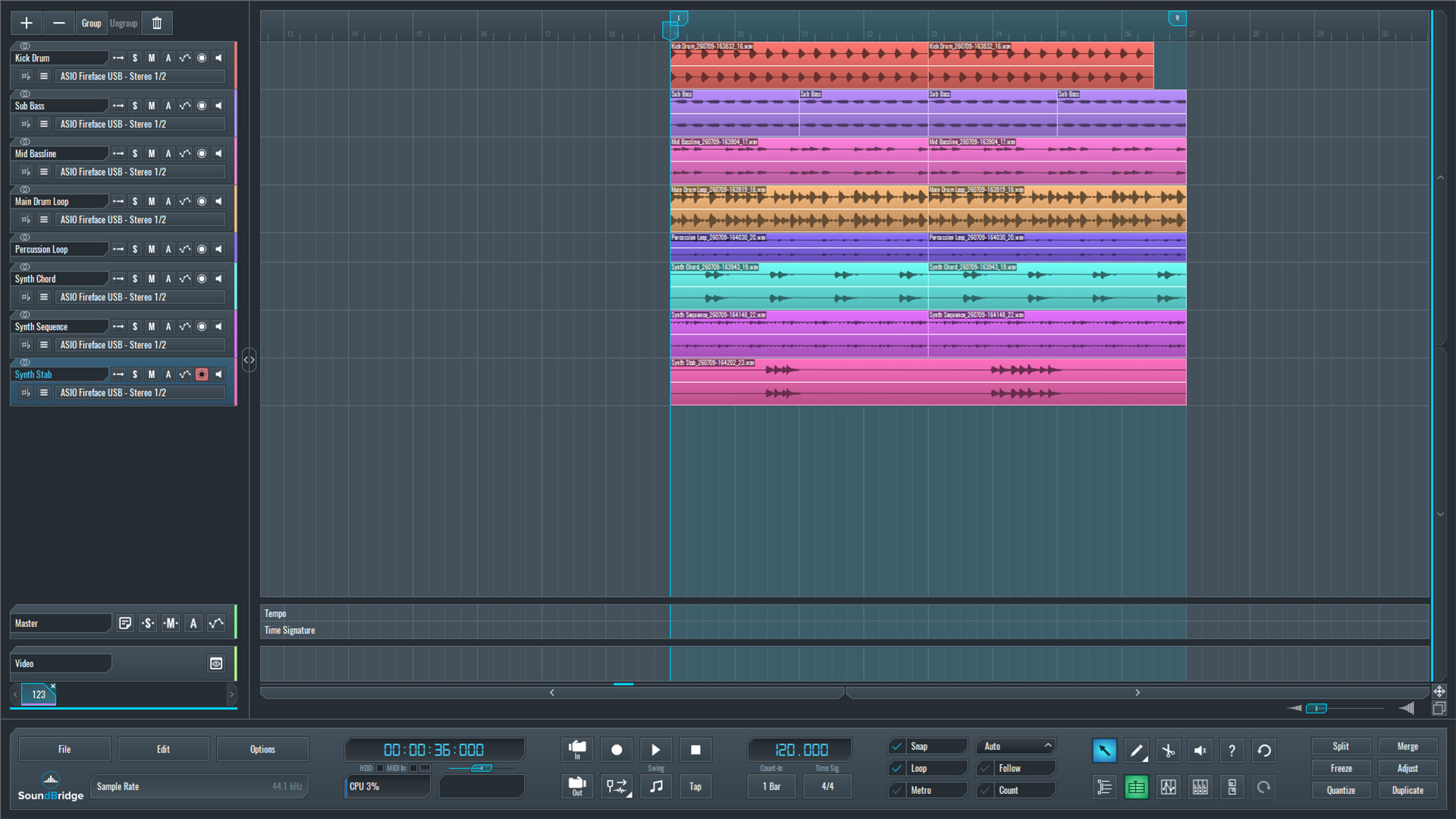
~Full Mix - Main Drum Loop (Unprocessed)
Preparing the Drum Loop to Create Our Build-up With the Resonator
With the groove established, the next step is focusing on the main drum loop. Although the loop works well as a rhythmic element on its own, it also contains enough tonal and transient information. This makes it an excellent candidate for creative sound design. Soon, we'll use it as the foundation for a completely new sound for our transition.
In the next step, we processed the drum loop with Polarity-RES. This resonator transforms it from a simple rhythmic pattern into a unique uplifter that builds energy leading up to the drop.

~Main Drum Loop - Solo (Unprocessed)
Designing the Resonator Effect
To prepare the transition, the main drum loop was first duplicated and placed under the original in the arrangement. We then moved it earlier in the timeline to serve as a dedicated build-up element, as shown in the example.
Next, we added the Polarity-RES plugin to the duplicated loop's track. When Initialized, the plugin presents a frequency spectrum where resonant points can be placed freely or snapped to musical notes. This makes it possible to transform almost any audio source into a tonal instrument while preserving much of its original rhythmic character.
Since the drum loop already has a recognizable tonal center, we set the global Root parameter to D. This ensures that every resonant point follows the chosen key, so the processed sound blends naturally with the rest of the arrangement.
When you enable the Notes view, the frequency display changes into a musical grid where you can draw resonant nodes directly. In this example, we created five fundamental resonant points to define the main tonal structure. Additionally, we enabled the Root +5 scale option, allowing the plugin to display the Perfect Fifth. We placed an extra resonant point between the fourth and fifth nodes, introducing another harmonic layer and creating a richer, more musical texture.
At this stage, we played back the processed drum loop using just these resonator settings, allowing us to hear how the plugin alone transforms the original rhythmic loop into a tonal, atmospheric element before moving on to the automation stage.
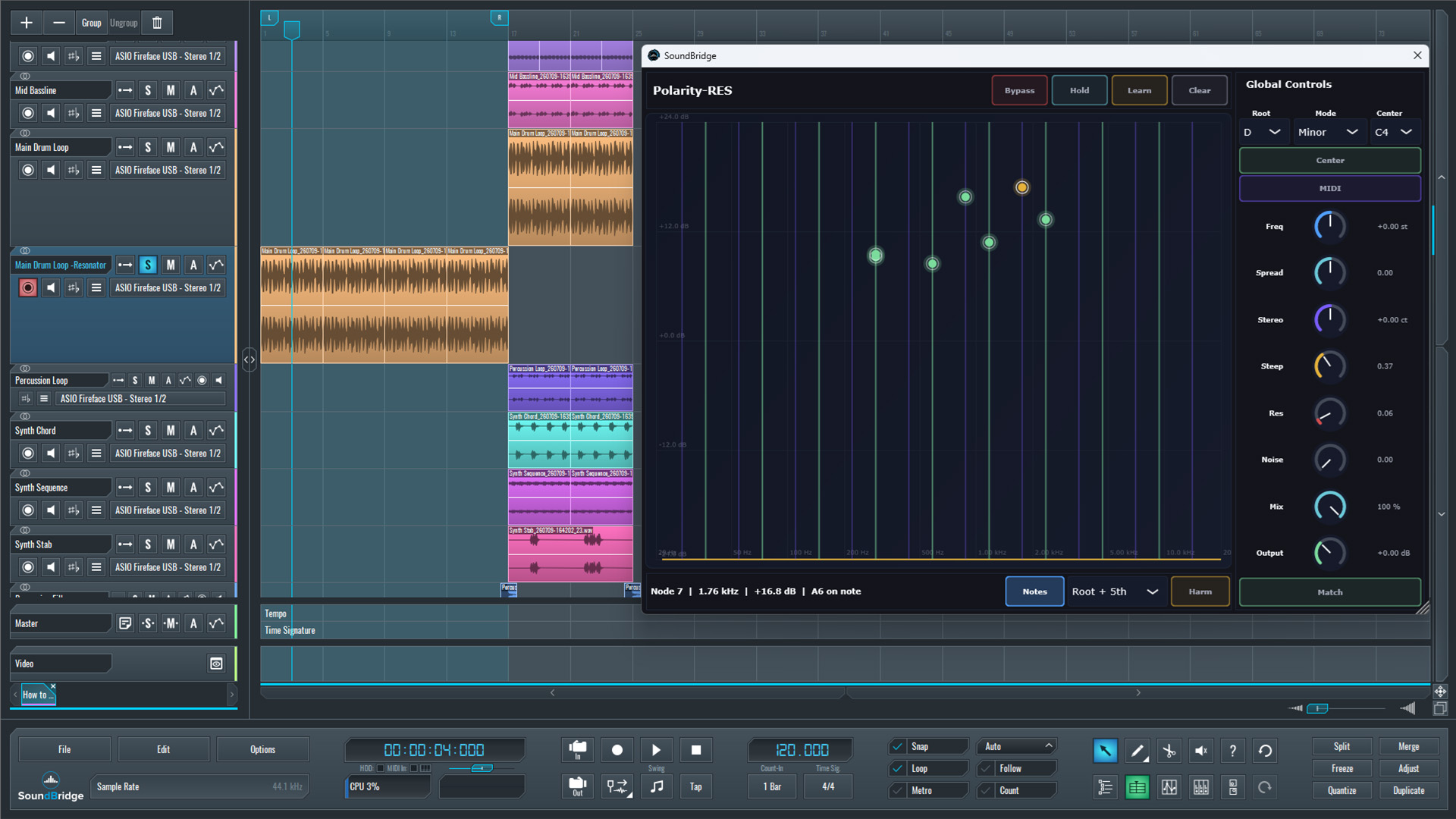
~Main Drum Loop - Solo (Processed With Polarity-RES With Default Settings)
Automating the Resonator to Create a Build-up From Our Loop
With the resonator configured, the next step is automating its most important parameters to gradually build energy toward the drop.
The first parameter is Res, which controls the overall resonance of the filter bank. Rather than increasing, the resonance gradually decreases throughout the build-up. This creates more space for the Noise parameter, allowing the noisy component to become increasingly dominant as the drop approaches.
Next, the Noise parameter is automated upward, introducing more texture and high-frequency energy into the resonator. This helps the processed loop become more intense and better suited for the final moments of the build-up.
We also automated the Output level, allowing the processed loop to fade naturally into the arrangement instead of appearing suddenly. This creates a smoother transition and makes the effect feel more organic.
Finally, we automated the Frequency parameter from 0 to +24 semitones. Although it technically functions as a frequency shifter rather than a conventional pitch shifter, the perceived result is a continuous upward movement that closely resembles a rising pitch. This produces a strong uplifter effect and adds a final layer of tension before the drop.
Completing the Build-up With a Reverb Tail
With all automations in place, we played the processed drum loop solo to clearly hear how each parameter contributes to the transformation. We then played it back in the context of the full mix, where the evolving resonator naturally builds energy and leads into the drop.
As a final enhancement, a long-tail reverb is introduced during the last moments of the build-up. Regardless of the specific reverb plugin used, the goal is to leave a spacious trail that extends into the drop, making the transition feel smoother and more cohesive. With this final effect in place, we listened to the processed drum loop solo, then to the full mix, where the resonator, automation, and reverb work together to create a unique, organic uplifter.
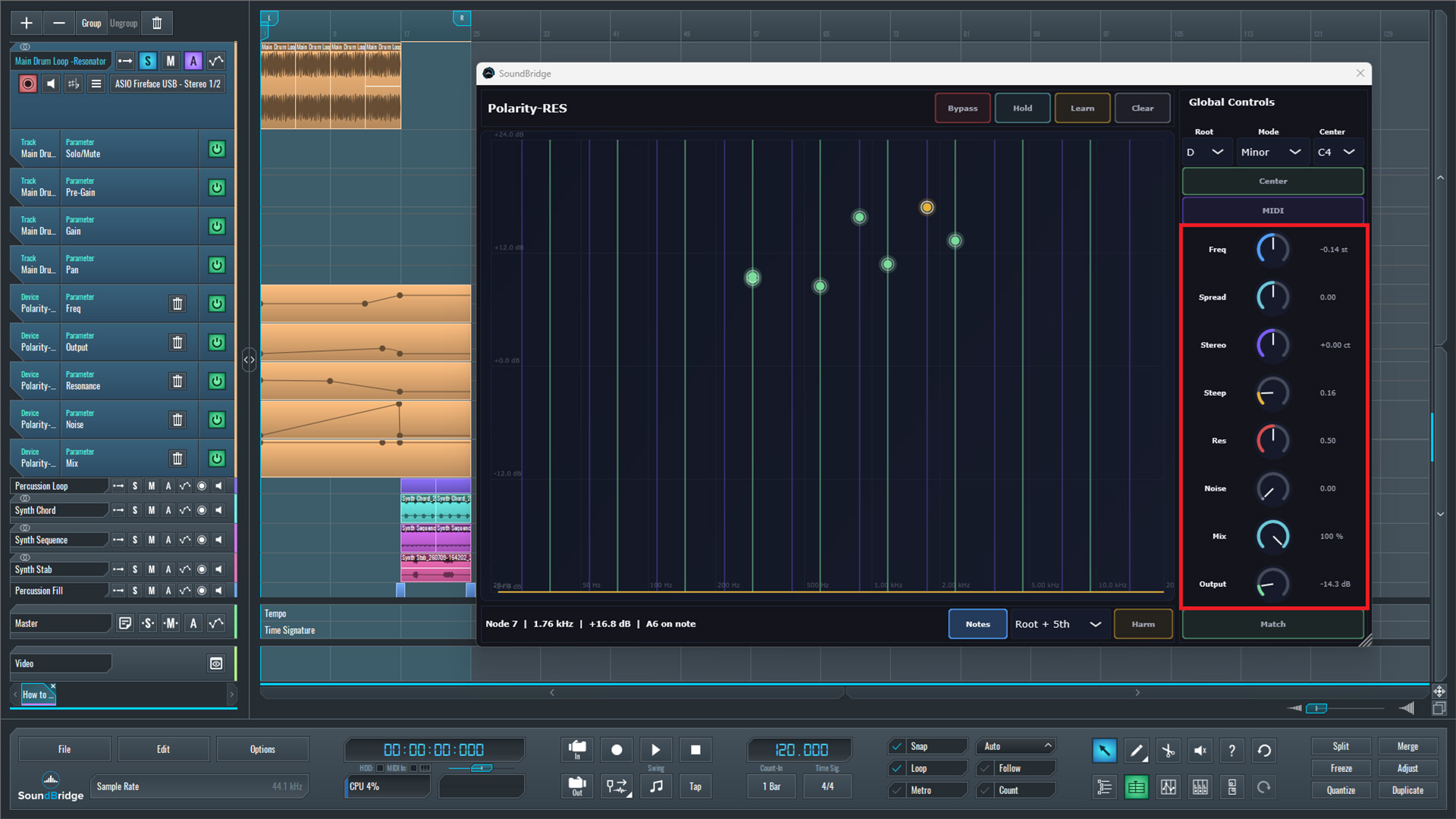
~Main Drum Loop - Solo (Processed With Polarity-RES With Param. Automation)
~Main Drum Loop - Solo (Processed With Polarity-RES With Param. Automation + Reverb)
Final Thoughts
With the resonator processing and automation complete, the final step is listening to the transformed drum loop in the context of the full mix. While the processed loop already creates a strong sense of movement on its own, its real purpose is to support the transition and work together with the other elements in the arrangement.
In this example, two synth arpeggios were introduced during the build-up. Both gradually open throughout the transition, while one continues into the drop, helping connect the two sections without interrupting the track's flow. Their evolving harmonic content complements the resonant drum loop, creating a wider and more immersive atmosphere.
Together with the resonator, automation, and the long-tail reverb, these supporting elements produce a build-up that feels organic rather than relying on traditional risers or transition samples. This idea creates a more cohesive and musical arrangement.
The key takeaway is that by processing your drum loops using a resonator, you can create some of the most creative build-ups. With thoughtful automation and a few complementary layers, even a simple drum loop can become a unique uplifter that naturally guides the listener into the drop, completely redefining its role.
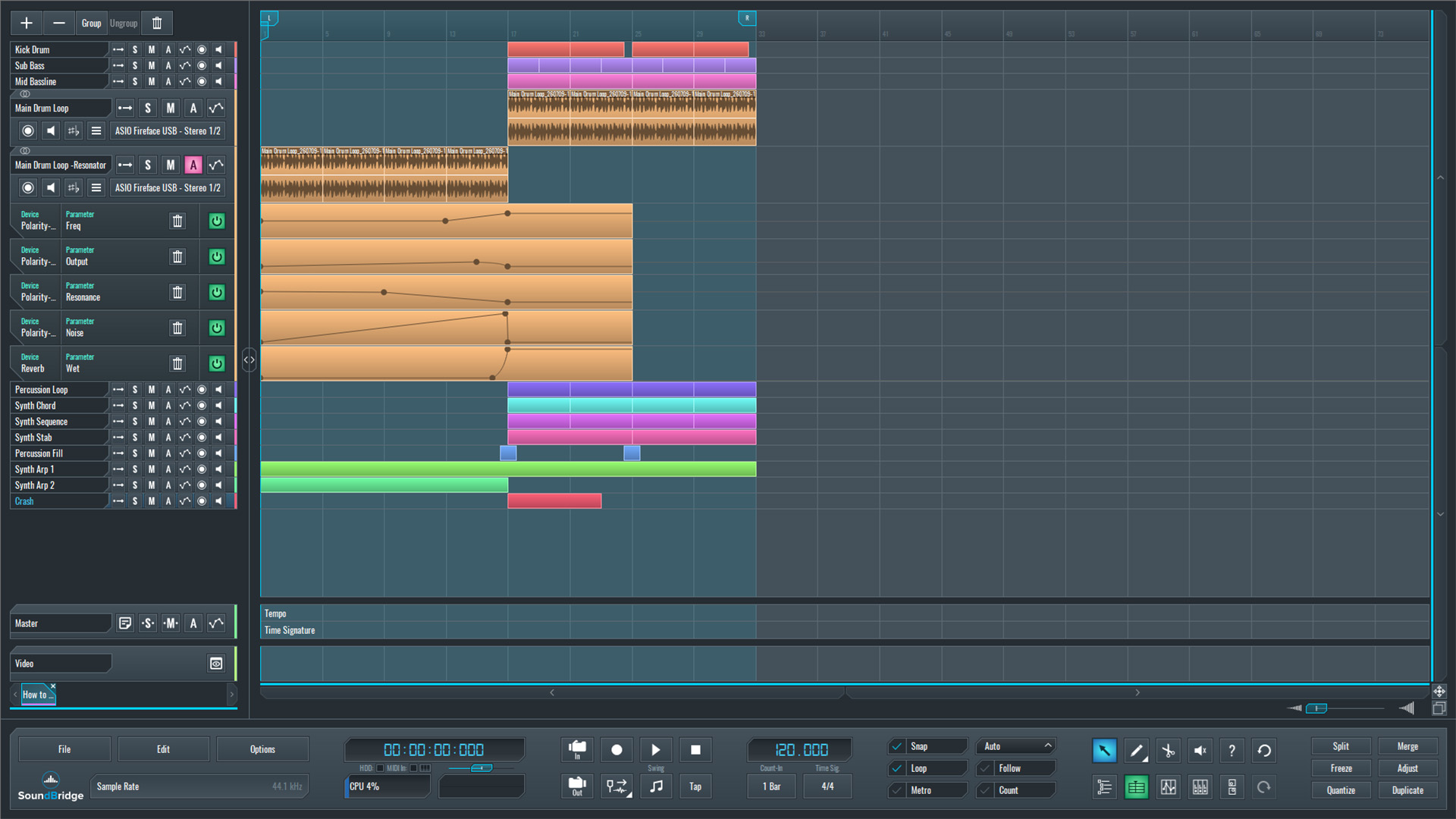
~Full Mix - Main Drum Loop (Processed)
If you liked this article, here are some more on the same subject:
MASTER MUSIC PRODUCTION
Expert-led courses designed to take you from fundamentals to finished tracks.

HOUSEFrom bouncy bass and solid kicks, this course teaches you the most modern House music production techniques needed to succeed and stand out.

TRAPQuit sounding like generic Trap and produce something World with hints of the Far East. Create ethnic soundscapes to put your Trap ahead of the curve.

AMBIENTProduce relaxing, sophisticated psy-influenced ambient. Psychedelic and relaxing to listen to, create meditative soundscapes to put your listeners in Zen.