

Why Choose Cloud-Based Music Production in 2026
Last Edited: May 27, 2026
Most producers assume cloud-based music production is either too unreliable for serious work or just a stripped-down browser toy for hobbyists. That assumption is costing them time, money, and creative opportunity. The real question of why to choose cloud-based music production goes beyond convenience. It touches on how you collaborate, how fast you iterate, and how much creative energy you spend on logistics versus actually making music. This article cuts through the noise and gives you a producer's honest look at what cloud workflows actually offer and where they still ask you to make trade-offs.
Key Takeaways
| Point | Details |
|---|---|
| Cloud production enables anywhere access | Work on your projects on any device without having to rebuild your session from scratch. |
| Real-time collaboration is a genuine advantage. | Distributed teams can co-produce with studio-accurate sync, removing the friction of file-sharing loops. |
| AI tools accelerate your creative output. | Cloud-integrated AI handles stem separation and spectral editing, significantly reducing post-production time. |
| Trade-offs exist and deserve attention. | Latency, file management, and subscription costs require planning before you commit to a cloud workflow. |
| Hybrid setups often perform best. | Combining cloud processing for heavy tasks with local hardware for real-time play gives you the best of both worlds. |
Why Choose Cloud-Based Music Production
Before we get into the specifics, it helps to understand what "cloud-based music production" actually means in practice. It is not one single product. It is a category of tools and workflows that move parts of your production process off your local machine and onto remote servers. That might mean a browser-based DAW, a cloud storage system syncing your project files, AI-powered processing running on remote GPUs, or a collaborative platform where multiple producers work on the same session in real time.
Here is what typically lives in a modern cloud production setup:
- Cloud DAWs and browser-based editors: Full-featured workstations that run in your browser or sync your projects to the cloud, so your session is accessible from any machine.
- Cloud storage and automatic backup: Your stems, samples, and project files live on remote servers, protected from local drive failures and synced across devices instantly.
- AI-powered processing tools: Services for stem separation, noise reduction, spectral editing, and even melody generation that run on cloud GPUs rather than your local CPU.
- Real-time collaboration layers: Shared sessions where a producer in Berlin and a vocalist in Toronto can work on the same project simultaneously, with changes reflecting live for both parties.
- Edge computing for low-latency tasks: Cloud-edge synergy enables cloud servers to handle large-scale processing. In contrast, edge nodes handle real-time interactive tasks such as live monitoring, keeping latency manageable.
Understanding this structure helps you see where cloud tools genuinely outperform local setups and where you still need your local rig to carry the load.
Key Benefits for Musicians and Producers
This is where cloud workflows earn their keep. The benefits of cloud music production are not abstract. They show up in your day-to-day sessions in specific, measurable ways.
-
Access your projects anywhere. Your session lives in the cloud, not on one laptop. You sketch a hook on your home machine, refine the arrangement at the studio, and tweak the mix on a travel laptop without losing a single plugin setting or audio file.
-
Real-time global collaboration. The advantages of digital music collaboration used to mean emailing bounce files back and forth for days. Cloud platforms now let co-producers, vocalists, and mixing engineers work simultaneously within the same session. Check out these remote collaboration tips for getting the most from distributed sessions.
-
Lower hardware costs over time. Heavy DSP processing shifts from your CPU to cloud servers. You do not need a top-spec machine to run complex sessions. A mid-range laptop becomes a viable production station because the real computational weight runs remotely.
-
Automated backup and version control. Cloud-based workflows transform music into persistent, metadata-rich systems where every version is saved automatically—no more "Final_mix_v7_REAL_FINAL.wav" chaos.
-
AI tools that multiply your speed. Cloud-based stem separation and spectral editing reduce manual post-production time by nearly 30%, while collaborative AI agents cut project turnaround by 25%. That is the time you reinvest in the creative work that actually excites you.
-
Scalable resources on demand. Need more CPU power for a dense orchestral mix? Cloud platforms let you scale processing resources up or down without buying new hardware. Managed cloud platforms reduce cycle times to final mixes by 40% through scalable CPU and GPU resources.
Pro Tip: Set up automatic cloud sync for your project folder from day one. The one time your local drive fails mid-project, you will be glad you treated backup as infrastructure rather than an afterthought.
Practical Considerations and Challenges
Cloud production is worth it for most producers, but walking in without understanding the trade-offs can lead to frustration. Here is an honest look at the challenges and how to navigate them.
| Challenge | What it means in practice | How to address it |
|---|---|---|
| Internet latency | Real-time monitoring can lag on slow connections | Use edge nodes or local monitoring; reserve cloud processing for non-real-time tasks. |
| Data security | Project files and stems live on third-party servers | Choose platforms with end-to-end encryption and clear data ownership terms |
| Subscription costs | Monthly fees accumulate, especially for pro tiers | Compare free tiers and pay-as-you-go options before committing to annual plans. |
| File version sprawl | Rapid iteration creates dozens of stem variants | Instrument your cloud workflows with version tracking from the start |
| Plugin compatibility | Some VST plugins do not run in browser-based DAWs | Confirm plugin support before migrating a plugin-heavy workflow to the cloud. |
The latency question gets more nuanced than most articles admit. Managed cloud services offer high fidelity but involve provider service-level agreements and billing trade-offs, while symbolic or local approaches trade some fidelity for lower latency and cost. For live performance or real-time vocal tracking, a hybrid setup where you monitor locally but process and store in the cloud tends to perform best.
Pro Tip: Before switching your full workflow to a cloud DAW, run a parallel session for two weeks. Keep your current local setup running alongside the cloud platform, and compare where each one slows you down or speeds you up.
Cloud Production Workflows in Action
Knowing the benefits is one thing. Seeing how producers actually use cloud tools in real sessions makes the picture much clearer.
-
Distributed co-production: Two beatmakers in different cities share a live session. One lays down a groove, the other adds chords in real time. No file transfers, no version confusion, no "which bounce is the latest?" The session syncs bidirectionally as they work.
-
AI stem separation for remixing: A producer receives a stereo master and needs isolated vocals to build a remix. Cloud-based AI separates the stems in minutes. Without cloud GPU access, the same task would take hours on a mid-range local machine or require expensive dedicated hardware.
-
Playlist and library sync across platforms: Cloud transfer technology handles complex playlist synchronization in minutes with higher metadata accuracy than manual methods, preserving song order and tags across services. This matters when you manage sample libraries or reference tracks across multiple platforms.
-
Film scoring with remote video sync: Composers working on picture lock need frame-accurate video playback alongside their DAW. Cloud-integrated platforms can stream the video reference to multiple collaborators simultaneously, so the director and composer stay in sync without emailing heavy video files.
-
Hybrid hardware and cloud sessions: You track live instruments locally through your audio interface at full 192kHz fidelity. The session then syncs to the cloud, where your collaborator handles arrangement and mixing. Audio interfaces elevate the sound quality of cloud sessions by keeping the capture stage local and pristine.
The creative gains from these workflows compound over time. Cloud-integrated AI shifts focus from technical mastery to conceptual agency, letting creators put their energy into vision while the software handles complex execution. That is not a small thing. It is the difference between spending your session fighting your tools and actually building something you are proud of.
Choosing the Right Platform for Your Needs
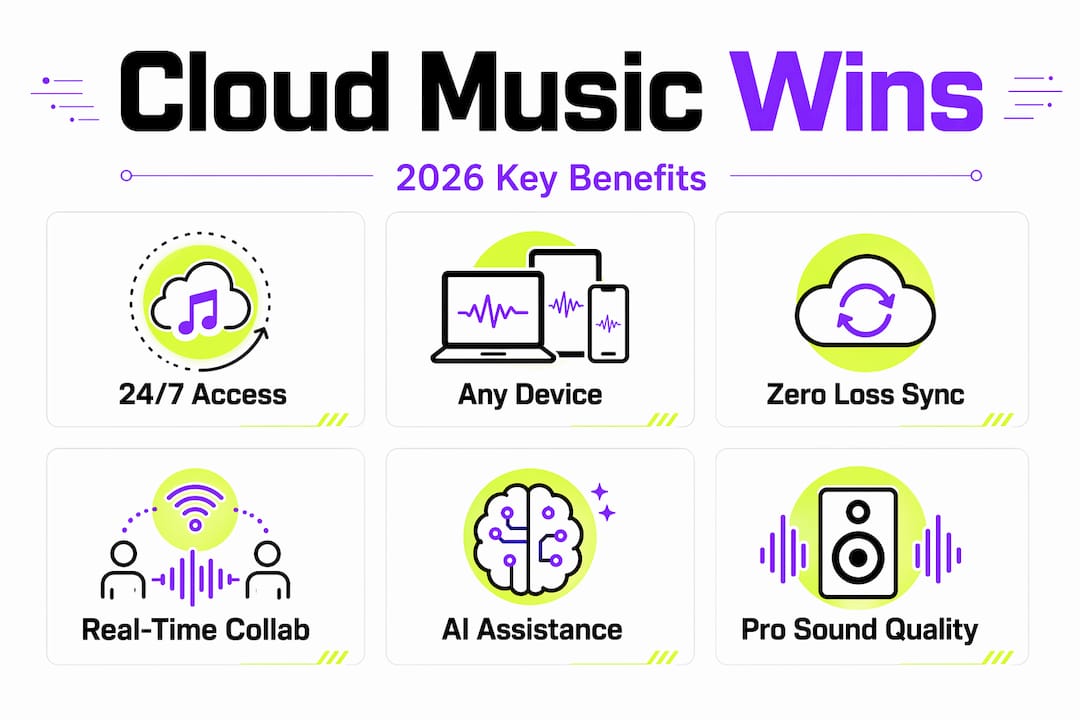
Not every cloud production platform is built the same. Before you commit, run your shortlist through this feature checklist.
| Feature | Why it matters | Questions to ask |
|---|---|---|
| Real-time collaboration | Enables live co-production across locations | How many users can edit simultaneously? Is sync truly real-time? |
| AI tool integration | Accelerates stem work, editing, and generation | Which AI processes run natively vs. requiring third-party exports? |
| Plugin and VST support | Preserves your existing sound design toolkit | Does the platform support your current plugins, or do you need alternatives? |
| Pricing model | Affects long-term cost and accessibility | Is there a free tier? Are credits scalable or fixed by subscription? |
| Security and data ownership | Protects your intellectual property | Who owns your uploaded files? Is encryption end-to-end? |
| Scalability | Let's you grow without switching platforms | Can you add storage, CPU, or collaborators without migrating? |
Start with a free tier or trial. Most serious platforms offer enough functionality on a free plan to test whether the workflow suits you before you pay anything. If you are already deep in a DAW-centric workflow, look for cloud platforms that integrate with your existing setup rather than requiring you to rebuild everything from scratch.
My Honest Take On Going Cloud
I have watched producers resist cloud workflows for years, convinced they would sacrifice audio quality or lose control of their sessions. What I have actually seen happen is the opposite. The producers who adopted cloud tools early now finish projects faster and collaborate more freely than those stuck waiting for bounced stems via email.
That said, I would not tell anyone to flip their entire workflow overnight. The real wins come from treating the cloud as a layer you add to your existing process, not a replacement for everything local. Start with cloud backup and version control. That alone changes how you work. Then layer in AI-assisted editing when you find yourself doing repetitive post-production tasks. Real-time collaboration comes naturally once those foundations are in place.
The one thing I consistently tell producers is this: do not let the fear of complexity keep you from experimenting. AI in cloud production genuinely democratizes creativity by removing technical barriers. You do not need to understand the infrastructure to benefit from it. You need to understand what you want to make, and the best cloud tools get out of your way so you can make it.
— Wake
Take Your Cloud Workflow Further With SoundBridge
If this article got you thinking about what a cloud-integrated production setup could look like for you, SoundBridge is built exactly for this.

SoundBridge offers zero-latency remote recording with studio-accurate synchronization, so you can track with collaborators anywhere without sacrificing audio fidelity. The platform supports 192kHz sample rates, bidirectional plugin control, and integrated talkback, giving you a real professional environment rather than a compromise. Whether you are just getting started or looking to move serious sessions into a more flexible setup, you can explore what a DAW can do for your workflow before committing to anything. For producers ready to go deeper on automation and editing efficiency, the audio editing automation guide is the natural next step. SoundBridge is free to start, with paid tiers that scale as your projects grow.
FAQ
What is cloud-based music production?
Cloud-based music production uses remote servers to store project files, run processing tasks, and enable real-time collaboration, accessed through a browser or synced desktop application. It supplements or replaces local-only workflows with internet-connected tools.
Is cloud music production worth it for independent producers?
Yes, especially for producers who collaborate remotely or work across multiple devices. The combination of automatic backup, AI-powered tools, and real-time collaboration typically outweighs the subscription costs for active projects.
Does cloud production affect audio quality?
Not significantly when configured correctly. Platforms supporting 192kHz sample rates and lossless file formats maintain professional fidelity. Latency during real-time monitoring is the more practical concern, addressed by hybrid local-monitoring setups.
How do I manage stems and versions in a cloud workflow?
Use platforms with built-in version control and label every major iteration with a clear naming convention. Tracking stems and outputs systematically from the start prevents the version sprawl that makes large cloud sessions hard to navigate.
Can I use my existing plugins with a cloud DAW?
It depends on the platform. Browser-based DAWs often support only their native instruments and effects, while cloud-synced desktop DAWs typically maintain full VST and AU compatibility. Always verify plugin support before migrating a complex session.
Recommended
MASTER MUSIC PRODUCTION
Expert-led courses designed to take you from fundamentals to finished tracks.

HOUSEFrom bouncy bass and solid kicks, this course teaches you the most modern House music production techniques needed to succeed and stand out.
TRAPQuit sounding like generic Trap and produce something World with hints of the Far East. Create ethnic soundscapes to put your Trap ahead of the curve.

AMBIENTProduce relaxing, sophisticated psy-influenced ambient. Psychedelic and relaxing to listen to, create meditative soundscapes to put your listeners in Zen.