

Game Audio in SoundBridge: Recreating a Street Fighter-Style Fight Scene
Last Edited: Mar 18, 2026
Game audio production often requires a fast, intuitive workflow where music composition, sound design, and implementation thinking occur simultaneously. In this project, I recreated the audio for a Street Fighter–style sequence using SoundBridge, demonstrating how its tools enable a fluid and creative environment for indie game audio production.
The piece follows a classic structure: character selection → character presentation → fight. All audio elements, music, foley, voices, FX, and ambiences, were produced and synchronized directly inside SoundBridge using features such as video integration, linear time mode, frame-based editing, the Sampler, RitMix, and the Arpeggiator.
The goal was to demonstrate how SoundBridge can be used to its fullest potential while maintaining an intuitive workflow that allows ideas to flow quickly from concept to execution.
1. Project Starting Template: Organizing Your Game Audio Session
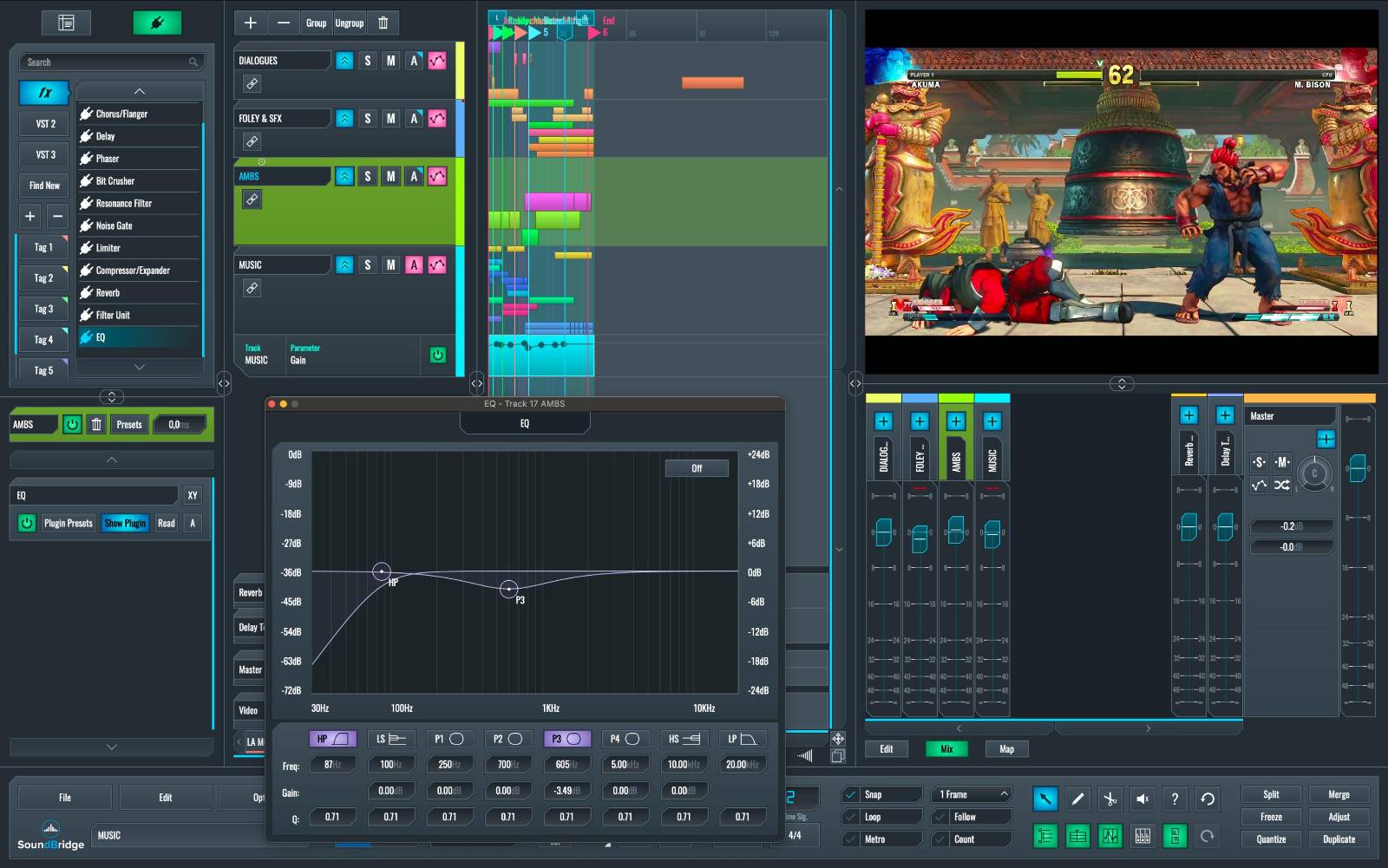
To begin the project, a session template was created to organize the entire sound production workflow from the start. Four main folder groups were created:
-
Dialogues
-
Foley & SFX
-
Ambients
-
Music
Inside each of these groups, additional subfolders and tracks were added to contain the different audio and MIDI elements used in the project. This structure provides several advantages:
-
Clear organization of the project session.
-
Faster navigation during editing and sound design.
-
Centralized volume and tone control for each audio category.
-
Efficient stem exporting, which is commonly required in professional audio post-production workflows.
By grouping tracks this way, the mix can easily be controlled at different levels, for example, adjusting all Foley sounds, voices, or music with a single folder control. SoundBridge’s interface allows producers to quickly focus on any track or group, while still maintaining immediate access to editing tools, instruments, and the mixer.
2. Customizable GUI Workflow for Sound Design
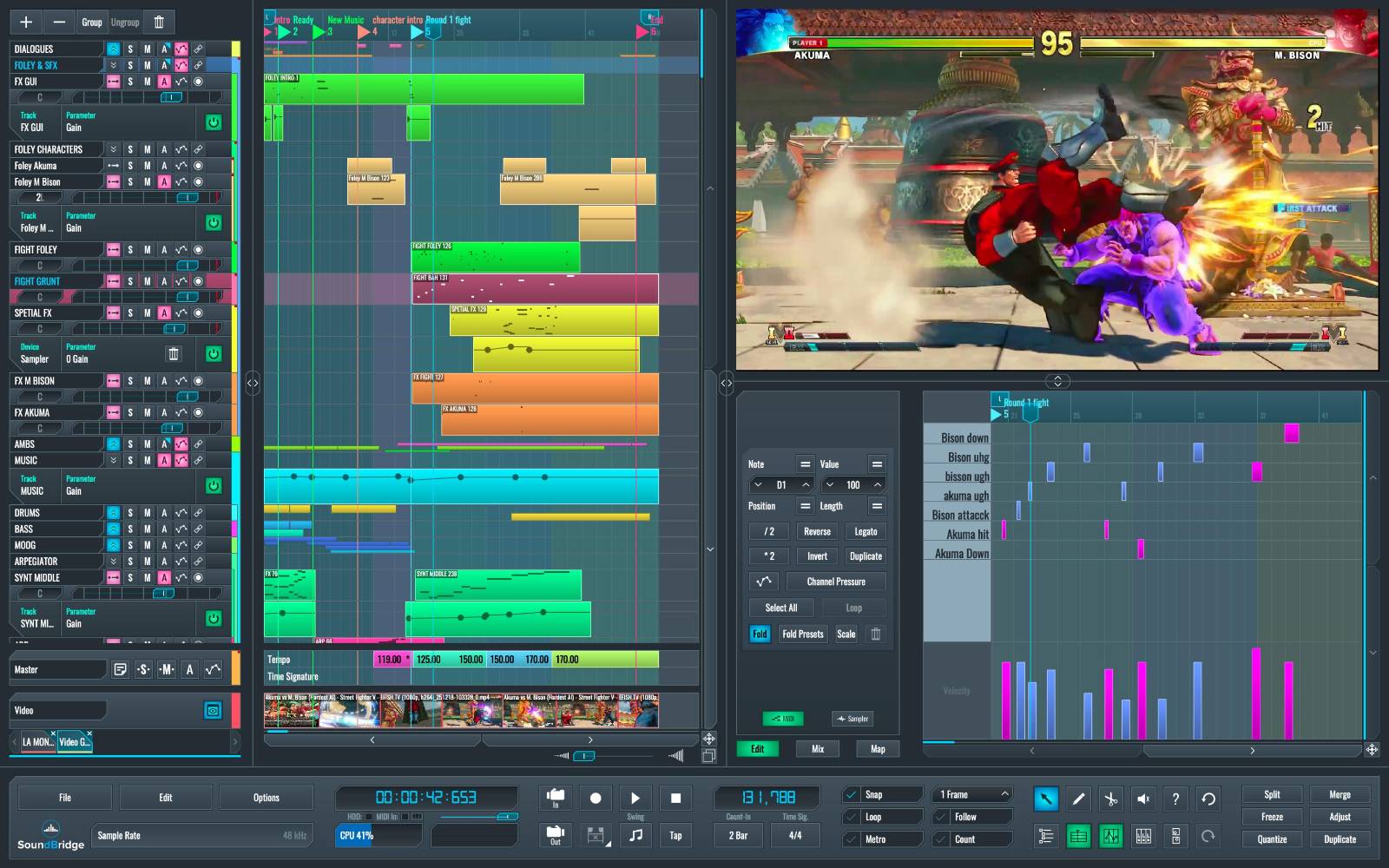
SoundBridge’s customizable interface played an important role in maintaining a fast and efficient workflow throughout the project. The interface was arranged to keep the most important tools always accessible: the Sampler, the mixer, the video window, and the Piano Roll editor.
Tracks were organized using folder groups, allowing Foley, voices, ambience, and music elements to remain clearly separated during editing and mixing. The Piano Roll custom naming feature was used to label MIDI triggers such as:
-
Punch / Heavy Punch
-
Jump
-
Impact
The Fold function in the Piano Roll was also enabled. This feature displays only the notes currently used in the pattern, making it much faster to access the keys assigned to each sound effect. This is particularly useful for sound design sessions where each MIDI note triggers a different sound variation. By hiding unused notes, the editor becomes cleaner and navigation between triggers becomes much quicker. (Insert screenshot here showing custom GUI layout and Piano Roll with Fold enabled.)
3. Working with Video & Sync in SoundBridge
SoundBridge’s video integration and linear time mode allow precise synchronization of audio elements with on-screen events while maintaining musical flexibility.
Key Workflow Features Used:
-
Frame-based editing for precise synchronization of hits and UI sounds.
-
Linear time mode to preserve sync during tempo changes.
-
MIDI and audio editing aligned with video frames.
These tools allow the music tempo to evolve without breaking synchronization between punches, menu clicks, and character actions. This workflow makes SoundBridge particularly well suited for game audio design, film scoring, and interactive media production.
4. Voices & Character Dialog Editing
Voices help define each fighter’s personality and reinforce key moments in the sequence. In this project, voice elements were organized into three main uses: Nickname presentation, Character dialog, and Fight reactions. All voice clips were edited and synchronized directly inside SoundBridge, allowing dialogue, reactions, and gameplay sounds to be managed within the same timeline as Foley, sound effects, and music.
-
Nickname Presentation: During the character presentation sequence, short voice-over clips announce each fighter’s nickname. These were imported into SoundBridge and positioned on the timeline to match the character reveal animations.
-
Character Dialog (AI Voices): Character dialog lines were generated using AI voice tools and then edited inside the SoundBridge audio editor. Adjustments included trimming clips, lip-sync alignment, and pitch correction when necessary. These quick adjustments allowed the voices to match the pacing of the scene.
-
Character Reactions: Short reactions were added to emphasize key moments, including laughter during character selection, victory screams, and effort sounds during attacks. These vocal cues reinforce the characters’ personalities and add energy to the action.
-
Ambience and Voice Placement: To better situate the characters within the fight environment, wind and crowd ambience were layered into the background. Subtle spatial processing and light reverb were applied to the voice tracks to integrate them naturally, allowing the voices to feel part of the environment rather than isolated from the action.
~Nickname and dialogue examples.
5. Foley & SFX: Designing Impactful Combat Sounds
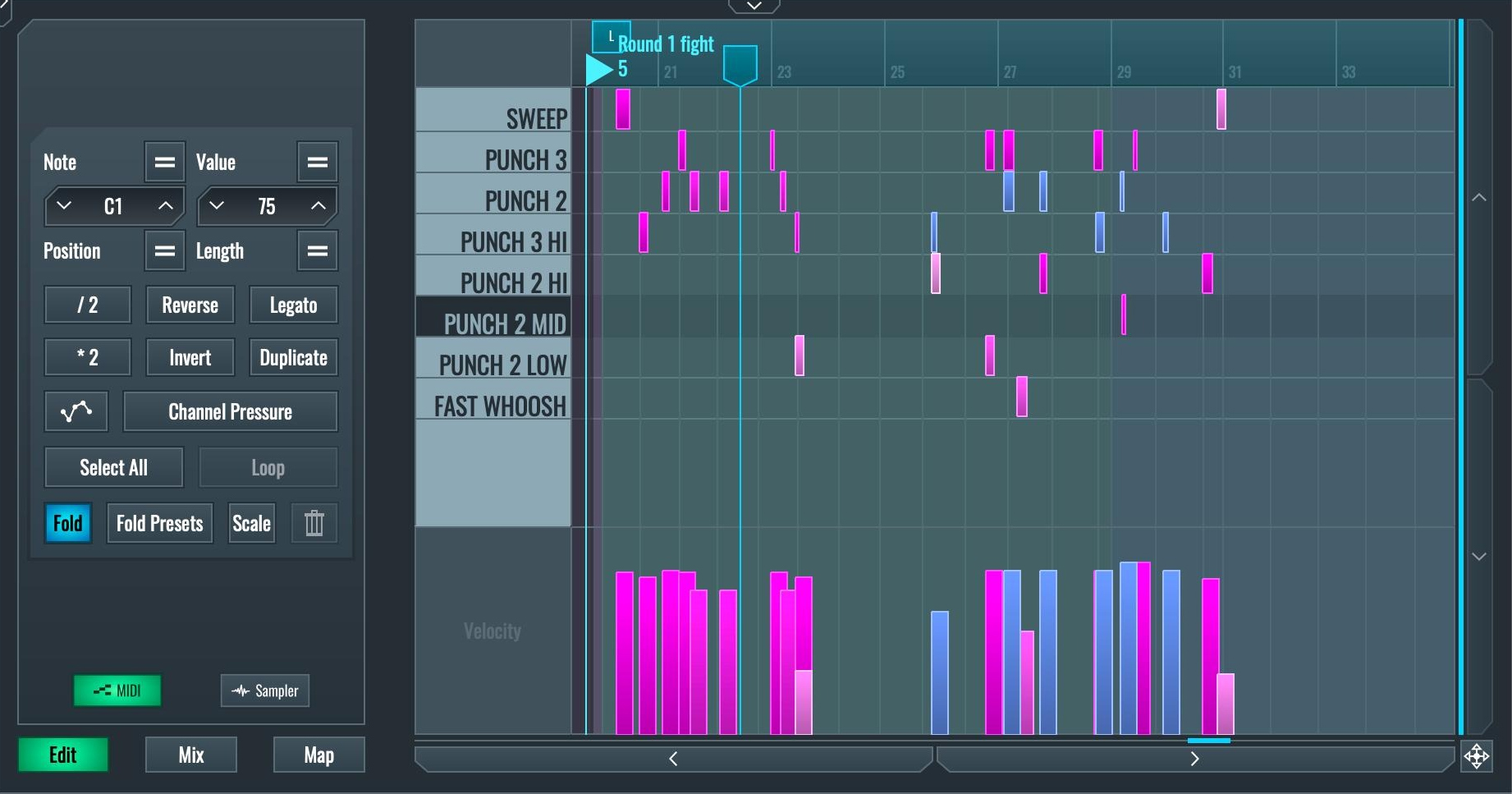
Foley and interaction sounds are essential for gameplay feedback. In this Street Fighter–style sequence, every interaction sound, from menu clicks to punches and character impacts, was created directly inside SoundBridge. The goal was to design responsive sounds that feel tightly connected to the on-screen action.
The SoundBridge Sampler was the central tool for building fight sounds and interactive effects. Its flexible design allows multiple samples to be layered and triggered from a single key. For example, a punch impact may combine:
-
A short transient hit.
-
A low-frequency body impact.
-
A character grunt.
-
A short noise burst for additional aggression.
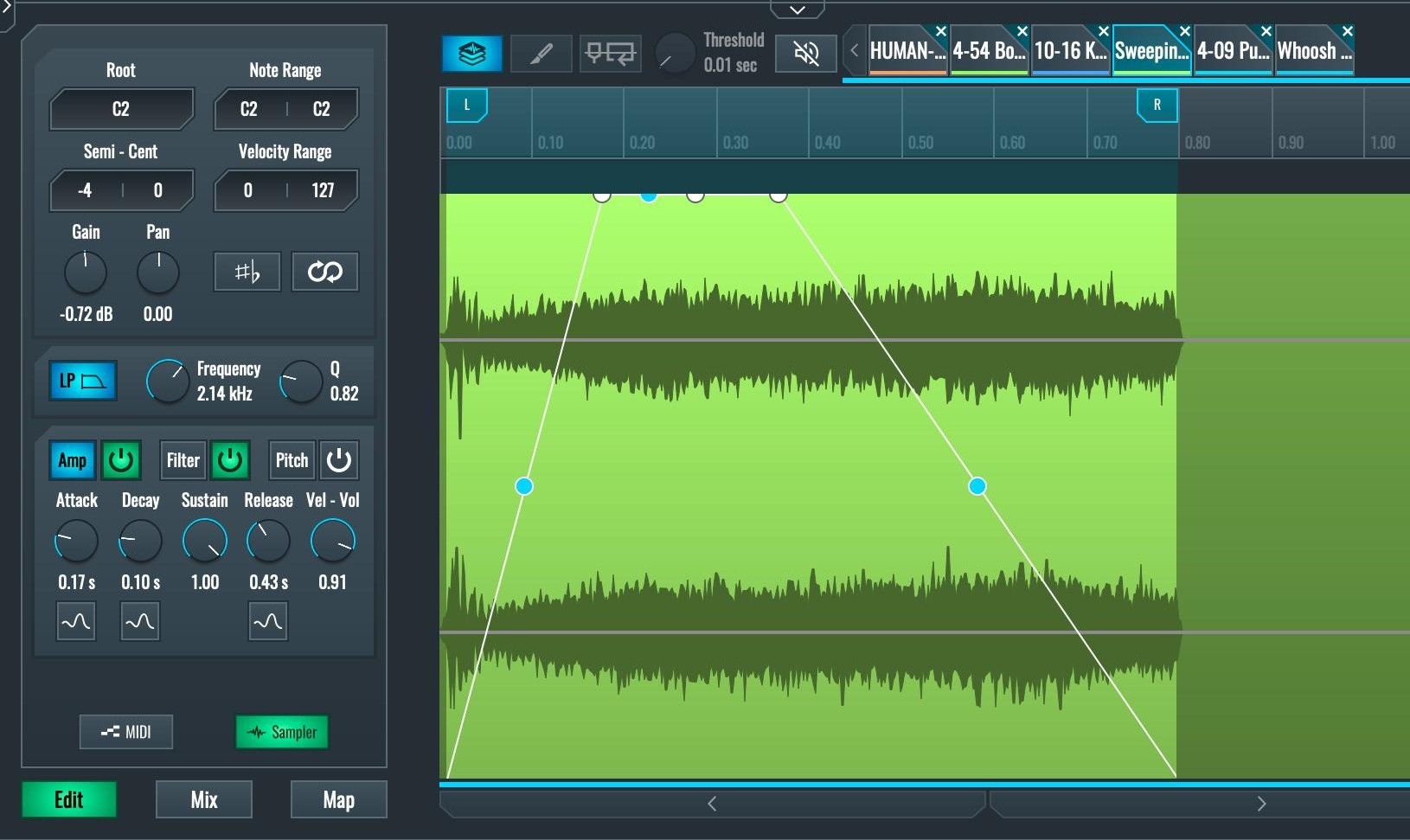
The Sampler provides tools for envelope shaping, pitch control, velocity response, and sample layering, making it possible to design complex game-ready sounds directly inside the instrument. Velocity layers were used to vary the intensity of impacts, allowing different punch sounds to trigger depending on how the note is played.
Character FX with Instrument VSTs: To give each fighter a unique sonic identity, instrument VSTs were used to design stylized special effects for character abilities and power attacks. These synthesized sounds were combined with the physical impact layers created in the Sampler, blending tonal elements with punch and grunt layers to produce more expressive action sounds.
~Foley and fight SFX examples.
6. Music Production: Creating Arcade Energy
The music was designed to support each stage of the sequence while maintaining a cohesive electronic aesthetic.
-
Character Menu Music: For the character selection screen, I composed a hard, synth-driven electronic theme featuring arpeggiated melodies and strong rhythmic motion.
-
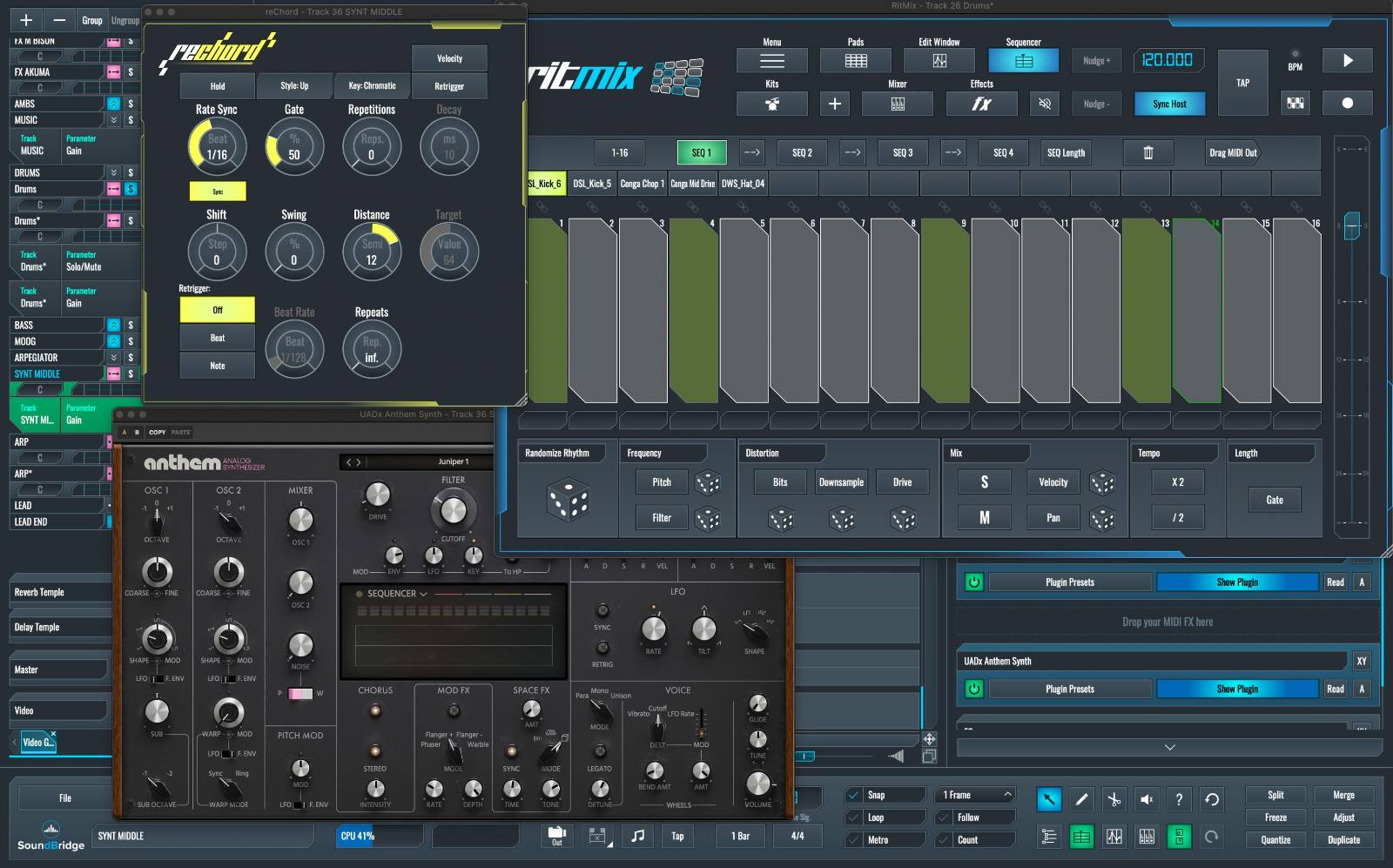
RitMix – Electronic Beat Design: All electronic drum patterns were created using RitMix, SoundBridge’s built-in drum machine. RitMix allowed quick programming of kick and snare patterns, hi-hats, and layered drum sounds for a strong arcade-style rhythm section.
-
SoundBridge Arpeggiator: The Arpeggiator was used to generate fast melodic patterns that create movement and tension, a common musical technique in fighting game menus.
-
Synth VSTs & Automation: Several synth VSTs were used for aggressive tonal textures. Automation was used to control filter sweeps and dynamic changes, helping build tension as the sequence transitions from character selection into the fight.
-
Fight Music: When the fight begins, the music shifts into a more rhythmic structure. Techniques included tempo automation aligned with fight intensity and layered synth stabs emphasizing attacks.
7. Sound Design & Interactive Audio Thinking
Rather than treating audio as simple linear playback, the project was approached from an interactive audio perspective, simulating how sounds would behave inside a real game engine.
-
UI sounds designed for rapid repetition without fatigue.
-
Music structured in loops for seamless gameplay continuity.
This approach demonstrates how SoundBridge can function not only as a DAW but also as a pre-implementation environment for game audio design.
8. Final Game-Audio Result
9. Conclusion: SoundBridge as an Indie Game Audio Tool
Recreating a Street Fighter–style sequence entirely inside SoundBridge demonstrated how a modern DAW can support music production, sound design, and interactive thinking within a single environment. From menu clicks to fight impacts, every element of the project was produced and synchronized inside the SoundBridge workflow.
More importantly, the process reinforced the value of intuitive tools in creative work. When the software stays out of the way, ideas move faster, experimentation becomes natural, and the focus remains on storytelling through sound. For indie game creators seeking a practical and creative audio solution, SoundBridge proves to be a powerful ally.
About the Author: Giovanni Betancourt is a SoundBridge Specialist and sound engineer with experience in music production, sound design, and broadcast audio. His work focuses on creative workflows for music and interactive media.
If you liked this article on sound design, here are some more on the same subject:
MASTER MUSIC PRODUCTION
Expert-led courses designed to take you from fundamentals to finished tracks.

HOUSEFrom bouncy bass and solid kicks, this course teaches you the most modern House music production techniques needed to succeed and stand out.

TRAPQuit sounding like generic Trap and produce something World with hints of the Far East. Create ethnic soundscapes to put your Trap ahead of the curve.

AMBIENTProduce relaxing, sophisticated psy-influenced ambient. Psychedelic and relaxing to listen to, create meditative soundscapes to put your listeners in Zen.