

VST Plugin Not Showing? 9 Fixes That Work
Last Edited: Oct 23, 2026
You installed the plugin. The installer said “success.” Then you open your DAW and the plugin is nowhere to be found. Almost every time, one of five things is the cause: the plugin sits in a folder your DAW doesn't scan, it is in a format your DAW doesn't read, it is the wrong bit-depth, the OS blocked it, or the scan never ran again. This guide walks you through each one in the order that saves you the most time.
TL;DR
- Find where the installer actually put the file, then make sure your DAW scans that exact folder.
- Match the format (VST2, VST3, AU) to what your DAW supports, and make sure it's 64-bit.
- Run a full rescan. A quick scan skips plugins that failed before.
- On Mac, check Gatekeeper and security prompts. On Windows, check antivirus quarantine and unzipped files.
- If one plugin still refuses, test it in a second host to tell a plugin problem from a DAW problem.
Start With the Quick Triage
Before you change settings, answer three questions. They point you to the right fix in under a minute.
| What you see | Most likely cause | Jump to |
|---|---|---|
| No plugins show up at all | DAW is not scanning any folder, or the scan is disabled | Folders and rescans |
| Only the new plugin is missing | Wrong folder, wrong format, or install failed | Formats and installers |
| Plugin appears but is greyed out or “failed” | Bit-depth mismatch, missing license, blocked file | Blocked and failed plugins |
| Plugin shows up on one machine but not the other | Different OS version or architecture | Mac and Windows quirks |
Write down three facts first: your operating system and version, your DAW and whether it is 64-bit, and the plugin’s format and version. Most support threads stall because one of these is missing.
Fix 1: Find Where the Plugin Was Installed
Don’t guess. Look at the installer’s final screen, or search your drive for the plugin name with the extension .vst3, .dll, .vst or .component.
Default locations differ by format and operating system. A lookup table of default VST2, VST3, AU and CLAP folders is a handy reference. The usual ones:
- Windows, VST3:
C:\Program Files\Common Files\VST3 - Windows, VST2: often a folder the installer asks you to choose, commonly under
C:\Program Files\VSTPluginsorSteinberg\VSTPlugins - Mac, VST3:
/Library/Audio/Plug-Ins/VST3 - Mac, VST2:
/Library/Audio/Plug-Ins/VSTor~/Library/Audio/Plug-Ins/VST - Mac, Audio Units:
/Library/Audio/Plug-Ins/Components
On Mac, the user Library folder is hidden by default. In Finder, hold Option and open the Go menu to reveal Library.
If the file isn't in any of these places, the install didn't finish, or it went to a custom path. Reinstall and read each installer screen. Many installers have a “custom” step where you can change the path without noticing.
Fix 2: Tell Your DAW Which Folders to Scan
VST3 plugins live in standard system folders, so most hosts find them automatically. VST2 plugins are different. Because they can be installed anywhere, many hosts only scan folders you have listed in preferences.
Open your DAW’s plugin or VST settings and check:
- Is there a list of folders to scan? Add the folder that holds your plugin.
- Point to the folder that holds the plugin file, not a parent folder three levels up, unless your DAW says it scans subfolders.
- Don’t point at a zip file or a downloads folder full of installers. The plugin must be unzipped and in its final location.
A common beginner trap: you download a free plugin as a zip, unzip it in Downloads, and point your DAW at Downloads. Some hosts scan that, but the plugin may be nested in an extra folder, or macOS may quarantine it. Move the finished plugin file to a dedicated plugin folder you control, for example, a VSTPlugins folder in a place you won’t clean out later, and scan only that.
Some hosts also have separate switches for “use VST2 custom folder” and “use VST3 custom folder.” If the switch is off, your folder is ignored. Support notes for one plugin maker make the same point: if you use a custom folder, confirm the plugin is actually installed in that folder.
Fix 3: Run a Full Rescan, Not a Quick One
Hosts remember plugins that failed validation. A quick scan often skips them, so a plugin that crashed once can stay hidden even after you fix the cause.
Look for a button such as “Rescan,” “Reset blocklist,” “Clear cache,” or “Re-scan all.” Use the full option. Then restart the DAW and open the plugin list again.
If your DAW has a blocklist or “blocked plugins” view, open it. Plugins sit there quietly after a failed scan. Unblock the entry, then rescan.
Two habits help:
- Close the DAW before installing a plugin, then open it afterward. Some hosts only scan at launch.
- Don’t open two DAWs at once while installing. One may hold a lock on a cache file.
Fix 4: Check the Format
This one catches more people than any other. A plugin ships in one or more formats, and your DAW reads only some.
| Format | Works on | Notes |
|---|---|---|
| VST2 | Windows, Mac, Linux | Older standard, still common for free plugins |
| VST3 | Windows, Mac, Linux | Current standard, installed in fixed system folders |
| AU (Audio Units) | Mac only | Required by some Apple-made hosts |
| AAX | Windows, Mac | Needed for certain Pro Tools workflows |
| CLAP | Windows, Mac, Linux | Newer open format, support varies by host |
If you installed a VST2 and your DAW supports only VST3 or AU, it will never appear, no matter how many times you scan. Go back to the vendor’s download page. Most current plugins offer several formats in one installer, and you can tick the one you need.
On a Mac, some hosts want AU only. If you installed the VST3 version and your host is AU-only, grab the AU build instead.
Fix 5: Match 32-Bit and 64-Bit, and Check Apple Silicon
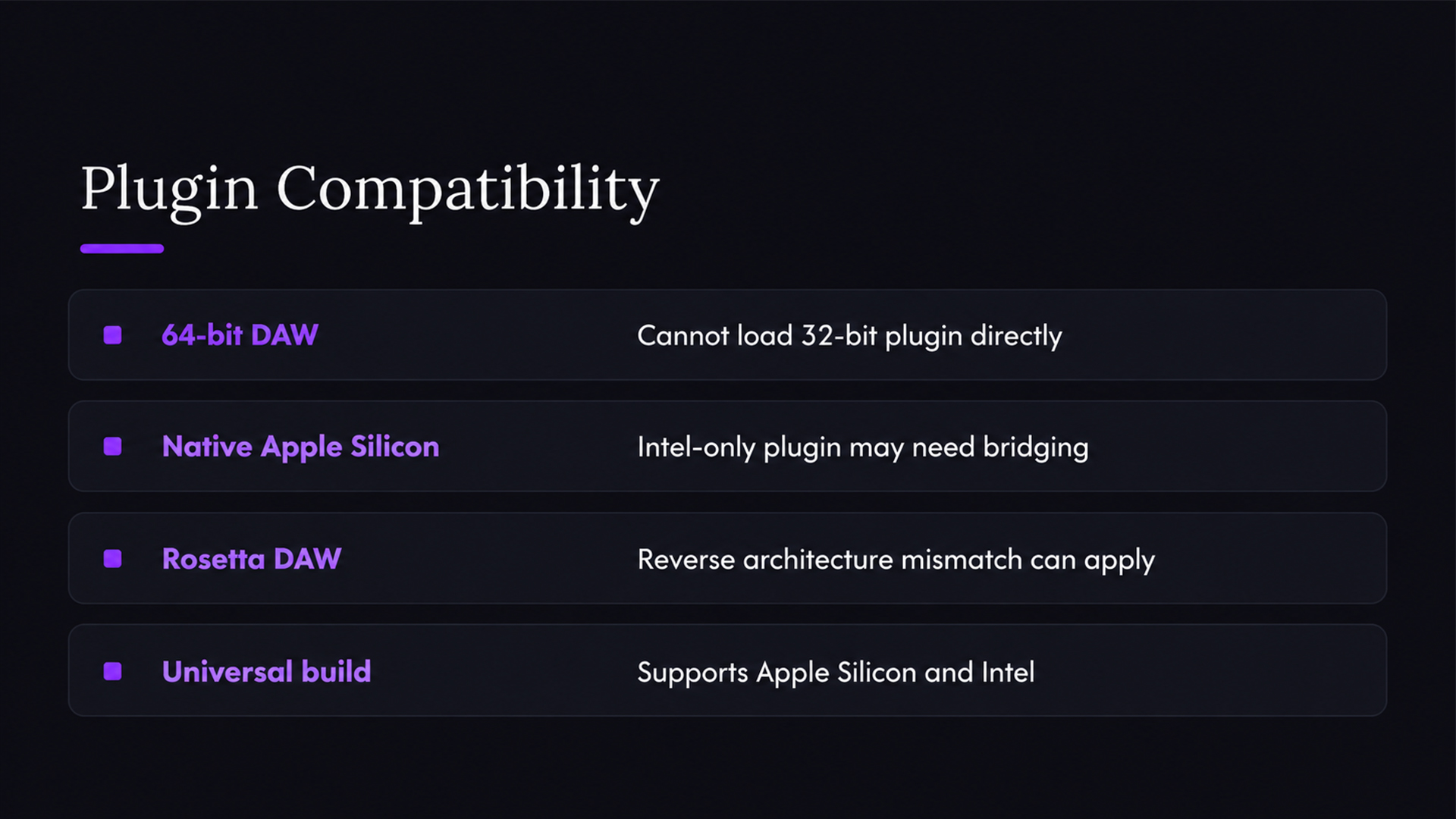
A 64-bit DAW cannot load a 32-bit plugin directly. If you are running an old free plugin from years ago, this is a likely culprit. Look for a 64-bit build from the maker. If none exists, the plugin is effectively retired, and a modern replacement is the cleaner path.
On Mac, check whether your plugin is built for Apple Silicon, Intel, or both (a universal build). If your DAW runs natively on Apple Silicon but the plugin is Intel-only, the host may refuse it or need a special bridging mode. If your DAW runs under Rosetta, the reverse can apply. Check the plugin’s system requirements page for your exact macOS version. Major macOS updates often cause plugins to stop loading until the maker ships an update.
Fix 6: Blocked and Failed Plugins
Sometimes the plugin appears in the list but will not load, or it disappears after the scan because the system quietly blocked it.
On Mac:
- Open System Settings, then Privacy & Security, and look for a message about a blocked item. Allow it, then rescan.
- If you downloaded a plugin as a zip and copied it manually, macOS may have flagged it. Reinstalling with the vendor’s installer usually clears this.
- Some Macs lose folder permissions after a migration or upgrade. If plugins vanished after moving to a new computer, reinstall them rather than copying the Library folder across.
On Windows:
- Check your antivirus quarantine. Security tools sometimes flag unsigned plugin DLLs, especially free ones and cracked copies. Restore only files you trust from a source you trust.
- Right-click the plugin file, open Properties, and look for an “Unblock” checkbox at the bottom of the General tab. Tick it if present.
- Many plugins need the Microsoft Visual C++ runtime. If a plugin fails silently, reinstall the runtime the vendor lists.
On both:
- Licensing. A plugin that needs a license manager or an activation file may fail validation until you sign in and activate it. Open the vendor’s own app first.
- Permissions. Install with an administrator account so files land in system folders.
Fix 7: Reinstall Cleanly
If nothing so far worked, reinstall with a clean slate:
- Close your DAW completely.
- Delete the plugin file from its folder. Leave preset and sample libraries alone unless the vendor says otherwise.
- Download a fresh installer from the vendor’s site that matches your operating system and DAW.
- Run it as administrator on Windows, or enter your password when macOS asks.
- Note the install path on each screen. Pick the format your DAW reads.
- Reopen the DAW and run a full rescan.
A fresh download matters. A corrupted download or an installer built for the wrong OS version is a common hidden cause, and it's cheap to rule out.
Fix 8: Test the Plugin in a Second Host
This step separates two problems that feel identical. If the plugin loads in a second host (even a free, lightweight plugin tester), the file is fine and your DAW’s scan settings are the issue. If it fails everywhere, the plugin or its install is the problem, and the vendor’s support page is your next stop.
If it works in the second host but not your main one, check your DAW’s version. Older DAW builds may not support newer plugin formats or newer versions of the VST3 SDK. Update the DAW, restart, and rescan.
Fix 9: Check the Project, Not Just the Plugin List
Sometimes the plugin shows in the browser but is missing from an old session. That is a different problem: the project remembers the plugin by an ID, and a different version, format, or path can break the link.
- Open the project on the machine it came from and note which format each plugin used.
- Install the same format and, where possible, the same version on the new machine.
- When you hand a session to a collaborator, send them the plugin list with formats and versions so both of you load identical builds.
This matters most for remote teams. Mismatched plugin versions are a common reason a session opens with “missing plugin” warnings on one side only.
Our Perspective: Plugin Trouble Is a Workflow Problem
We see the same pattern repeatedly. A producer loses an hour to a missing plugin, and the plugin was fine. The setup around it was the issue: scattered folders, three formats of the same plugin, a collaborator on a different OS.
SoundBridge is built around the idea that tools should get out of your way. Our DAW runs on Mac and Windows, supports bi-directional control of plugins and hardware, and ships with a library of built-in virtual instruments and effects. That means you can start a session and make music before you ever touch a scan setting. When you do bring in third-party plugins, a tidy setup pays off: one folder per format, a note of what you installed and when, and a rescan after every install.
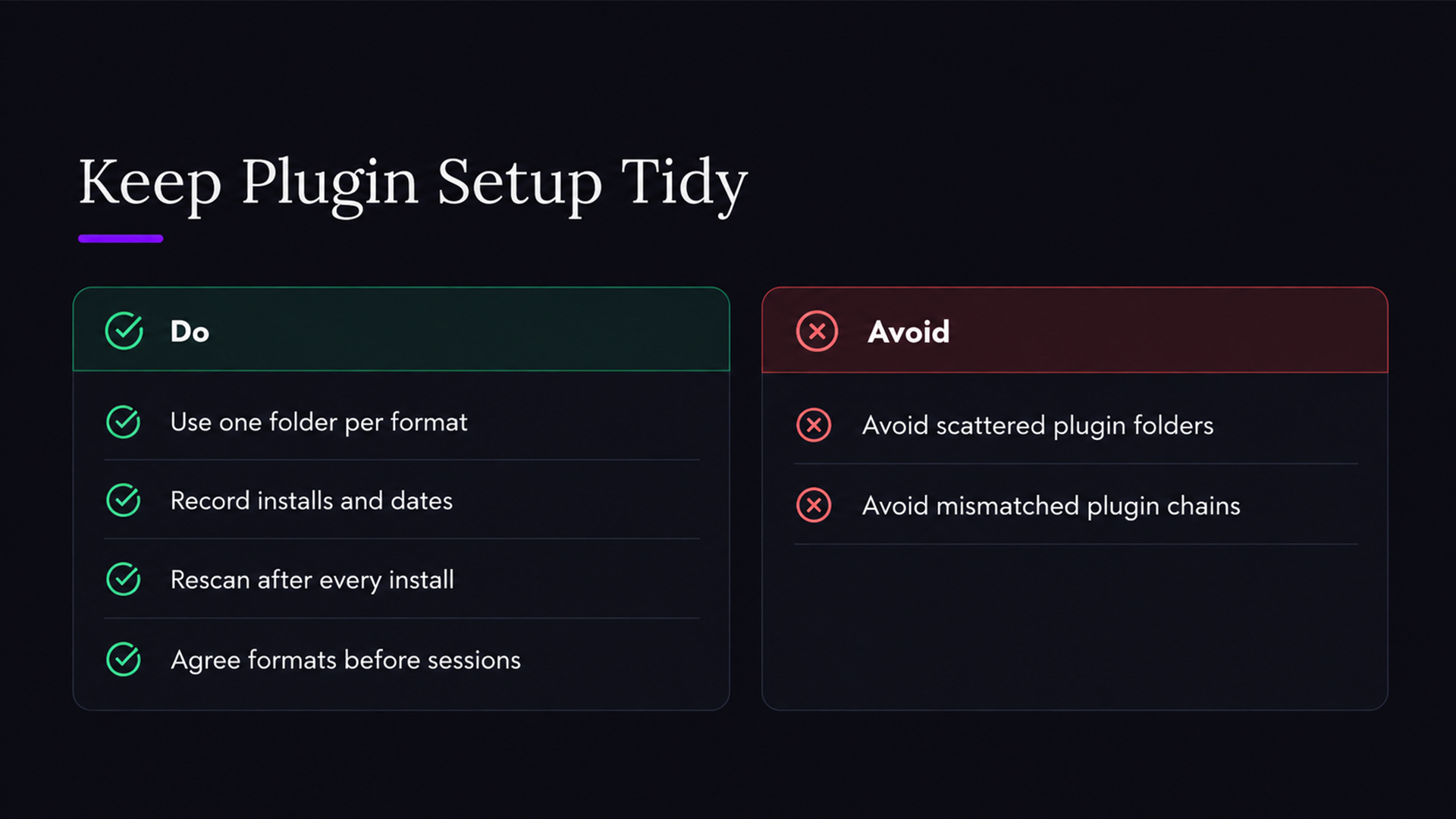
If you work with others, the stakes go up. SoundBridge sessions run with studio-accurate synchronization and zero-latency remote tracking, so you don't want a mismatched plugin chain breaking the flow. Agree on formats before the session, and keep the shared plugin list short and current.
Our advice: treat your plugin folder like your sample library. Name it, organize it, back it up.
— Wake
Build a Setup That Avoids the Problems
A few small habits prevent most missing-plugin headaches:
- One home per format. Keep VST3 in the system folder, VST2 in one custom folder, and nothing else scattered around.
- Keep an install log. A simple note with the plugin name, version, format, and date saves you during future troubleshooting.
- Update the DAW and OS on purpose. Don’t update either in the middle of a deadline week. After any major update, check your key plugins first.
- Prefer VST3 where you can. They install to a predictable place, so you have less to configure.
- Back up your license files. Keep activation emails and vendor accounts in a password manager.
If you want to get more out of the plugins once they load, read our guide to using plugins for music production and our walkthrough of essential music production effects. New to the whole idea of a DAW? Start with what a digital audio workstation is.
Skip the Hunt With Built-in Instruments
If you are still fighting for a basic synth or piano sound, you may not need another plugin yet. SoundBridge includes virtual instruments and effects, so you can sketch ideas right away. Explore our keyboard and string instrument pages to see what is included.
We offer a Free Version, a Premium Version, and a Lifetime License, all on the SoundBridge site. For remote sessions, optional STUN/TURN access costs 4.99 $ per month. Try the free version, build a session, and keep your creative momentum.
When to Contact the Plugin Maker
Reach out to vendor support when:
- The plugin fails in every host you try.
- The installer errors out, or the file never appears on disk.
- A license will not activate.
- A recent OS update broke a plugin that worked yesterday.
Include your OS and version, DAW and version, plugin name, version and format, and the exact install path. Add a screenshot of the error. Support teams answer faster when you hand them everything in the first message.
FAQ
Where should I install VST plugins?
VST3 plugins go in the standard system folders, such as C:\Program Files\Common Files\VST3 on Windows and /Library/Audio/Plug-Ins/VST3 on Mac. VST2 plugins can live anywhere, so choose one folder and add it to your DAW’s scan list. The default path table covers each format.
Why does my DAW not detect a plugin I just installed?
Common reasons include an unscanned folder, an unsupported format, a bit-depth mismatch, or a quick scan that skipped the file. Run a full rescan after adding the folder, then restart the DAW. If it is still missing, confirm the format against what your DAW supports.
Why is a VST plugin not showing on my Mac?
Check that it's in the right Library folder, that macOS hasn't blocked it in Privacy & Security, and that the build matches your Mac’s chip. After moving to a new Mac, reinstall plugins with their installers instead of copying folders.
Can a free plugin from a zip file fail to appear?
Yes. Unzip it, move the plugin file into a dedicated plugin folder, and point your DAW at that folder. Make sure it is a 64-bit build in a format your DAW reads, and check that your antivirus hasn't quarantined it.
Sources
- Where Are VST Plugins Stored? Default Paths
- Ableton Live: my plug-ins aren’t showing up (PROCESS.AUDIO support)
Recommended
MASTER MUSIC PRODUCTION
Expert-led courses designed to take you from fundamentals to finished tracks.
HOUSEFrom bouncy bass and solid kicks, this course teaches you the most modern House music production techniques needed to succeed and stand out.
TRAPQuit sounding like generic Trap and produce something World with hints of the Far East. Create ethnic soundscapes to put your Trap ahead of the curve.

AMBIENTProduce relaxing, sophisticated psy-influenced ambient. Psychedelic and relaxing to listen to, create meditative soundscapes to put your listeners in Zen.